
Updated Sep 24, 2026
AI Prompt Library Notion Template
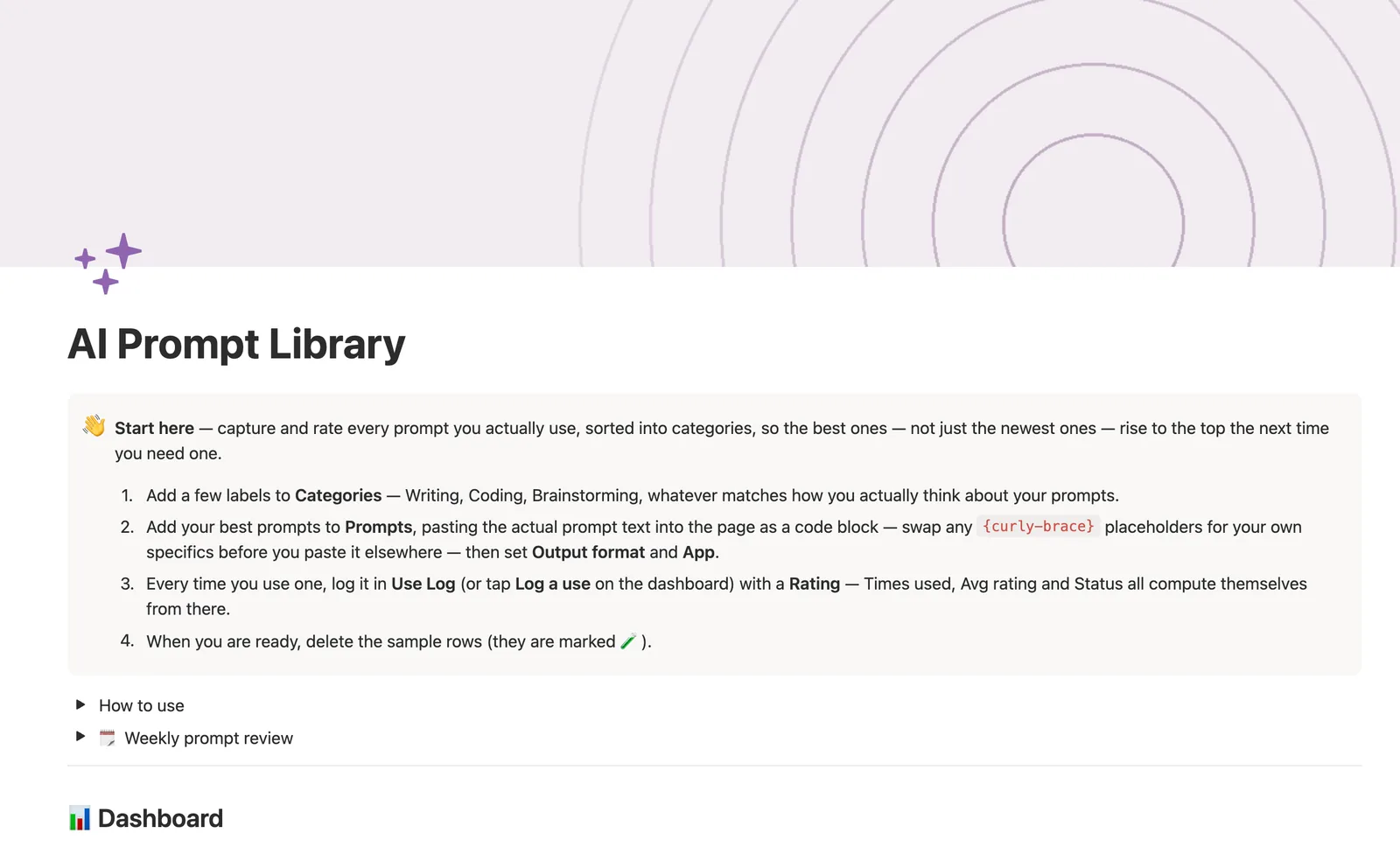
The AI Prompt Library is a Notion template for capturing and rating every prompt you actually use, sorted into Categories. Every time you use a prompt, log it in Use Log with a 1 to 5 rating: Times used, Avg rating, Reuse rate and Status all compute themselves from there, so nothing gets typed twice.
One-time payment · Works on Notion Free · Instant Library access
Who it's for
Who it's for
- People who reuse the same handful of AI prompts and keep losing track of the good ones
- Anyone switching between ChatGPT, Claude, Midjourney and Gemini who wants prompts sorted by output type
- People who want their best prompts to surface by actual results, not just by whatever they saved most recently
- Anyone about to pair prompts with a real AI agent workflow
What's inside
What's inside
Ratings live in a log, not the prompt
Times used, Avg rating, Reuse rate, Last used and Status all compute from Use Log entries, never typed on the Prompt itself, so a prompt you haven't tried yet reads 🆕 Not tried yet, never a misleading 0.
A real capture-to-triage Stage
A new prompt starts 📥 Captured and sits in Inbox until you give it a Category, Output format and App and flip it to ✅ Active, or 🗄️ Archived if it's not worth keeping.
Status reads the room for you
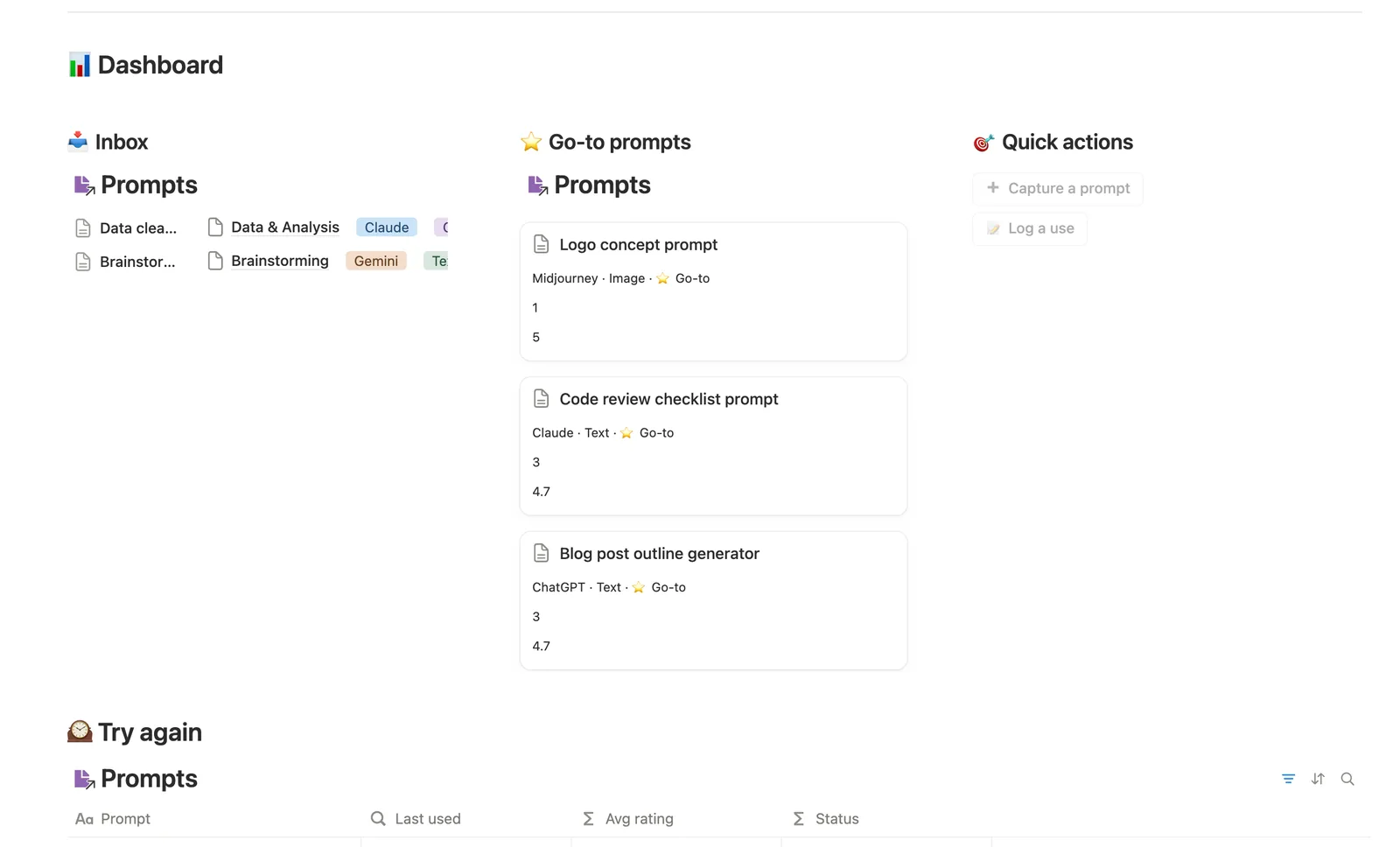
⭐ Go-to is a prompt you starred as a Favorite or one that's earned it, rated 4.5★+ across 3+ uses. 🕰️ Try again flags a good prompt (4★+ average) you haven't touched in 45+ days.
Prompt text lives in a code block
The actual prompt text sits on each Prompt's own page in a fenced code block, so it's one click to copy, not buried in a property column.
Categories roll up their own average rating
A two-tier chain, Use Log to Prompts to Categories, means each Category shows a real Avg rating across every Prompt inside it, not just a prompt count.
Needs linking, for a fast-logged use
The dashboard's Log a use button can't attach the Prompt it's logging (a dashboard button can't know which prompt you just used), so Use Log's Needs linking view catches anything still unattached.
How it works
How it works
Three databases connect: Categories, Prompts and Use Log. A Prompt can belong to one or more Categories and builds its own history in Use Log, every time you actually use it, you log a Rating and whether you'd reuse it. Times used, Avg rating, Reuse rate, Last used and Status on the Prompt all roll up from that log, and a second rollup carries the average rating one tier further, up to each Category.
Spec
- Databases
- 3
- Two-way relations
- 2
- Formulas
- 6
- Rollups
- 6
- Views
- 16
- One-click buttons
- 2
- Database templates
- 4
- Sample rows
- 29
- Databases Categories, Prompts, Use Log
- Entity pages Prompts
- Buttons ➕ Capture a prompt, 📝 Log a use
How to use
- 01
Every Prompt can belong to one or more Categories and builds its own history in Use Log — log a prompt every time you actually use it, with a 1–5 Rating and whether you'd reuse it, and Times used, Avg rating, Reuse rate, Last used and Status on the Prompt all fill themselves in from that log. Nothing gets typed twice.
- 02
Stage is the capture-to-triage flow: a new prompt starts 📥 Captured (via the dashboard's Capture a prompt button or the New prompt template) and sits in Inbox until you give it a Category, Output format and App and flip it to ✅ Active — or 🗄️ Archived if it's not worth keeping.
- 03
Status reads the room for you: ⭐ Go-to is either a prompt you've starred as a Favorite or one that's earned it (rated 4.5★+ across 3 or more uses), 🕰️ Try again flags a good prompt (4★+ average) you haven't touched in 45+ days, and 🆕 Not tried yet is anything still waiting on its first Use Log entry.
- 04
The dashboard's Log a use button can't attach the Prompt it's logging — buttons can't set relations — so check Use Log → 🔗 Needs linking and connect anything it created.
- 05
Open any prompt's own page for just its Use Log history — the fastest way to see what worked and what didn't — and to read the prompt text itself, which lives in a code block on the page so it's one click to copy.
- 06
Pair this with Custom Agent Starter Kit once a favorite prompt is proven — hand it to an actual agent instead of pasting it by hand every time.
Setup
Setup
- 01
Duplicate the template into your own Notion workspace.
- 02
Add a few labels to Categories that match how you actually think about your prompts.
- 03
Add your best prompts to Prompts, pasting the prompt text into the page as a code block, then set Output format and App.
- 04
Log every real use in Use Log with a Rating, and delete the 🧪 sample rows once you're set up.
Compared
| This template | Plain notes doc | |
|---|---|---|
| Usage stats per prompt | Computed from a Use Log | Not tracked |
| Best prompt surfaced | Status formula (⭐ Go-to) | Whatever you scroll to first |
| Untried vs. rated poorly | Reads 🆕 Not tried yet | Usually looks the same as a bad rating |
| Category-level average rating | Two-tier rollup | You'd tally it by hand |
§ FAQ
FAQ
Does Notion have an AI prompt library template?
Not a built-in one. Notion has no native prompt-management feature, so a real prompt library has to be built or duplicated. This template ships a capture-to-triage Stage flow, plus Categories and a Use Log that compute every rating and usage stat automatically.
How do I organize and rate the AI prompts I use often?
Log every real use as a separate entry with a rating, instead of rating the prompt itself once, that way Avg rating reflects results over time, not a single first impression. This template's Use Log does exactly that, and rolls the numbers back up to the Prompt automatically.
What is an AI prompt library?
A structured place to save, categorize and rate the prompts you actually reuse with an AI tool, instead of scrolling back through old chat history to find one. This template adds a Stage-gated capture flow, Output format and App filters, and computed usage stats on top of a plain saved list.
Is there a free version of this template?
This exact AI Prompt Library isn't a free Lite template, it's part of the $47 Templitize Bundle with 49 other templates, but it works on Notion's Free plan with no paid Notion upgrade needed.
Does this connect to ChatGPT or Claude directly?
No, this is a Notion database, not an API integration. App is a plain select field you set by hand (ChatGPT, Claude, Midjourney, Gemini or Other) to filter by, not a live connection to any of them.
More from AI
§ The Bundle
Get the whole Bundle
AI Prompt Library plus 49 more templates, one payment.
One-time payment · Works on Notion Free · Instant Library access