
Updated Sep 24, 2026
§ Business Ops
Notion Business Templates
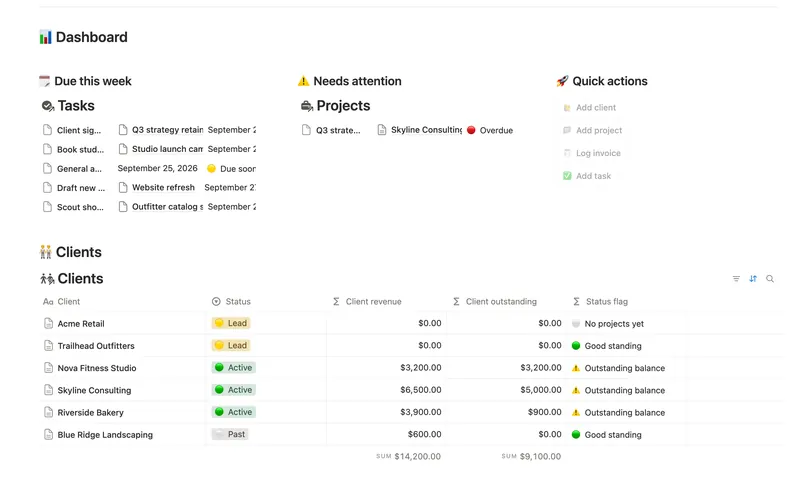
Four templates for running a small business day to day: Small Business Dashboard is the owner's single view across Clients, Projects, Invoices and Tasks, Task & Project Manager is a deeper, generic project system once one dashboard isn't enough detail, Meeting Notes & Decisions captures what actually got decided and by whom, and SOPs & Team Wiki documents how the business runs so it isn't only in one person's head.
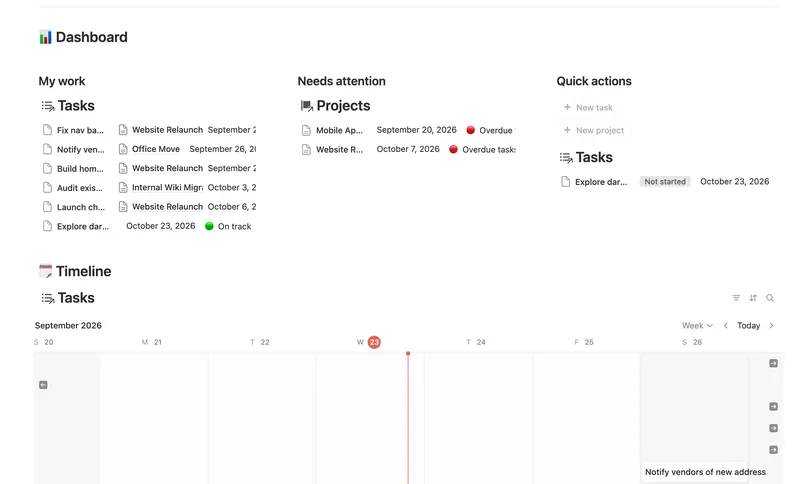
Small Business Dashboard rolls revenue and what's owed up automatically from Invoices to Projects to Clients, which makes it a natural starting point; Task & Project Manager goes further on any one project specifically, with real sub-items, dependencies and a dependency-aware Timeline that a single dashboard table can't show. Meeting Notes & Decisions and SOPs & Team Wiki both capture knowledge rather than active work: meetings capture what was decided, SOPs capture how something is done, with a real version history behind each process instead of a single last-edited date.
Start with Small Business Dashboard if you want one weekly view across everything. Add Task & Project Manager once a single project has enough moving parts, dependencies especially, that the dashboard's own Tasks view isn't detailed enough. Meeting Notes & Decisions is worth adding the first time an action item gets forgotten after a meeting, and SOPs & Team Wiki the first time you're explaining the same process out loud for the third time.
4 templates in Business Ops
- 45 Small Business Dashboard See every client, project, invoice and task in one weekly dashboard — with revenue and what's owed rolling up automatically from invoice to project to client, so nothing is ever typed in two places. 4 db · 18 formulas · 4 buttons
- 46 Task & Project Manager Break every Project into Tasks with real sub-items and dependencies, then let Progress, Health and a dependency-aware Timeline compute themselves — with a My work view that always shows exactly what's yours to do next. 3 db · 11 formulas · 2 buttons
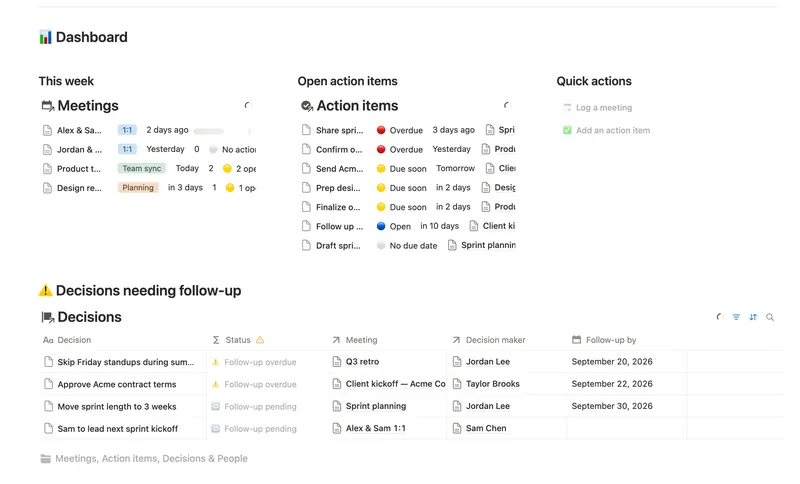
- 47 Meeting Notes & Decisions Capture every meeting's notes, decisions and action items in one connected place — see who owns what, what's overdue, and which decisions still need a follow-up, without re-typing any of it by hand. 4 db · 8 formulas · 2 buttons
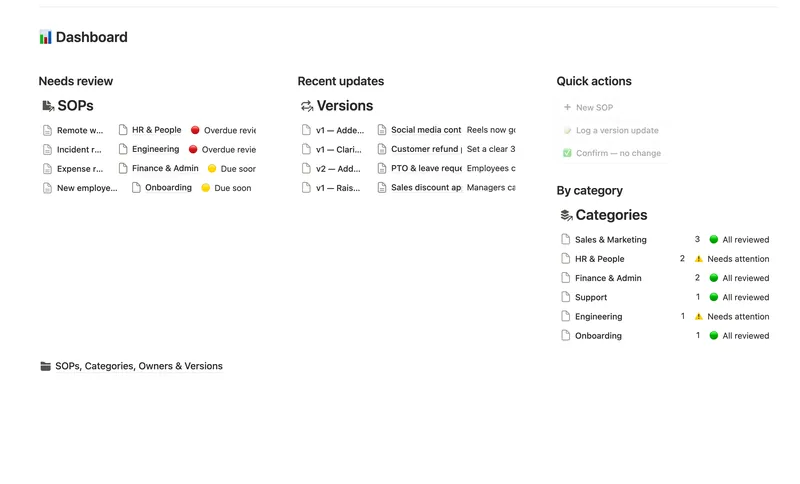
- 48 SOPs & Team Wiki See every process your team runs, who owns it and when it's next due for review — grouped by category, with a real version history behind each one instead of a single "last edited" date. 4 db · 11 formulas · 3 buttons
§ FAQ
FAQ
What Notion templates help run a small business?
Small Business Dashboard for one weekly view across clients, projects, invoices and tasks, Task & Project Manager for going deeper on any one project, Meeting Notes & Decisions for what actually got decided, and SOPs & Team Wiki for documenting how the business runs.
Does Notion have a project management template?
Yes, two relevant ones: Small Business Dashboard includes Projects alongside Clients, Invoices and Tasks in one weekly view, and Task & Project Manager goes deeper on Projects specifically, with sub-items, dependencies and a dependency-aware Timeline.
What's the difference between Small Business Dashboard and Task & Project Manager?
Small Business Dashboard is the wider, shallower view: Clients, Projects, Invoices and Tasks together in one weekly dashboard. Task & Project Manager is narrower and deeper, built around Projects, Tasks and Milestones with real dependencies and a Timeline, without the client or invoicing side.
Does Meeting Notes & Decisions use AI transcription?
No. It's a manual, structured system of People, Meetings, Action items and Decisions databases; you type up notes and tag action items and decisions yourself. It doesn't transcribe or summarize a meeting for you.
Does Notion have an SOP template with version history?
Yes. SOPs & Team Wiki keeps a real Versions database behind each SOP, not just a single last-edited timestamp, alongside Categories and Owners so you can see who owns a process and when it's next due for review.
§ The Bundle
Get all 50, including every Business Ops template
One payment, $197 value, lifetime updates.
One-time payment · Works on Notion Free · Instant Library access