
Updated Sep 24, 2026
§ Planning & Focus
Notion Planner Templates
Seven templates cover planning at every zoom level: the day, the week, the quarter and the year, plus the habits and stray thoughts underneath all of it. Weekly Planner and Daily Planner & Time Blocks work at the schedule level, turning tasks into either a week of projects and areas or a day of real start and end times. Habit Tracker and ADHD Command Center work at the behavior level, tracking streaks, quests and brain dumps instead of appointments. Goals & OKRs and Annual Review & Year Planner zoom out further, turning a year's theme into quarterly goals and measurable key results. Idea Inbox sits quietly underneath all of it, catching whatever doesn't fit anywhere else yet.
The two schedule templates are meant to be picked, not stacked: Weekly Planner organizes by project and area with a weekly review, while Daily Planner & Time Blocks organizes by the actual hour, tracking planned Start/End against how the day actually went. Habit Tracker and ADHD Command Center both use check-ins and streaks, but ADHD Command Center wraps that in a wider system: Quests, a Dopamine Menu and a Brain Dump, built for days that don't go to plan, not just the good ones. Goals & OKRs is the more structured cousin of Annual Review & Year Planner: OKRs roll Key Results up into Objectives every quarter, while Annual Review starts from a single yearly theme and works down into quarterly goals and monthly focus.
Start with Weekly Planner if you want one home for your week's tasks and don't yet have a system. If your days keep slipping even when your week is planned, add Daily Planner & Time Blocks for the hour-by-hour view. Habit Tracker is the simplest way in if you're only trying to build one or two habits; reach for ADHD Command Center instead if your whole day tends to scatter and you want quests, dopamine and brain dumps handled in the same place. Goals & OKRs suits anyone already setting quarterly goals at work, and Annual Review & Year Planner is the better start if you've never done a structured year-end review before. Idea Inbox is worth adding to any of the above the moment good ideas start getting lost.
7 templates in Planning & Focus
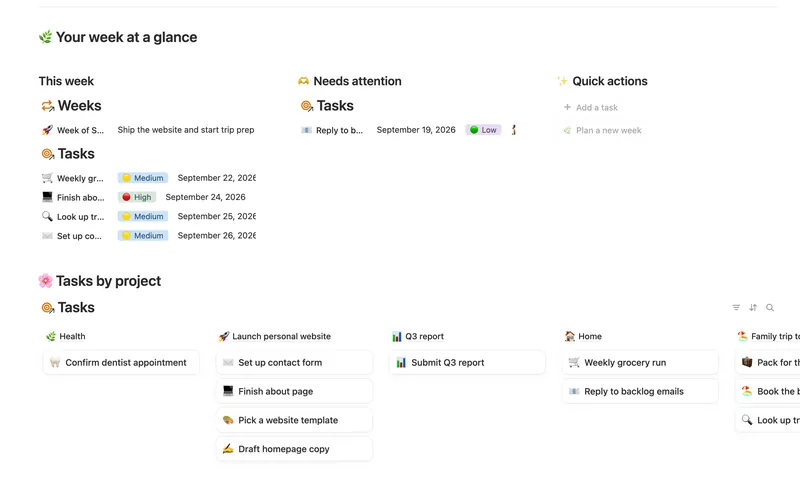
- 01 Weekly Planner Plan your week around what actually matters, connect every task to the project or area it belongs to, and close each week with a gentle review — progress that computes itself, no guilt, no spreadsheet. 3 db · 8 formulas · 2 buttons
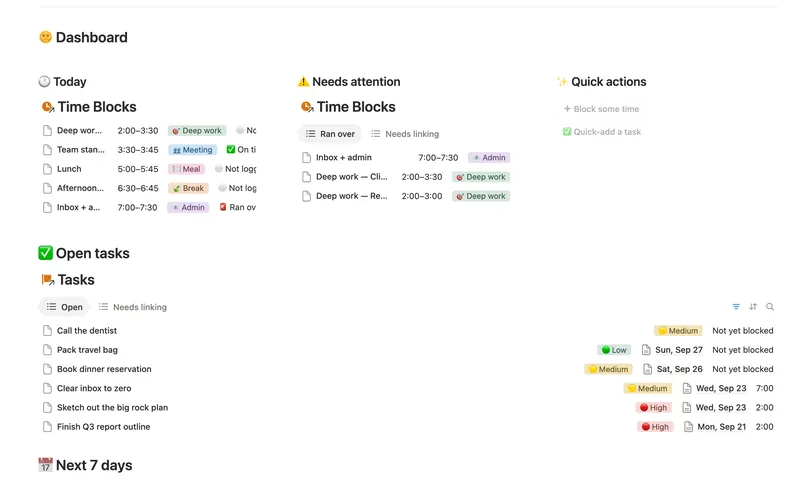
- 02 Daily Planner & Time Blocks Block your day into real Start/End times, keep tasks tied to the hour you meant to do them, and see — gently, never guiltily — whether today actually went the way you planned it. 3 db · 6 formulas · 2 buttons
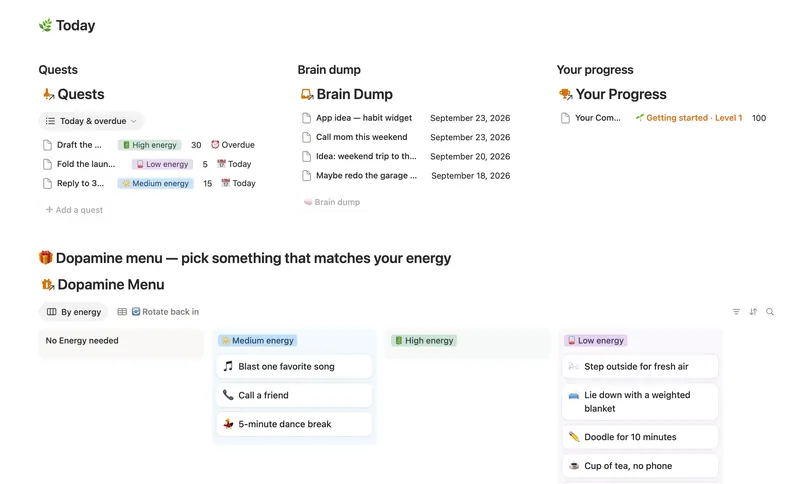
- 03 ADHD Command Center Corral every quest, stray thought and dopamine hit into one gentle system — one that tracks your XP and shows up for you on the days that don't go to plan, not just the good ones. 5 db · 12 formulas · 3 buttons
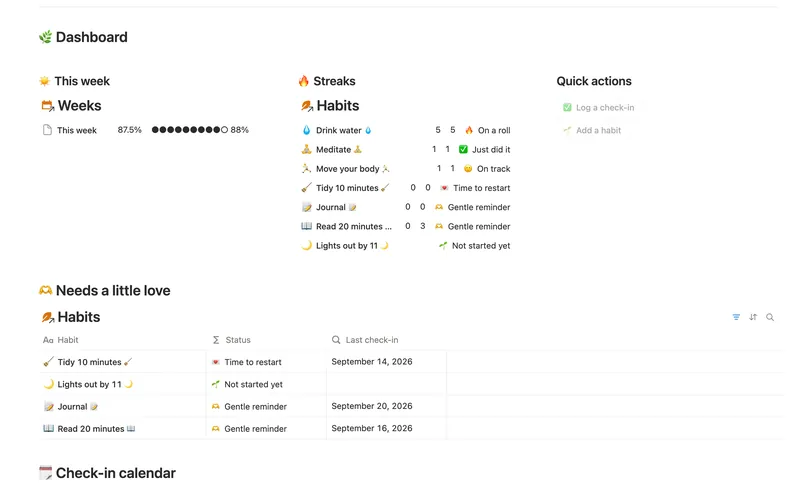
- 04 Habit Tracker Check off your habits day by day and watch streaks and a weekly score build themselves — with a gentle nudge, never a guilt trip, toward whatever needs a little love. 3 db · 13 formulas · 2 buttons
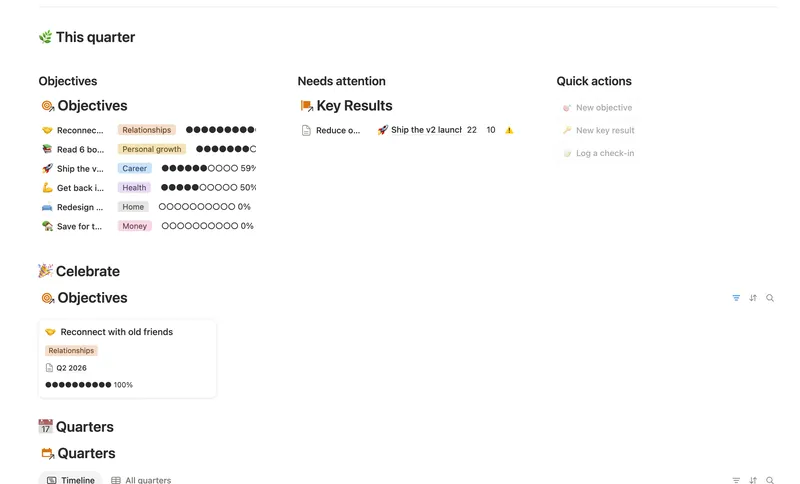
- 05 Goals & OKRs Turn each quarter's goals into Objectives with measurable Key Results, log a quick Check-in whenever you make progress, and watch two-tier rollups keep every Objective's — and the whole Quarter's — percentage honest, all the way up, without ever re-typing a number. 4 db · 15 formulas · 3 buttons
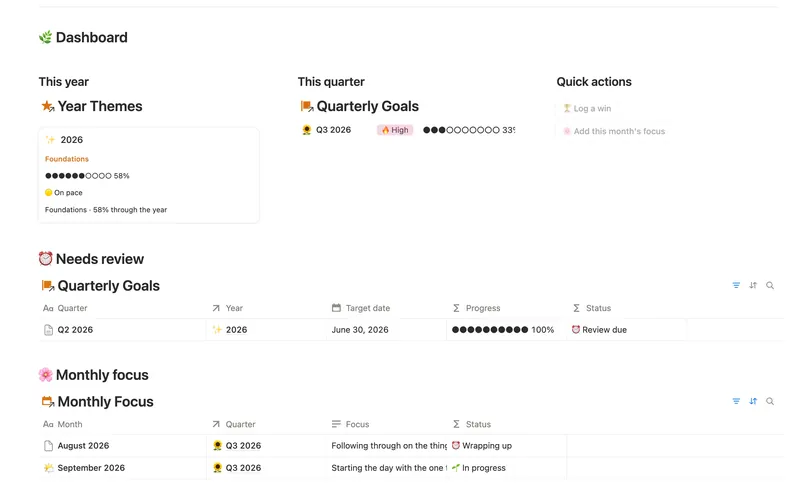
- 06 Annual Review & Year Planner Look back on the year with honest reflection prompts, then turn one yearly theme into quarterly goals and monthly focus you'll actually follow through on. 4 db · 16 formulas · 2 buttons
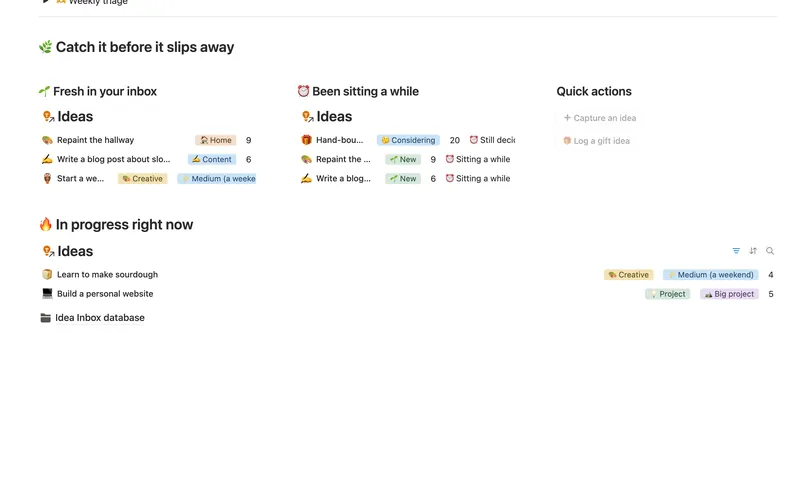
- 07 Idea Inbox Catch every idea the moment it lands, then gently triage it each week — so nothing brilliant slips away and nothing half-baked clutters your day. 1 db · 4 formulas · 2 buttons
§ FAQ
FAQ
What are the best Notion templates for planning and productivity?
It depends on what's actually breaking down. Weekly Planner and Daily Planner & Time Blocks cover day-to-day scheduling, Habit Tracker and ADHD Command Center cover behavior and follow-through, and Goals & OKRs or Annual Review & Year Planner cover longer-range planning. Most people start with one schedule template and one behavior template, not all seven at once.
Does Notion have a daily and weekly planner?
Yes, as two separate templates: Weekly Planner organizes Tasks under Projects & Areas with a weekly review, and Daily Planner & Time Blocks breaks a single day into real Start/End time blocks. They're built to be used side by side, Weekly Planner for the shape of the week and Daily Planner for the hour-by-hour reality of one day in it.
Is there a Notion template that works well for ADHD?
Yes, ADHD Command Center is built specifically for that: a Daily Log, a Dopamine Menu, Quests and a Brain Dump feed a single XP-based progress view, designed for days that don't go to plan rather than assuming every day will. Habit Tracker's gentler status ladder also works well if you just want one focused habit system rather than the full command center.
Can I use Habit Tracker and Weekly Planner together?
Yes. They're separate templates, each with its own dashboard, so you'd check Weekly Planner for tasks and Habit Tracker for habits rather than one replacing the other. If you'd rather have habits and daily structure handled in one place, ADHD Command Center is built as a single wider system instead of two separate templates.
Do these planning templates work on Notion's Free plan?
Yes, every template in this group works on Notion's Free plan. Nothing here requires a paid Notion plan to use.
§ The Bundle
Get all 50, including every Planning & Focus template
One payment, $197 value, lifetime updates.
One-time payment · Works on Notion Free · Instant Library access