
Updated Sep 24, 2026
Travel Planner Notion Template
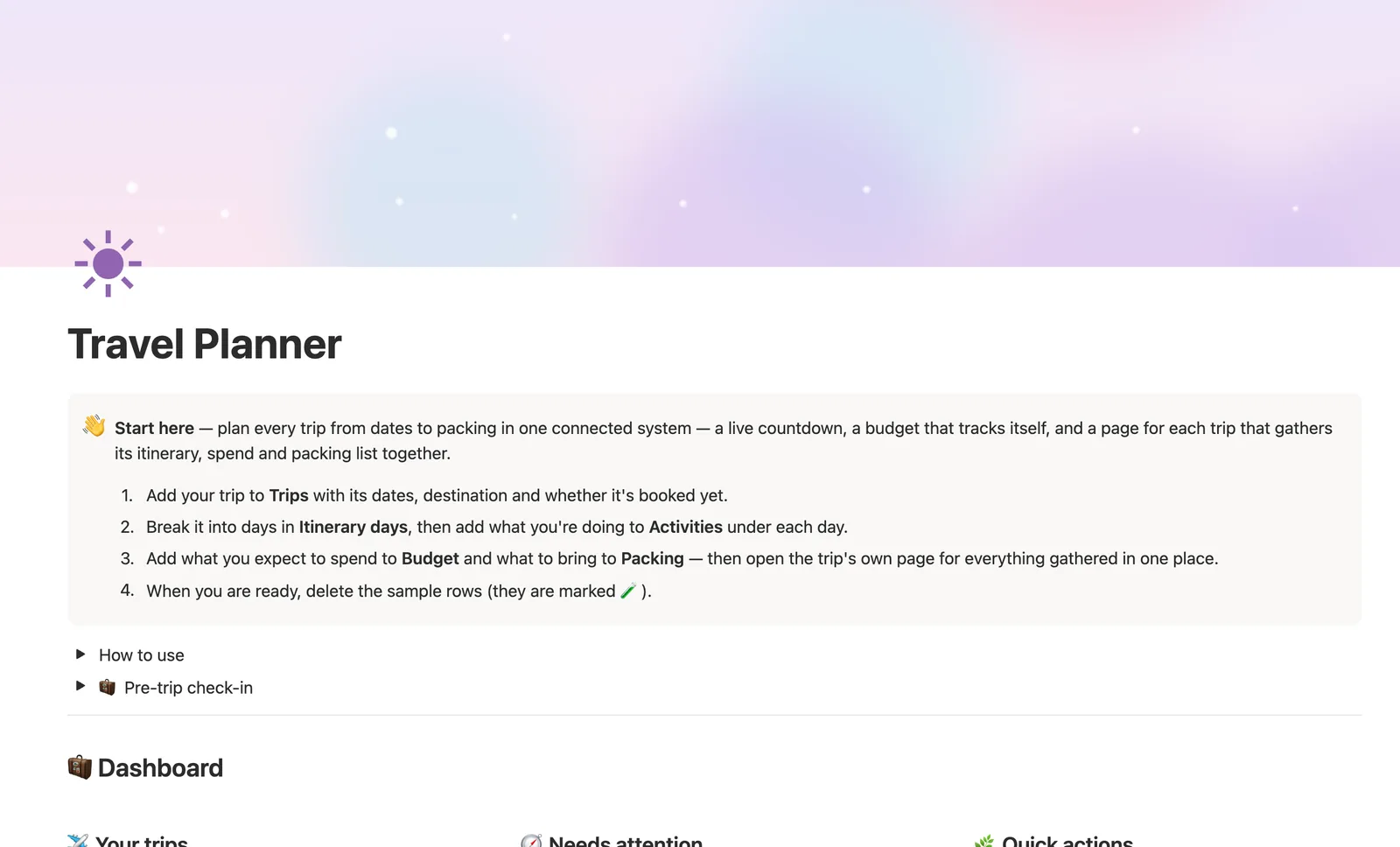
This Notion travel planner template plans every trip from dates to packing in one connected system. Add a trip to Trips and its own page gathers the itinerary, budget and packing list automatically. Trip status reads your dates and Booked checkbox for you, and Budget status compares actual spend to plan per trip.
One-time payment · Works on Notion Free · Instant Library access
Who it's for
Who it's for
- Anyone planning more than one trip at once and tired of separate documents for each
- People who want a trip's countdown, budget and packing list gathered on one page
- Anyone who wants their trip status (planning, booked, traveling, done) to update itself
- People who want to compare planned vs. actual spend, trip by trip
What's inside
What's inside
A dashboard per trip, automatically
Link a day, an expense or a packing item to a trip, and it shows up on that trip's own page without any extra setup.
Trip status that reads your dates
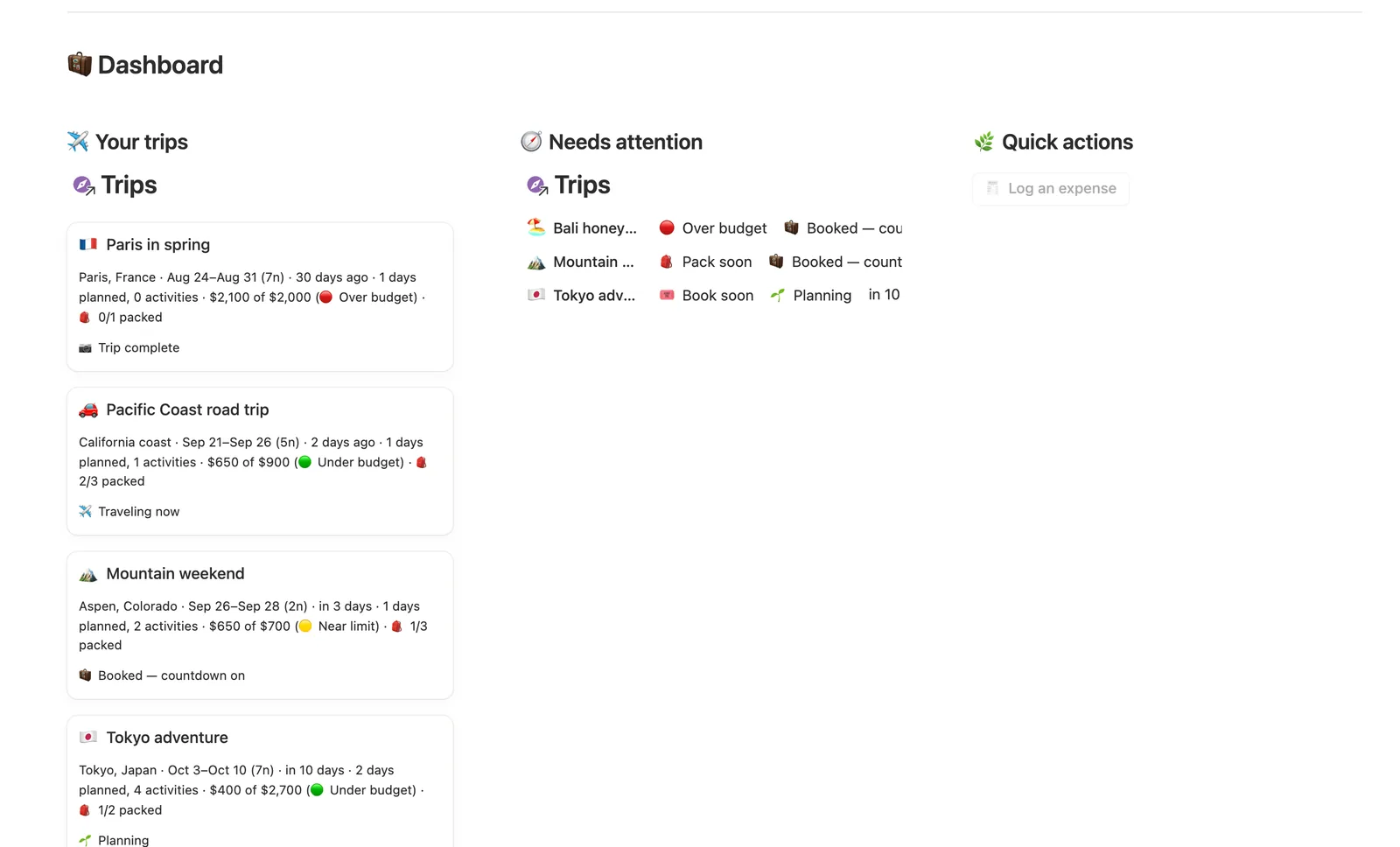
Planning, Booked, Traveling now or Trip complete, none of it set by hand, all of it computed from your Start and End dates and the Booked checkbox.
A one-line overview per trip
Trip Overview pulls together destination, countdown, days planned, activities, spend vs. plan and packing progress into one digest, never retyped.
Budget status per trip
Compares what you've actually spent to what you planned, with a status of under, near the limit or over, so you catch it before you go.
Needs attention that goes quiet on its own
It flags a trip within two weeks still not booked, or within a week still short on packing, and stops flagging once a trip's marked complete.
How it works
How it works
Trips is the hub. Itinerary days, Budget and Packing all relate back to it, and Activities relate to Itinerary days rather than straight to Trips, so a day's own Activities roll up into a Day cost, which rolls up a second hop into the trip's Itinerary cost. Budget and Packing relate to Trips directly, feeding Budget status and Packing progress. Trip status itself is computed from your Start and End dates plus the Booked checkbox, so it updates on its own as a trip goes from being planned to booked to actually happening.
Spec
- Databases
- 5
- Two-way relations
- 4
- Formulas
- 16
- Rollups
- 8
- Views
- 26
- One-click buttons
- 1
- Database templates
- 11
- Sample rows
- 54
- Databases Trips, Itinerary days, Activities, Budget, Packing
- Entity pages Trips, Itinerary days
- Buttons 🧾 Log an expense
How to use
- 01
Everything flows from Trips: link a day, an expense or a packing item to a trip and it shows up on that trip's own page automatically — open any trip from Trips for a warm little dashboard of just that trip.
- 02
Adding a new trip? Use the + New ▾ arrow next to Trips and choose New trip for the full guided page — its Itinerary/Budget/Packing dashboard is already built in; a plain new page won't have it.
- 03
Trip status reads your dates and the Booked checkbox for you — 🌱 Planning, 🧳 Booked, ✈️ Traveling now or 📷 Trip complete — never something you set by hand.
- 04
Trip Overview, at the top of every trip's own page, is a one-line digest of destination, countdown, itinerary, budget and packing — pulled together from everything you've logged, never re-typed.
- 05
Budget status compares what you've actually spent to what you planned, per trip (🟢 under, 🟡 near the limit, 🔴 over) — log each line in Budget and link it to the right trip.
- 06
Needs attention on the dashboard flags a trip within two weeks that's still not 🎟️ booked, or within a week that's still short on 🎒 packing — it goes quiet on its own once a trip's status reads 📷 Trip complete, so nothing nags you about a trip that's already done.
- 07
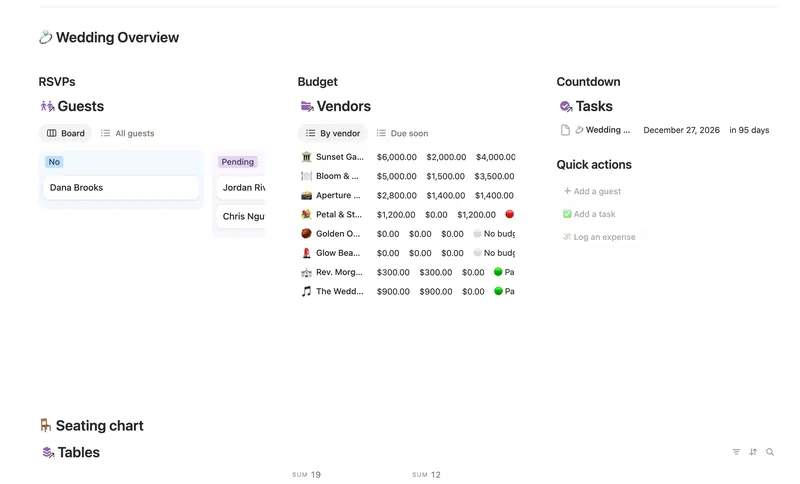
A button- or template-created day, activity, expense or packing item has no trip linked yet — buttons and database templates can't set relations — so check each database's 🔗 Needs linking view and tag it to the right trip. Pair this with Wedding Planner for the other big Life Event on your plate.
Setup
Setup
- 01
Duplicate the template into your own Notion workspace.
- 02
Add your trip to Trips with its dates, destination and whether it's booked yet, using the New trip database template so its dashboard comes built in.
- 03
Break it into days in Itinerary days, then add what you're doing to Activities under each day.
- 04
Add what you expect to spend to Budget and what to bring to Packing.
- 05
Delete the sample trips, activities and packing items once your own trip is set up.
Compared
| This template | Spreadsheet | |
|---|---|---|
| Trip status | Computed from your dates automatically | Manually updated |
| Budget vs. actual per trip | Rolled up and compared automatically | Separate tabs, manual totals |
| Itinerary and packing | One page per trip, auto-filtered | Separate documents per trip |
| Needs-attention alerts | Built-in, goes quiet once a trip's done | Nothing, unless you check manually |
§ FAQ
FAQ
Does Notion have a travel planner template?
Not built in. This template adds one: five linked databases (Trips, Itinerary days, Activities, Budget, Packing) where every trip gets its own auto-filtered page, with a live countdown, a self-tracking budget and a packing list.
Can Notion track my trip budget?
Yes, once this template's set up. Log planned and actual amounts in Budget, linked to the right Trip, and Budget status compares them automatically for that trip, showing under, near the limit or over.
Is there a free Notion travel planner?
Not this specific one. It's a Flagship-tier template in the $47 bundle rather than one of Templitize's five free Lite templates, though it works fully on Notion's Free plan once you have it.
Does Notion have a trip itinerary template with a map?
Not this one. Itinerary days and Activities are structured as databases, with a day, a time and a cost per activity, but there's no built-in map embed. If a visual map matters to you, you'd need to add a separate Notion widget for it.
How do I add a new trip so it gets its own dashboard?
Use the New trip database template from the + New dropdown next to Trips, not a blank page. Only that database template routes a new trip through its full itinerary, budget and packing dashboard; the template doesn't ship a dashboard button for creating a trip, on purpose, since a button-created page would skip that setup.
More from Leisure & Life Events
§ The Bundle
Get the whole Bundle
Travel Planner plus 49 more templates, one payment.
One-time payment · Works on Notion Free · Instant Library access