
Updated Sep 24, 2026
Wedding Planner Notion Template
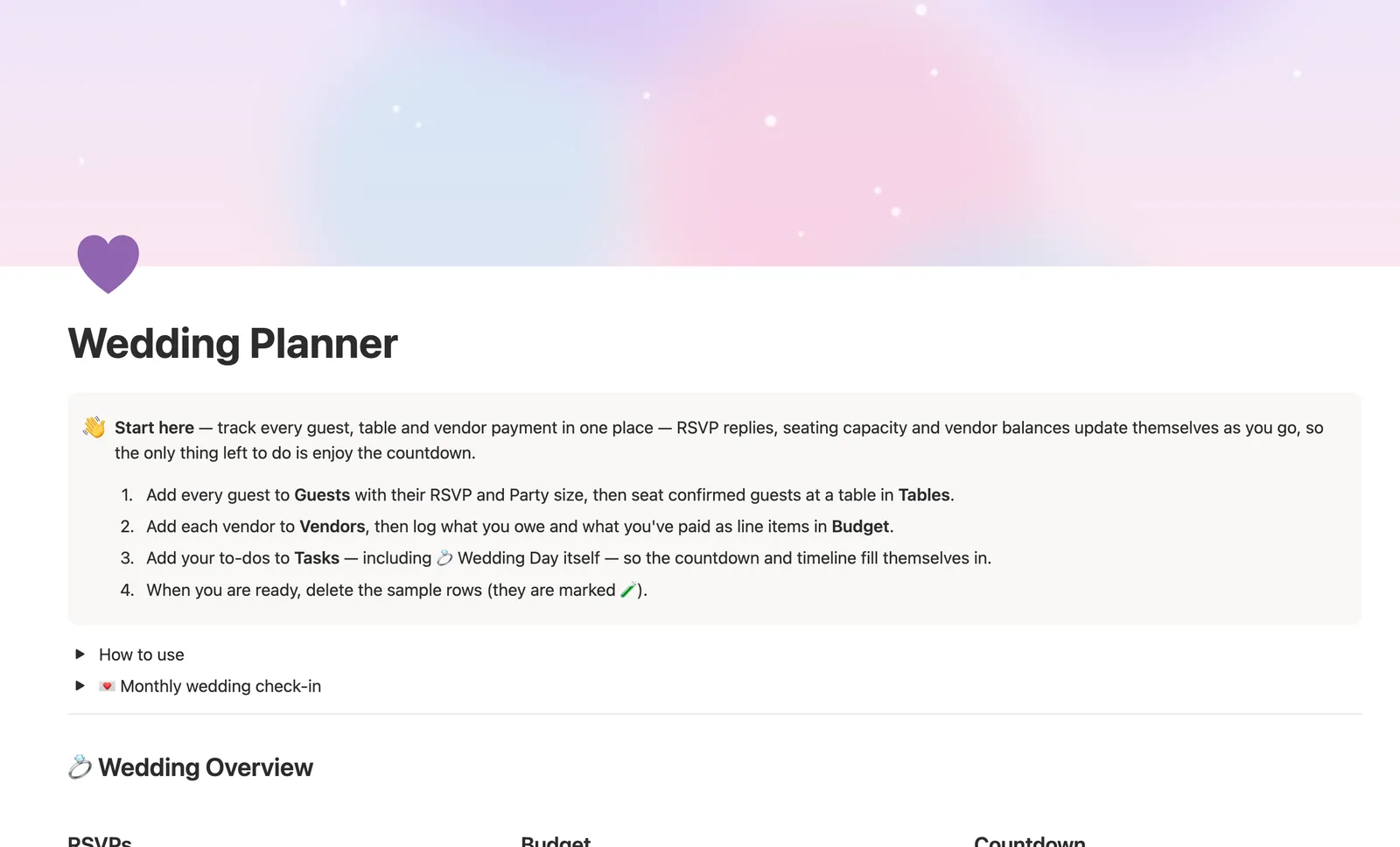
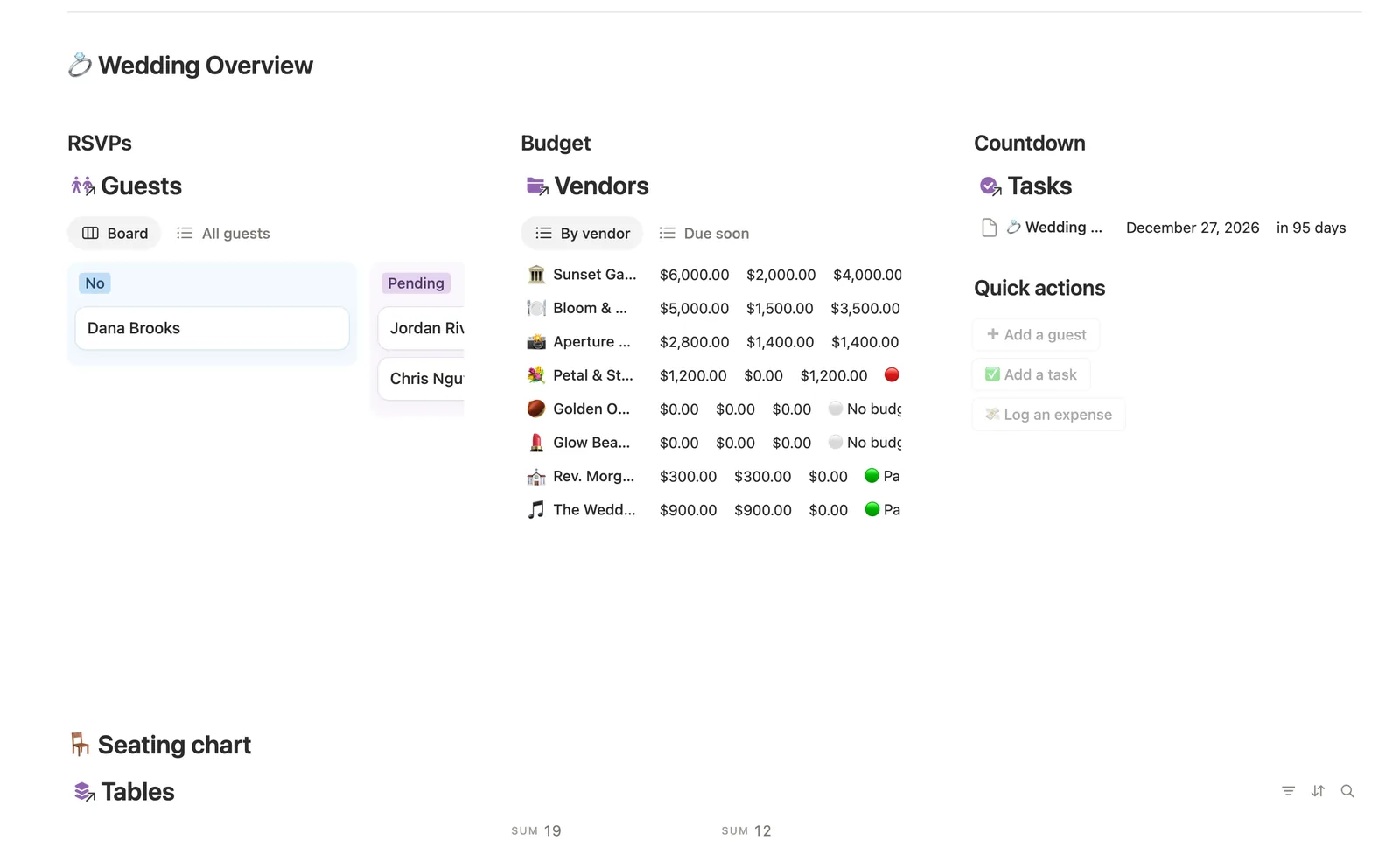
This Notion wedding planner template tracks every guest, table and vendor payment in one place. Seat a guest at a table and Capacity status updates itself, drag an RSVP card from Pending to Yes or No, and every vendor's Planned total, Paid total and Balance due build themselves from the expenses you log.
One-time payment · Works on Notion Free · Instant Library access
Who it's for
Who it's for
- Couples planning a wedding who want guests, tables, vendors and budget connected, not five separate lists
- Anyone who wants seating capacity to flag itself the moment a table's overbooked
- People who want vendor payments and balances tracked without a separate spreadsheet
- Anyone who wants an honest thank-you tracker for gifts received
What's inside
What's inside
Seating that catches itself
Seated (#) and Capacity status on Tables sum every seated guest's Party size, flagging a table the moment it's over capacity.
RSVP as a live board
Drag a guest card from Pending to Yes or No as replies come in, and the board's own column counts are your live RSVP tally, no formula needed.
Vendor balances that build themselves
Planned total, Paid total and Balance due sum automatically from a vendor's own Budget line items, and Next payment due surfaces the soonest unpaid one.
A thank-you tracker on every guest
Gift received and Thank-you sent combine into a Thank-you status right on the Guest row, so nothing needs a separate list.
A page per vendor
Open any vendor's own page to see just its Budget items and Tasks, handy right before a call with your caterer or photographer.
How it works
How it works
Guests seat at a Table, and Tables sums every seated guest's Party size into Seated (#), flagging Capacity status the moment a table's full or over. Budget line items link to a Vendor, and each vendor rolls up its own Planned and Paid totals from those into Balance due and a Payment status, while a further formula scans a vendor's unpaid items to surface Next payment due. Tasks relate to Vendors too, so a milestone like the wedding day itself gets its own countdown, and every vendor's page shows its Budget items and Tasks together.
Spec
- Databases
- 5
- Two-way relations
- 3
- Formulas
- 11
- Rollups
- 3
- Views
- 33
- One-click buttons
- 3
- Database templates
- 8
- Sample rows
- 44
- Databases Tables, Guests, Vendors, Budget, Tasks
- Entity pages Vendors
- Buttons ➕ Add a guest, ✅ Add a task, 💸 Log an expense
How to use
- 01
Seated (#) and Capacity status on Tables aren't typed in — they add up every guest's Party size assigned to that table, so a table set for 2 that somehow has 3 people at it turns 🔴 the moment you seat the third.
- 02
Every vendor's Planned total, Paid total and Balance due are the sum of its own rows in Budget — log an expense once, link it to the right Vendor, and that vendor's own Payment status updates itself.
- 03
Next payment due looks at every one of a vendor's unpaid line items and surfaces the soonest one — that's what the Budget card's Due soon tab on the dashboard is really showing you.
- 04
RSVP is a board, not a formula — drag a card from Pending to Yes or No as replies come in, and the board's own column counts are your live RSVP tally.
- 05
Open any vendor's own page to see just its Budget items and Tasks — handy right before a call with your caterer or photographer.
- 06
A button-created row can't know which Vendor it belongs to — Budget → Needs linking catches anything you added from the dashboard so you can link it by hand.
Setup
Setup
- 01
Duplicate the template into your own Notion workspace.
- 02
Add every guest to Guests with their RSVP and Party size, then seat confirmed guests at a table in Tables.
- 03
Add each vendor to Vendors, then log what you owe and what you've paid as line items in Budget.
- 04
Add your to-dos to Tasks, including the wedding day itself as a Milestone, so the countdown fills itself in.
- 05
Delete the sample guests, vendors and tasks once your own wedding details are in.
Compared
| This template | Spreadsheet | |
|---|---|---|
| Seating capacity | Flags itself when a table's overbooked | Manually counted |
| RSVP tally | Live board counts, drag to update | Retyped totals |
| Vendor balance due | Computed from linked budget items | Manual subtraction per vendor |
| Thank-you tracking | Built into each guest row | A separate checklist |
§ FAQ
FAQ
Does Notion have a wedding planner template?
Not built in. This template adds one: five linked databases (Tables, Guests, Vendors, Budget, Tasks) where seating, RSVPs and vendor balances all update themselves from what you log.
Can Notion track wedding guest RSVPs and seating capacity?
Yes, once this template's set up. RSVP lives as a board you drag guests across as they reply, and Tables sums every seated guest's Party size into a live Capacity status.
Is there a free Notion wedding planner?
Not this specific one. It's a Flagship-tier template in the $47 bundle rather than one of Templitize's five free Lite templates, though it works fully on Notion's Free plan once you have it.
Can this track vendor payments and balances due?
Yes. Log each cost as a line item in Budget, linked to its Vendor, and Planned total, Paid total, Balance due and a Payment status all build themselves from there, along with a Next payment due date.
Can I use this for an event other than a wedding?
Yes, mechanically. Tables, Guests, Vendors, Budget and Tasks aren't wedding-specific databases, so the same structure works for another big one-time event like a large anniversary party. The sample data and copy are wedding-themed, but you can rename and retag anything.
More from Leisure & Life Events
§ The Bundle
Get the whole Bundle
Wedding Planner plus 49 more templates, one payment.
One-time payment · Works on Notion Free · Instant Library access