
Updated Sep 24, 2026
ADHD Planning in Notion: What Actually Works
Notion works for ADHD when it's built around capture-first inboxes and energy-matched tasks, not a longer to-do list. The parts that actually help: a brain dump database kept separate from Tasks, an Energy property alongside Priority, and progress that counts the days you showed up instead of a streak one bad day can wipe out.
Is Notion good for ADHD?
Yes, conditionally. Notion's blank-page flexibility is the same thing that makes it hard to use out of the box: no structure, no defaults, and an unlimited number of ways to build the "perfect" system instead of using an imperfect one today. The fix isn't a different tool. Three things need to exist before you touch a single task: somewhere to dump a thought without deciding what to do with it yet, a way to pick tasks by energy instead of by guilt, and a progress number a bad day can't erase.
What actually works
A brain dump database, separate from Tasks
The single biggest failure mode for an ADHD to-do list is that every stray thought becomes a task, and the list becomes unusable within a week. A Brain Dump database fixes this by giving a thought somewhere to land that isn't a commitment yet:
- Item — whatever the thought is, typed exactly as it occurred to you.
- Captured date.
- Status — select, with options like 🌱 New, 🔍 Triaged, ✅ Became a task, 🗑️ Released.
- A relation to Tasks, filled in only once a thought actually becomes one.
Nothing here needs a decision the moment you capture it. Triaging is a separate step, usually once a day, where "released" counts as a real outcome, not a failure to follow through.
An Energy property, not just Priority
A Priority field alone tends to collapse into everything being marked High within a week. Add a second select property, Energy (🔋 High, 🔆 Medium, 🪫 Low), and you can filter Tasks by how you actually feel right now instead of by what the list says should matter most. Build one saved view, filtered to Energy is Low and Done is unchecked, and that view becomes the entire plan for a rough day, ready before the rough day happens.
Progress that counts days, not a streak
A classic streak resets to zero the moment you miss a day, which is exactly the wrong incentive for a brain that already treats one missed day as proof the whole system failed. The fix is to count Active days instead: any day with at least one task marked done, tracked with a rollup that never resets on a quiet day.
Set it up as a short rollup chain:
- On your Tasks database, add a relation to a Daily Log (one row per day).
- On Daily Log, add a rollup, Wins today, using the "Checked" calculation on Tasks' Done property. It counts how many of that day's linked tasks are checked off.
- Add a formula, Active:
if(prop("Wins today") > 0, 1, 0). - On a single "Your Progress" row related to every Daily Log entry, add a rollup that sums Active across all of them: Active days.
Active days can only go up. A rough week doesn't erase a good one before it, and a rough day doesn't put you back at zero the way a broken streak does.
A dedicated view for a rough day
Sort that Low-energy, not-done view by task size, smallest first, and pin it somewhere obvious. However the day is going, the plan for a hard day is already built before the day happens. You're not deciding what a rough day looks like while you're in the middle of one.
How do I use Notion without it becoming another overwhelming system?
Three habits keep the system itself from becoming the overwhelming thing:
- One inbox, not five. A single Brain Dump database beats a task list, a notes page and three half-started project pages that all compete for the same stray thought.
- Views over new databases. A "Low energy" or "Today" view is a saved filter, not a new place to maintain. Reach for a view before reaching for a new database.
- Let the system stay imperfect. A brain dump item that sits in 🌱 New for a week isn't a failure of the system. It's the system doing its job: holding the thought so you didn't have to.
How does this compare to a plain to-do list?
| Plain to-do list | ADHD-structured Notion setup | |
|---|---|---|
| Capturing a stray thought | Goes straight onto the task list | Goes into Brain Dump, triaged later |
| Choosing what to do next | By priority (often everything's "High") | By Energy, matched to how you feel right now |
| Tracking progress | A streak that resets to 0 on a miss | Active days, which only ever goes up |
| A rough day | No separate plan | A pre-built "lowest energy" view is the whole plan |
FAQ
Is Notion good for ADHD? Yes, with structure. Notion's flexibility is a liability without a capture inbox, energy-based task filtering, and forgiving progress tracking built in first. A default, empty Notion workspace is not especially ADHD-friendly on its own.
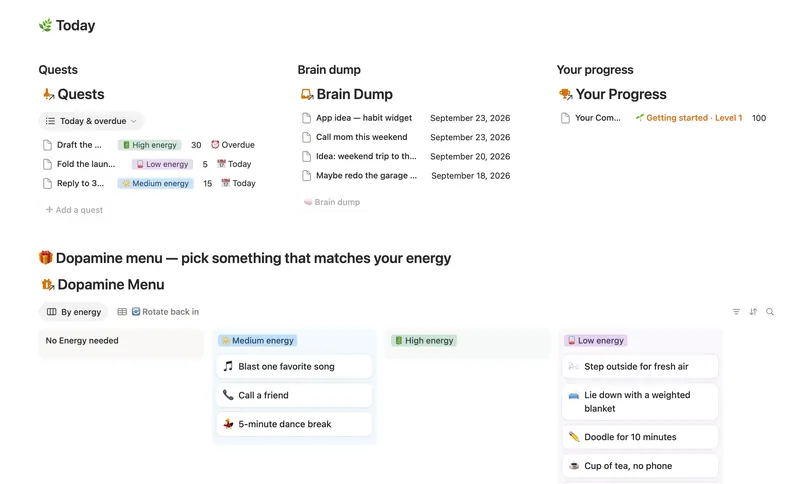
What is the best Notion template for ADHD? Look for one built around a brain dump inbox, an Energy tag on tasks alongside Priority, and a progress metric a missed day can't erase. The ADHD Command Center is built around exactly this: a Daily Log, a Dopamine Menu matched by energy, Quests tagged by energy and XP, a Brain Dump, and a Your Progress page tracking Active days instead of a streak.
How do I use Notion without it becoming another overwhelming system? Keep it to one inbox, use filtered views instead of new databases for every context, and treat an untidy inbox as the system working, not failing.
Is there a free Notion ADHD planner? Not a dedicated free version of the ADHD Command Center specifically; it's part of the full Templitize library rather than a free Lite template. The structure above, a Brain Dump database, an Energy property, and an Active-days rollup, is free to build yourself in a blank Notion workspace on any plan, Free included.
Templates built around this
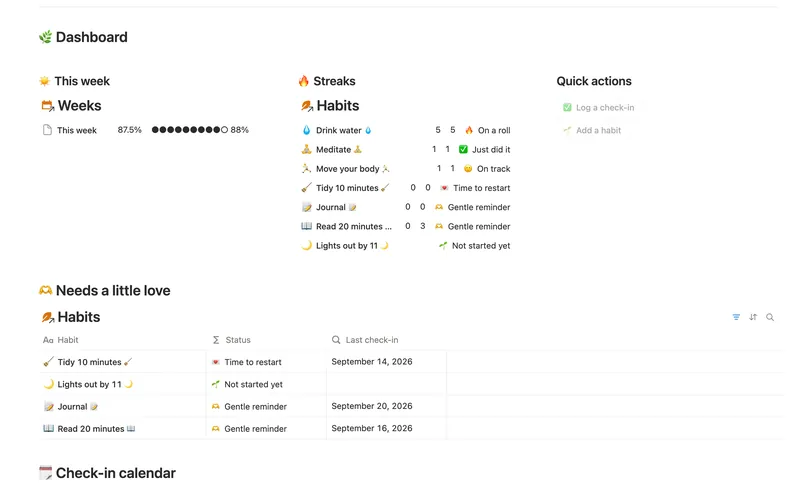
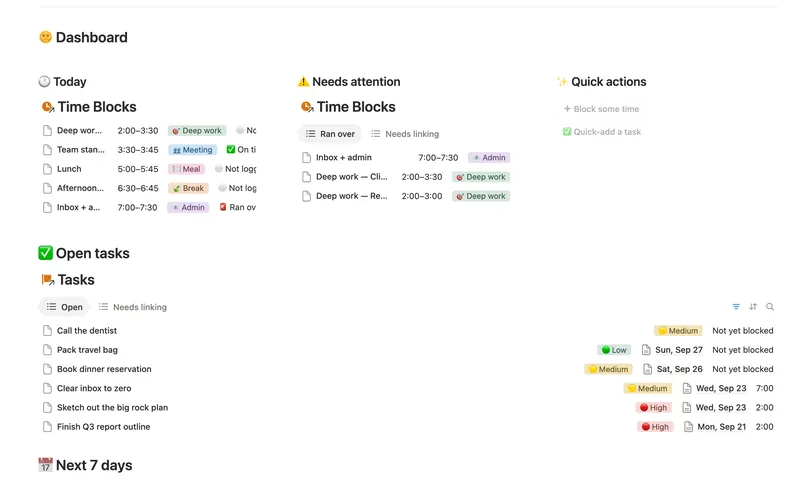
The ADHD Command Center ships the whole system above: Daily Log, Dopamine Menu, Quests, Brain Dump and Your Progress, wired together so XP and Active days compute themselves instead of being typed by hand. Pair it with the Habit Tracker for anything you're doing daily regardless of energy level, and the Daily Planner & Time Blocks once a day needs more structure than a Quest list alone. All three are part of the Bundle, 50 templates for $47 once.
Related templates
- 03 ADHD Command Center Corral every quest, stray thought and dopamine hit into one gentle system — one that tracks your XP and shows up for you on the days that don't go to plan, not just the good ones. 5 db · 12 formulas · 3 buttons
- 04 Habit Tracker Check off your habits day by day and watch streaks and a weekly score build themselves — with a gentle nudge, never a guilt trip, toward whatever needs a little love. 3 db · 13 formulas · 2 buttons
- 02 Daily Planner & Time Blocks Block your day into real Start/End times, keep tasks tied to the hour you meant to do them, and see — gently, never guiltily — whether today actually went the way you planned it. 3 db · 6 formulas · 2 buttons
§ The Bundle
Build it once, or start from a template
50 Notion templates, $197 value, $47 once.
One-time payment · Works on Notion Free · Instant Library access