
Updated Sep 24, 2026
Notion Content Calendar for Creators: From Idea to Published Post
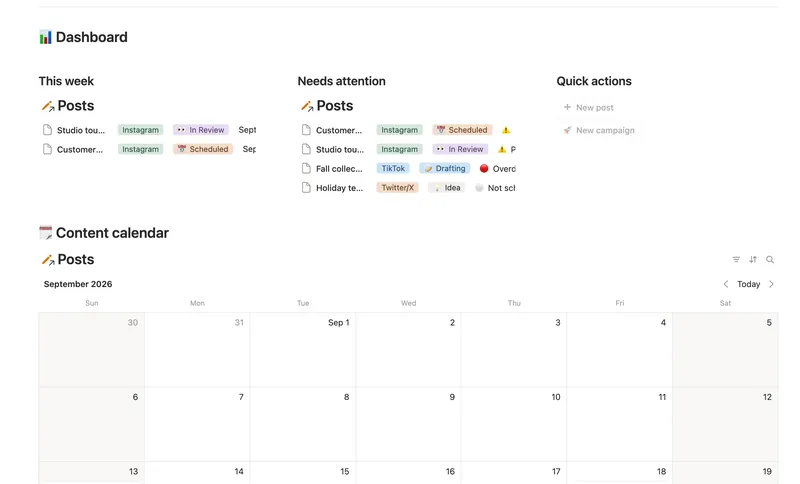
A Notion content calendar works best as three linked pieces: Pillars for your recurring themes, Campaigns for time-boxed pushes like a launch, and Posts for the actual calendar. Status moves through a staged pipeline by hand, while a computed Timing flag catches a slipping post before it's actually late.
How do I plan content in Notion?
- Set up Pillars for your recurring themes, Educational, Behind the Scenes, Promotional, whatever you actually post about. These are what keep your mix honest over time, separate from any single push.
- Log every post in a Posts database, tagging Platform, Format, a Pillar, and, only if it's part of a time-boxed push, a Campaign.
- Set a Publish date and move Status along a real pipeline: Idea → Drafting → In Review → Scheduled → Published → Needs Update. A generic "To Do / Doing / Done" hides more than it shows once you're posting to more than one platform.
- Watch the calendar view, not a list. Plotting every post by Publish date surfaces the gaps a table hides, an empty week, three posts landing the same day.
- Check Timing before Status. Status is what you moved by hand; Timing is what's actually about to be late, and it's worth checking first.
Does Notion have a content calendar template?
Not built into Notion itself. You can build a database with a Calendar view over a Publish date property in a few minutes, which covers the basics, or start from a template that already has Pillars, Campaigns, and the timing logic wired up, like Content Calendar.
How do I avoid running out of content ideas?
A content calendar answers "what's scheduled." It doesn't answer "what should I make next," which is a separate, honest gap worth naming: Content Calendar and an idea bank are two different jobs, usually two different databases, even when you use both together.
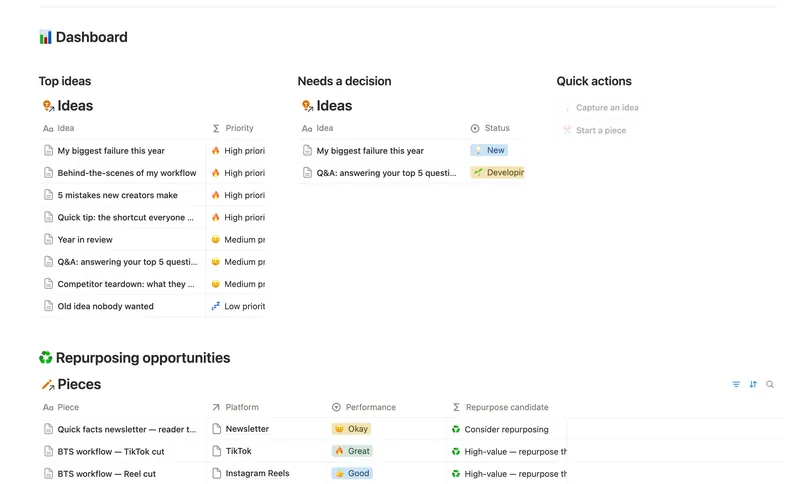
Content Idea Bank & Repurposing is built for the second question. Ideas get scored, not ranked by gut feeling: Interest and Audience fit count in your favor, Effort counts against you, and the result feeds a Priority label so your best ideas sort to the top on their own. A self-relation, "Repurposed from" pointing at an earlier row in the same Pieces database, is what turns one published video into a tracked chain of Reels and TikTok cuts instead of three unconnected rows. Note the honest limit: Content Calendar and Content Idea Bank are separate templates with separate databases (Posts vs. Pieces); there's no live link auto-connecting an Idea to a Post. Pairing them means running both side by side, not one merged system.
Can Notion flag a post that's about to be late?
Yes, and this is the mechanic that actually earns the word "calendar" instead of "list." A Timing formula reads Status and Publish date together, using lets(), Notion's newer formula syntax for naming a value once and reusing it in the same expression:
if(prop("Status") == "✅ Published", "✅ Published",
if(prop("Status") == "🔁 Needs Update", "🔁 Needs update",
if(empty(prop("Publish date")), "⚪ Not scheduled",
lets(due, dateBetween(prop("Publish date"), today(), "days"),
if(due < 0, "🔴 Overdue", if(due <= 2, "⚠️ Publishing soon", "🟢 On track"))))))
A post flips to Overdue the moment its scheduled date passes without being marked Published, and to Publishing soon two days out, without you scrolling the whole calendar to notice. The same discipline applies one level up: a Campaign's own status can compute itself from Start date and End date instead of being set by hand:
if(empty(prop("Start date")) or empty(prop("End date")), "⚪ Not scheduled",
if(dateBetween(prop("Start date"), today(), "days") > 0, "🔜 Upcoming",
if(dateBetween(prop("End date"), today(), "days") < 0, "✅ Wrapped", "🟢 Active")))
Spreadsheet vs. a Notion content calendar
| Spreadsheet | Notion content calendar | |
|---|---|---|
| Overdue flag | Manual, easy to miss | Computed Timing, updates itself |
| Content mix by theme | Manual tally | Pillars with a freshness flag |
| Campaign progress | Manual percentage | Progress bar rolled up from posts |
| Idea backlog, scored | Separate document, untracked | Linked idea bank with a computed score |
| Multi-platform view | One tab per platform, easy to drift | One Posts database, filtered by Platform |
The idea, calendar, and newsletter pipeline
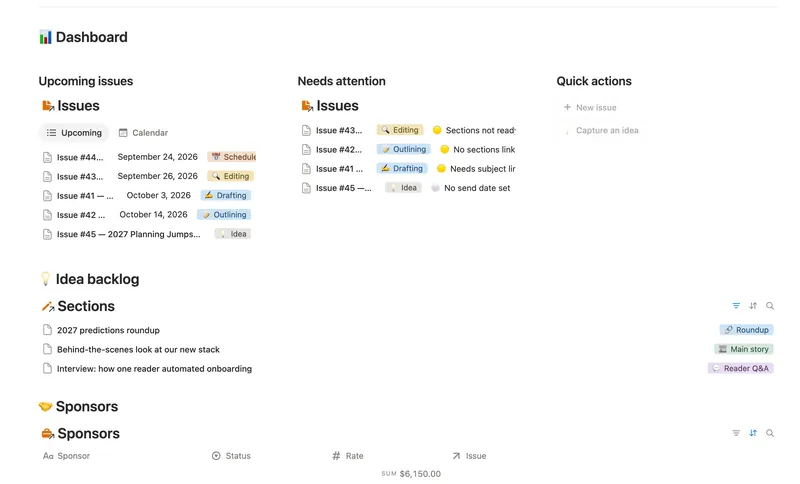
These three templates are designed to chain: Content Idea Bank & Repurposing is where a piece of content gets scored and captured, Content Calendar is where it gets scheduled across platforms, and Newsletter Planner is where its own idea backlog (unlinked Sections rows) turns into a specific issue once you know which send it belongs in. Each one is a standalone template with its own databases, so nothing auto-syncs between them; what they share is the same underlying pattern, an idea bank feeding a production pipeline, applied at each stage of getting something published.
All three are part of the full 50-template bundle: $47 once for all 50, with lifetime updates.
FAQ
How do I plan content in Notion? Pillars for recurring themes, a Posts database with Platform, Format, and Publish date, a named status pipeline you move by hand, and a Calendar view plotting everything by Publish date.
Does Notion have a content calendar template? Not a built-in one from Notion itself. A basic version is a database with a Calendar view over a Publish date property; a fuller one adds Pillars, Campaigns, and a computed Timing flag.
How do I avoid running out of content ideas? A separate, scored idea bank, not the calendar itself. Rating each idea's Interest, Effort, and Audience fit produces a Priority ranking automatically, so the best ideas surface without a manual review.
Can Notion flag a post that's about to be late? Yes, with a formula comparing today's date to the post's Publish date: overdue once that date passes without the post marked Published, publishing soon inside a short window, on track otherwise.
Related templates
- 37 Content Calendar Plan and publish across every platform from one staged pipeline — with a live calendar, a Timing flag that catches a slipping post before it's late, and Campaigns/Pillars that show whether a push is on track and whether your content mix is actually balanced. 3 db · 8 formulas · 2 buttons
- 40 Content Idea Bank & Repurposing Capture every content idea before you forget it, score it so you always know what's worth making next, and turn one piece into several — without losing track of what's already been repurposed. 3 db · 9 formulas · 2 buttons
- 39 Newsletter Planner Plan every issue from idea to send — sections and ideas flow into the right issue, sponsor revenue tracks itself, and a Send readiness flag tells you exactly what's left before it goes out. 3 db · 6 formulas · 2 buttons
§ The Bundle
Build it once, or start from a template
50 Notion templates, $197 value, $47 once.
One-time payment · Works on Notion Free · Instant Library access