
Updated Sep 24, 2026
Second Brain in Notion: The PARA Method, Explained
A second brain is an external system for capturing tasks and notes so your memory doesn't have to hold everything. PARA (Projects, Areas, Resources, Archives) is the filing method behind most second brains: it sorts by how soon something needs action, not by topic. In Notion, that maps to linked databases whose progress rolls up automatically from checked tasks.
What is a second brain?
The term comes from productivity writer Tiago Forte, and it means what it sounds like: instead of trying to remember every task, idea and reference on your own, you build an external, searchable system that holds it for you. The point isn't the note-taking. It's freeing up the working memory you'd otherwise spend trying not to forget something.
Notion is one reasonable place to build one because it has real relational databases: a task can link to the project it belongs to, and that link is what lets progress compute itself instead of being tracked by hand.
What is the PARA method?
PARA splits everything you'd capture into four categories, organized by actionability rather than subject:
- Projects — active efforts with a specific outcome and, usually, a deadline. "Launch personal website," "Run a 10K."
- Areas — standards you maintain on an ongoing basis, with no finish line. Health, Career, Finances, Home.
- Resources — reference material you're keeping around because it's useful, not because it's due. Articles, books, courses, tools.
- Archives — anything from the first three that's no longer active, kept for reference instead of deleted.
The organizing question for any new item isn't "what is this about?" (a topic-based system, like folders or tags, answers that). It's "how soon do I need to act on this?" A note about sleep science could be a Resource you're keeping for general interest, or a Task inside a Project called "Fix my sleep schedule," depending on whether you're actively working on it right now.
How is PARA different from a regular to-do list?
A flat to-do list treats every task the same: one long list, sorted by due date or priority, with no sense of what part of your life it belongs to. PARA nests a task under the Project it serves, and that Project under the Area it belongs to, so you can ask a bigger question a flat list can't answer: is Health actually moving, or is it just Career and Home eating all your attention this month?
That's a genuine structural difference, not just a different label on the same list. It only works because the nesting is a real database relation, not a manual folder you have to keep re-sorting by hand.
How do I build PARA in Notion?
- Create an Areas database: the ongoing parts of your life (Health, Career, Home, Finances, Personal Growth). No due dates here, on purpose.
- Create a Projects database, related to Areas, with a Status (Active, On hold, Done, Archived) and a Target date.
- Create a Tasks database, related to Projects, with a Done checkbox and a Due date.
- Create a Resources database (reference material, related to Areas) and a Notes database that can link to a Project, a Resource, or both.
- Roll progress up automatically, two hops: from Tasks, to the Project they belong to, to the Area that Project belongs to.
Why does the rollup chain need a formula in the middle?
Notion won't let a rollup read directly from another rollup's output; the platform rejects that "rollup of a rollup" outright when you try to configure it. To roll progress up two hops, from Tasks all the way to Areas, you buffer the middle step through a plain formula property instead:
- On Projects, add a rollup property, Task % done, rolling up Tasks → Done, using the "Percent Checked" calculation. This is a genuine rollup, configured in Notion's rollup settings, not typed into a formula.
- Still on Projects, add a formula property, Progress fraction, with a single line:
prop("Task % done")It does nothing except copy that rollup's number into a property another rollup is allowed to read.
- On Areas, add a rollup, Area progress, rolling up Projects → Progress fraction, using the "Average" calculation.
The middle "Progress fraction" property never shows up anywhere you'd look at it directly; it exists purely to make the second hop legal. Skip it, and Notion rejects the Area-level rollup the moment you try to save it.
The same two-hop pattern gives you a per-Project Health status, computed from that project's own Tasks rather than typed by hand:
if(prop("Status") == "Done", "✅ Done",
if(prop("Status") == "On hold", "⏸ On hold",
if(prop("Task count") > 0 and prop("Task % done") >= 1, "🎉 All tasks done",
"🟢 On track")))
Is Notion Second Brain better than Obsidian?
Neither is better in general; they're built around different tradeoffs. Obsidian stores plain markdown files locally, with a graph view that shows links between notes, and no native relational database or rollup math without a community plugin. Notion is cloud-based, and its databases can do the arithmetic above natively, an Area's progress computed from its Projects' Tasks, with no plugin required.
If what you want is a fast, local, plain-text note graph, Obsidian's design fits that directly. If what you want a second brain where a Project's progress and an Area's health compute themselves from checked boxes, that's a database problem, and Notion's relations and rollups are built for it. Which one is "better" depends entirely on which of those two problems you're actually trying to solve.
How is this different from just using folders and tags?
| PARA in Notion | Folders and tags | |
|---|---|---|
| Filing logic | By actionability: Project, Area, Resource, or Archive | By topic |
| "Is this on track?" | Computed: Area progress rolls up from Tasks automatically | You check every folder yourself |
| Unfiled capture | A real "Unfiled" view catches anything not yet sorted | Usually just sits in an inbox folder indefinitely |
| Backlinks between notes | A self-relation, so a note shows what links to it | Depends on the tool |
FAQ
What is a second brain? An external system, outside your own memory, for capturing tasks, notes and reference material so you don't have to hold it all in your head. The term comes from Tiago Forte's writing on the same idea.
What is the PARA method? A filing system with four categories, sorted by actionability rather than topic: Projects (active, with an outcome), Areas (ongoing, no end date), Resources (reference material) and Archives (inactive). See the full breakdown above.
How is PARA different from a regular to-do list? A to-do list is flat. PARA nests a task under the Project it serves, and that Project under the Area of your life it belongs to, so progress can roll up two hops instead of staying one unsorted list.
Is Notion Second Brain better than Obsidian? They solve different problems. Notion's relational databases compute progress and health automatically from linked tasks; Obsidian's local markdown files and graph view suit a plain-text note network better. Neither is objectively better; it depends on which one you need.
Templates built around this
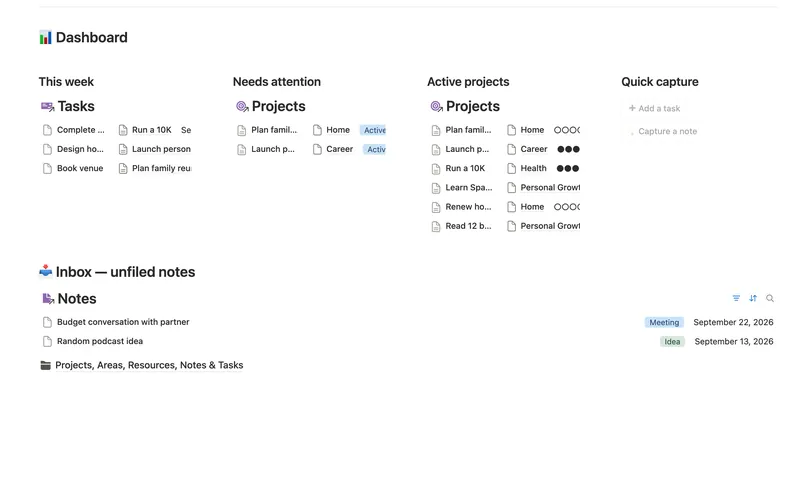
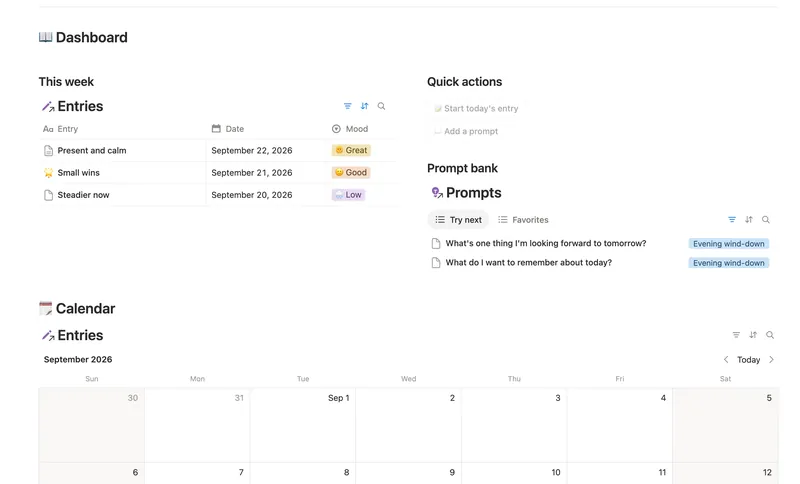
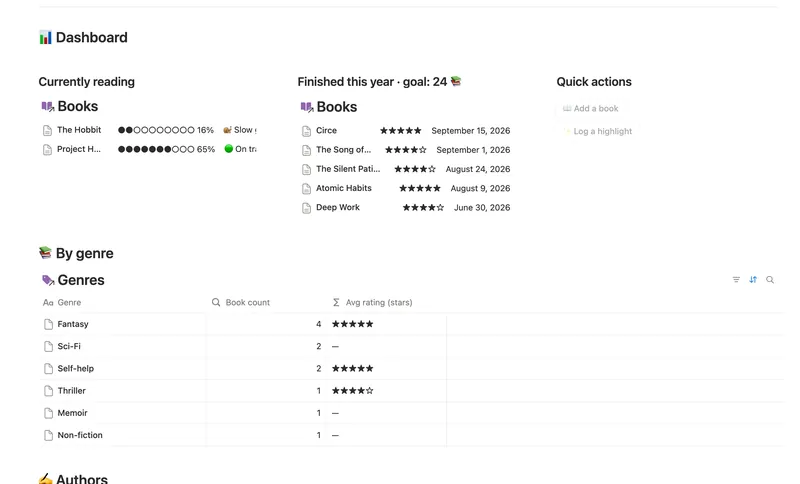
The Second Brain (PKM) template ships the Projects/Areas/Resources half of PARA above as real linked databases, Areas, Resources, Projects, Tasks and Notes, with the two-hop Area progress rollup and per-Project Health already wired. It doesn't add a separate Archive database; you archive by changing a Project's own Status instead. If journaling is part of your capture habit, the Daily Journal covers the reflective side PARA doesn't. And if books and articles make up a big share of what you're filing into Resources, the Reading List & Book Notes tracks those in more depth than a single Resources row would. All three are part of the Bundle, 50 templates for $47 once.
Related templates
- 25 Second Brain (PKM) Capture everything into Tasks and Notes, file it against Projects, Areas and Resources, and watch Progress, Next due and Health roll up two hops — from a single checked box to a real picture of what's on track and what's stalled. 5 db · 10 formulas · 2 buttons
- 28 Daily Journal Capture how each day actually felt — a mood, a gratitude, a few honest lines — and watch a gentle streak build the moment two days land back-to-back. 2 db · 7 formulas · 2 buttons
- 26 Reading List & Book Notes Track every book alongside its Author, Genre and Highlights — with a live reading pace, a projected finish date and a yearly-goal count that updates the moment you turn a page. 4 db · 13 formulas · 2 buttons
§ The Bundle
Build it once, or start from a template
50 Notion templates, $197 value, $47 once.
One-time payment · Works on Notion Free · Instant Library access