
Updated Sep 24, 2026
Reading List & Book Notes Notion Template
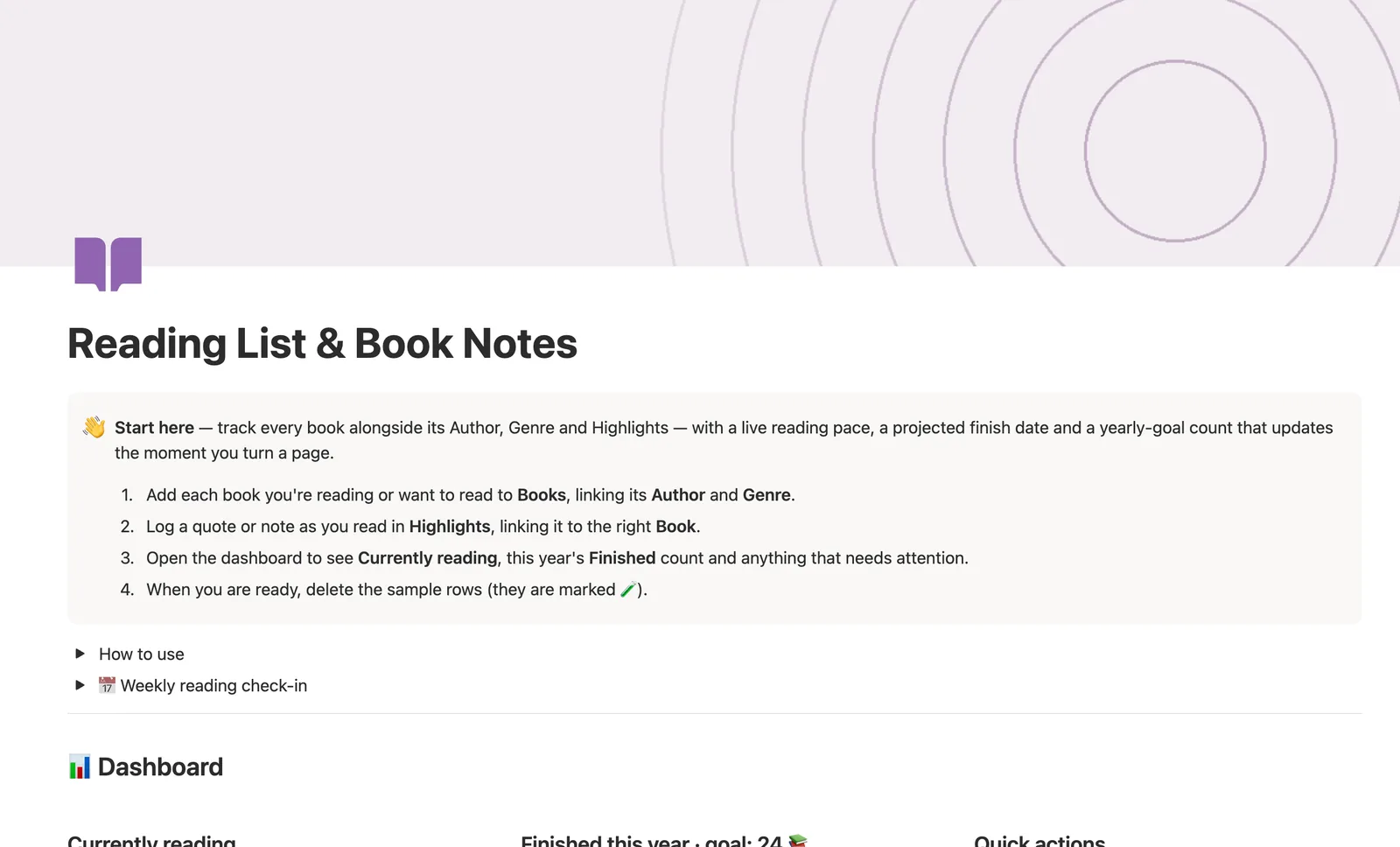
This Notion template tracks every book alongside its Author and Genre, with a live reading pace and a projected finish date that update the moment you change Current page. Highlights link to each book so your quotes stay attached to where they came from, and a Finished this year count tracks your yearly reading goal.
One-time payment · Works on Notion Free · Instant Library access
Who it's for
Who it's for
- Readers who want their pace and finish date to compute themselves instead of guessing
- Anyone tracking a yearly reading goal without a separate habit-tracker app
- People who save quotes and want them organized by book, not lost in a Notes page
- Readers who want their average rating by author or genre rolled up automatically
What's inside
What's inside
Pace and Est. finish date, computed daily
Update Current page and Pace, Progress, and Est. finish date all recompute; a stalled book (14+ days at under 5 pages/day) gets flagged 🐌 Slow going.
Authors and Genres as real databases
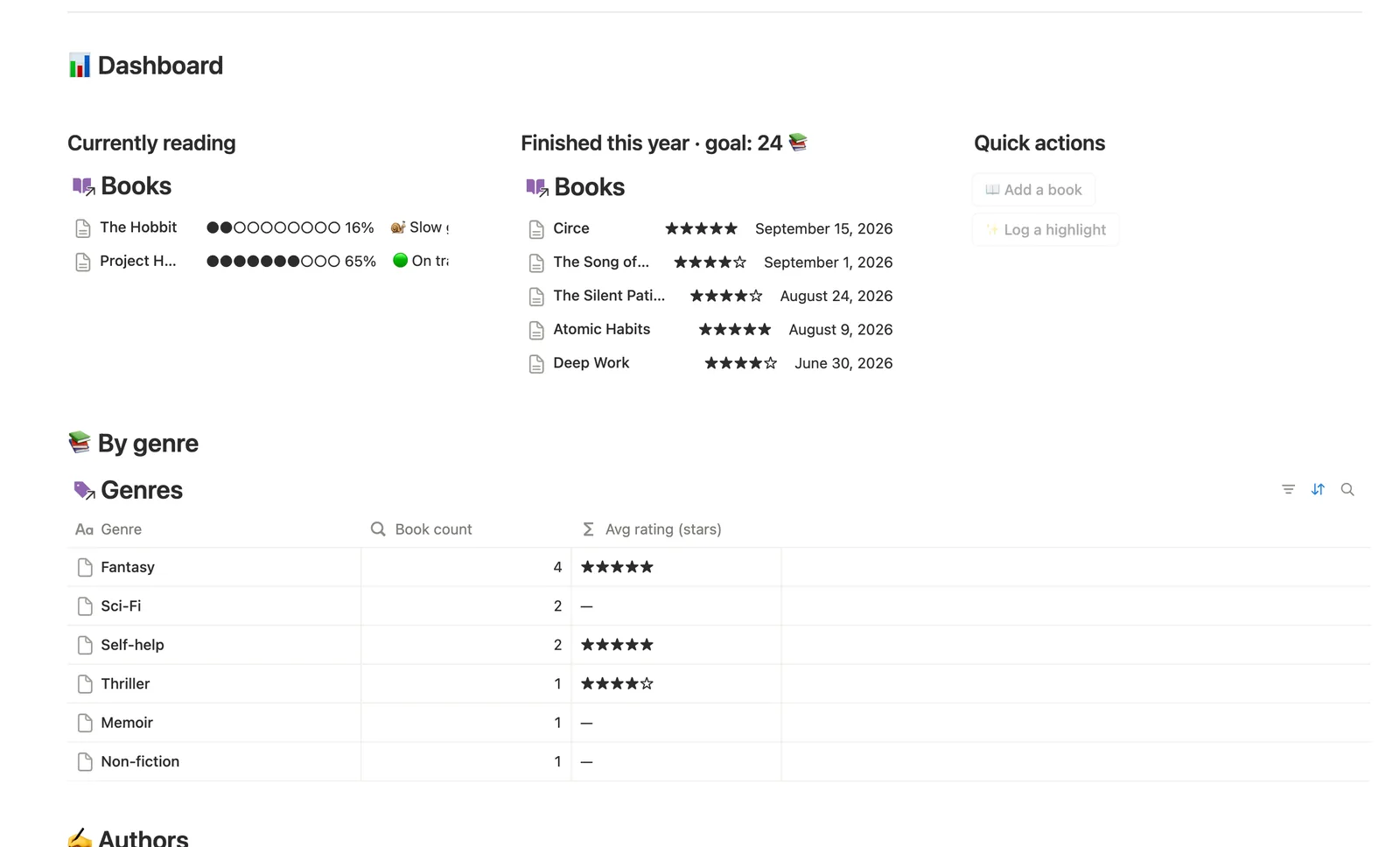
Not tags: Authors and Genres are their own databases that roll up how many books you've read by each and your average rating there.
Highlights linked to their book
Log a quote in Highlights and link it to the Book it came from; open that Book's own page to see every highlight from it, in page order.
A yearly goal you edit in place
Finished this year counts books completed this calendar year; the dashboard heading carries the goal number, starting at 24, so you edit it directly as your target changes.
Latest read, per author
Authors → Latest read shows the most recent book you finished by each author, so you know if there's a newer one to catch up on.
How it works
How it works
Every Book links to one Author and one Genre, and Highlights link back to the Book they're quoted from. Authors and Genres roll up how many books you've read there and your average rating; Books itself computes Pace and Est. finish date from Current page, and a same-row check flags anything finished this calendar year toward your yearly goal.
Spec
- Databases
- 4
- Two-way relations
- 3
- Formulas
- 13
- Rollups
- 4
- Views
- 20
- One-click buttons
- 2
- Database templates
- 3
- Sample rows
- 36
- Databases Authors, Genres, Books, Highlights
- Entity pages Books
- Buttons 📖 Add a book, ✨ Log a highlight
How to use
- 01
Everything flows from Books: link an Author and Genre to each one, and Authors/Genres roll up how many books you've read by each and your average rating there — computed, never counted by hand.
- 02
Progress, Pace and Est. finish date are never typed — update Current page as you read and they recompute themselves; leave a book open too long at too slow a pace and Reading health flags it 🐌 in Needs attention.
- 03
Finished this year drives the yearly-goal count on the dashboard — check it against your own target and adjust the number in the dashboard's own text as your goal changes.
- 04
Open a Book's own page to see just its Highlights — every quote and note you've logged for that one book, in page order.
- 05
Authors → Latest read shows the most recent book you finished by each author, so you always know if there's a newer one to catch up on.
- 06
Pair this with Course & Learning Tracker or Second Brain (PKM) for the rest of your Mind & Learning notes.
Setup
Setup
- 01
Duplicate the Reading List & Book Notes template into your workspace.
- 02
Add each book you're reading or want to read, linking its Author and Genre.
- 03
Set the goal number in the dashboard's "Finished this year · goal: 24" heading to your own target, then delete the 🧪 sample rows.
- 04
Log quotes as you read in Highlights, linking each one to its Book.
Compared
| This template | Plain reading log | |
|---|---|---|
| Reading pace | Computed from Current page automatically | You calculate it yourself |
| Average rating by author or genre | Rolled up automatically | Manual counting |
| Highlights | Linked to their book, viewable in page order | Mixed in with everything else |
§ FAQ
FAQ
Does Notion have a book tracker?
Not built in, but this template adds one. Books links to Author and Genre databases, computes your reading Pace and Est. finish date from Current page, and rolls up your yearly Finished count automatically.
How do I track my reading progress in Notion?
In this template, update Current page as you read; Progress (a percent bar), Pace (pages per day), and Est. finish date all recompute from that one field, so you never type a percentage by hand.
Is there a free Notion book tracker template?
Yes. Reading List & Book Notes ships as a free Lite version — Books and Highlights, with Progress and a yearly Finished count. The full version adds Author and Genre as their own linked databases, live Pace and Est. finish date, and is part of the $47 bundle of all 50 templates.
Can Notion estimate when I'll finish a book at my current pace?
Yes. Est. finish date divides your remaining pages by your current Pace and projects a date forward; a book you just started, or one with no page count set, reads “—” instead of a false projection.
Does this template work on Notion's Free plan?
Yes, every database, relation, and formula here runs on the Free plan. There's no reading-challenge chart widget; the editable yearly goal count in Finished this year stands in for one instead.
More from Mind & Learning
- 27 Course & Learning Tracker Track every course from syllabus to final grade — Modules in order, Assignments weighted into a live grade, and what's due next surfaced before it's late. 3 db · 12 formulas · 2 buttons
- 28 Daily Journal Capture how each day actually felt — a mood, a gratitude, a few honest lines — and watch a gentle streak build the moment two days land back-to-back. 2 db · 7 formulas · 2 buttons
- 25 Second Brain (PKM) Capture everything into Tasks and Notes, file it against Projects, Areas and Resources, and watch Progress, Next due and Health roll up two hops — from a single checked box to a real picture of what's on track and what's stalled. 5 db · 10 formulas · 2 buttons
§ The Bundle
Get the whole Bundle
Reading List & Book Notes plus 49 more templates, one payment.
One-time payment · Works on Notion Free · Instant Library access