
Updated Sep 24, 2026
Second Brain (PKM) Notion Template
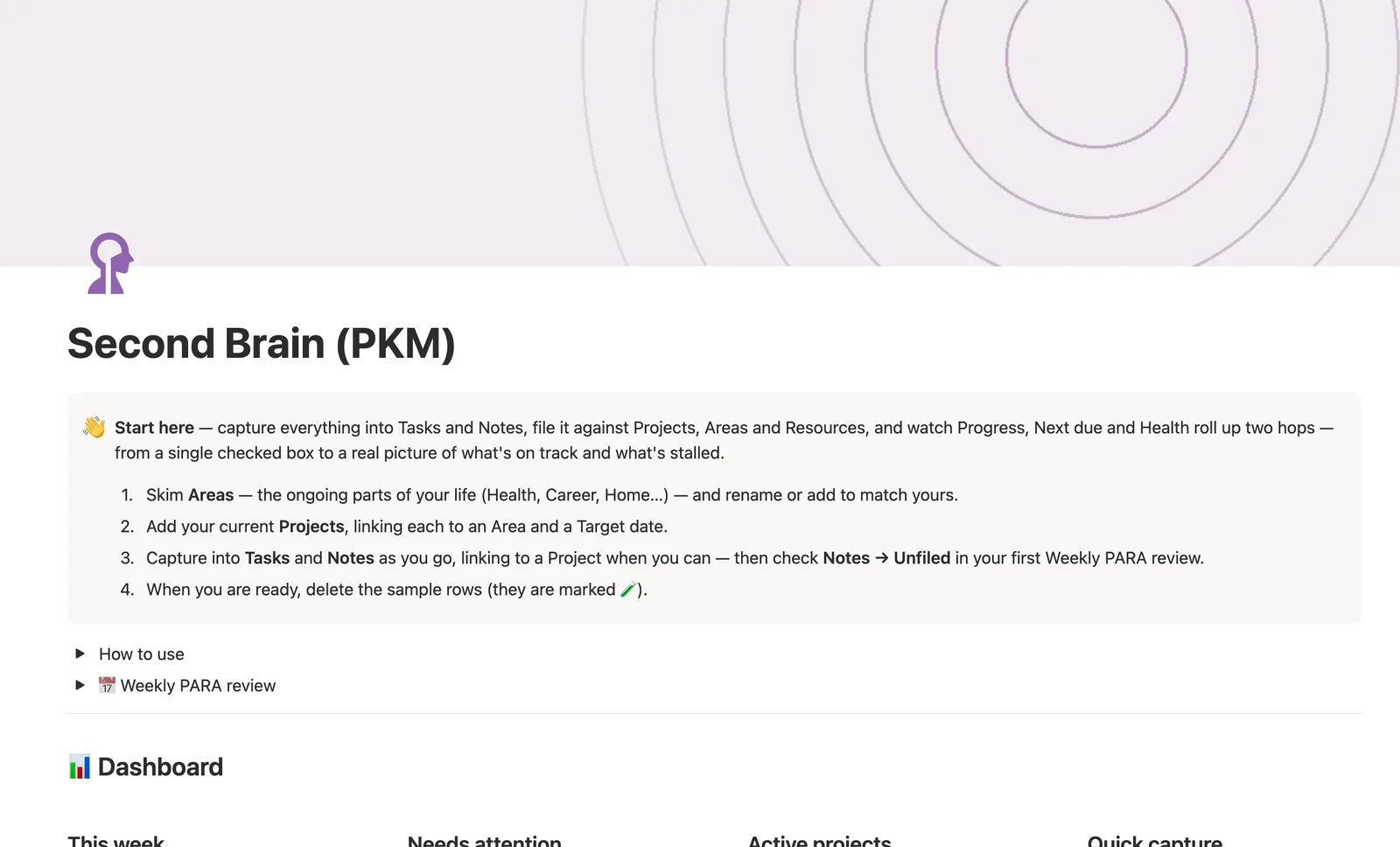
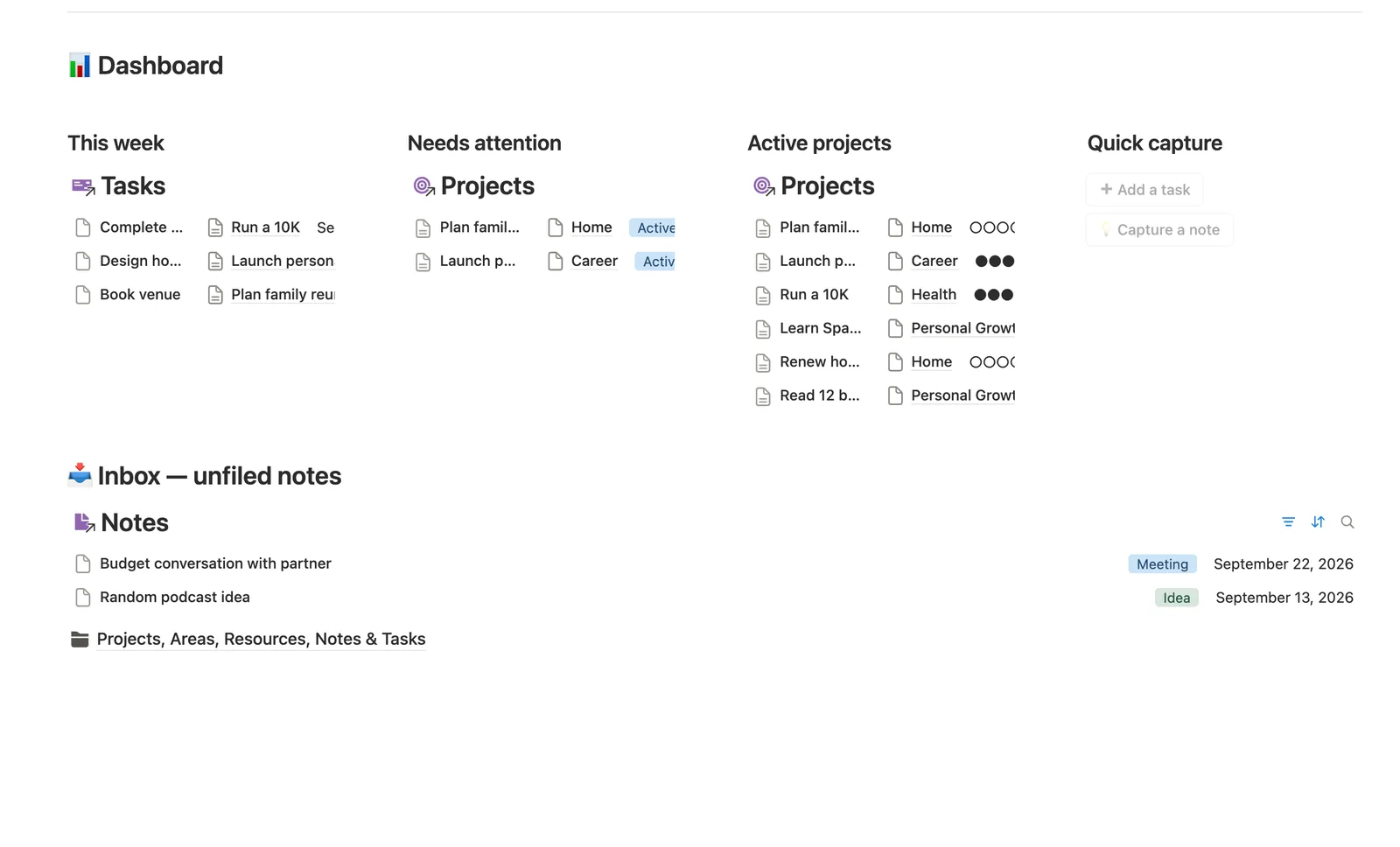
This Notion template runs the PARA method: Projects link to Areas, and Tasks and Notes link to Projects or to the Resources they came from. Progress, Next due, and Health update on their own from your Tasks, and a Notes → Unfiled view catches anything you haven't filed yet. Built for people who capture more than they organize.
One-time payment · Works on Notion Free · Instant Library access
Who it's for
Who it's for
- Anyone running PARA (Projects, Areas, Resources, Archive) in Notion instead of a folder tree
- People who capture ideas faster than they file them and need a real inbox
- Freelancers or professionals juggling several ongoing projects across different areas of life
- Notion users who want Progress and Health computed from real tasks, not typed by hand
What's inside
What's inside
Progress, Next due, and Health that compute themselves
Every Project's Progress, Next due date, and Health badge (🔴 slipped, 🟢 on track) are formulas that read straight from that project's own Tasks, not fields you update by hand.
A real inbox: Notes → Unfiled
Notes don't have to be filed the moment you capture them. Anything with no Project and no Resource shows up in a dedicated Unfiled view, so nothing gets lost.
Two-hop Area progress
Areas → Area progress rolls up every Project's own Progress into one number for that part of your life, Health, Career, Home and the rest, not just a project count.
A dashboard page per Project
Every Project you add gets its own page automatically, showing that project's Open and Done Tasks and linked Notes side by side.
Resources that track whether you've processed them
Link a Note back to a Resource and its Status flips from 🆕 Not yet processed to 📝 Notes taken, a nudge to actually use what you save.
A built-in weekly PARA review
A toggle on the dashboard walks you through emptying the Unfiled inbox, clearing overdue tasks, and checking each Area for stalled projects.
How it works
How it works
Every Project links to one Area, and both Tasks and Notes link to a Project when you file them; a Note can also link to the Resource it came from. Tasks feed Projects (Progress, Next due, Health), and Projects feed Areas (Area progress), a two-hop chain, so an Area's number reflects what's actually getting done inside it, not just how many projects exist.
Spec
- Databases
- 5
- Two-way relations
- 6
- Formulas
- 10
- Rollups
- 11
- Views
- 25
- One-click buttons
- 2
- Database templates
- 7
- Sample rows
- 45
- Databases Areas, Resources, Projects, Tasks, Notes
- Entity pages Projects
- Buttons ➕ Add a task, 💡 Capture a note
How to use
- 01
PARA in one page: every Project belongs to an Area; Tasks and Notes can each link to a Project, and a Note can also link to the Resource it came from. Nothing has to be filed the moment you capture it — that's what Notes → Unfiled is for.
- 02
Progress, Next due and Health on each Project are never typed — they're computed from that project's own Tasks. 🔴 means a task (or the deadline) has slipped, 🟢 means it's on track, and ⏸ / ✅ / 🗄 just mirror whatever Status you've set.
- 03
Areas → Area progress is a two-hop rollup: each Task's Done box rolls up into its Project's Progress, and every Project's Progress then rolls up into its Area — so an Area shows a real picture of that part of your life, not just a project count.
- 04
Related notes is a self-link between two Notes — connect the handful that are genuinely related, not every passing mention, and it shows up on both notes automatically.
- 05
Resources → Status flips from 🆕 Not yet processed to 📝 Notes taken the moment a Note links back to it — a nudge to actually process what you save, not just collect it.
- 06
Every Project — sample or one you add later from the New project template — gets its own page with Open/Done Tasks and Notes filtered to just that project. Pair this with your Course & Learning Tracker or Reading List templates if you use them; Resources here is for everything that doesn't need its own system.
Setup
Setup
- 01
Duplicate the Second Brain template into your own Notion workspace.
- 02
Rename or add to the six starter Areas (Health, Career, Home, Finances, Personal Growth, Community) to match your life.
- 03
Add your current Projects, linking each to an Area, then delete the 🧪 sample rows in Tasks, Notes, and Resources.
- 04
Capture into Tasks and Notes as you go, linking to a Project when you can; check Notes → Unfiled during your first weekly review.
Compared
| This template | A folder of notes | |
|---|---|---|
| Where a task or note lives | Linked to a Project, Area, or Resource | Wherever you happened to save it |
| Project status | Progress, Next due, and Health computed from your Tasks | You have to remember to check |
| Capturing something you haven't filed yet | Notes → Unfiled inbox catches it | Lost in a random folder |
§ FAQ
FAQ
What is a second brain in Notion?
A second brain is a single system for capturing tasks, notes, and reference material instead of scattering them across apps. This Notion template implements it with five linked databases, Areas, Resources, Projects, Tasks, and Notes, so what you capture stays connected to what it's for.
What is the PARA method?
PARA stands for Projects, Areas, Resources, and Archive, a way of organizing by actionability instead of topic. In this template, Projects belong to Areas, Notes and Tasks link to Projects, and anything not yet filed lands in a Notes → Unfiled inbox until you sort it.
Is there a free Notion second brain template?
Not a separate free version of this one. Second Brain is part of the $47 bundle of all 50 templates, not sold on its own. A few other templates in the bundle ship as free Lite versions if you want to try the system first.
Is Notion Second Brain better than Obsidian?
That depends on what you want. Obsidian is a local-first note app built around backlinks and plugins, while this is a Notion template that adds structure, Areas, Projects, Tasks, Resources, Notes, on top of the workspace you probably already use for other things. If you're already in Notion, this keeps your system in the same place as your other work.
Does the Second Brain template work on Notion's Free plan?
Yes. Every database, formula, relation, and button in this template runs on Notion's Free plan, no paid Notion features required.
More from Mind & Learning
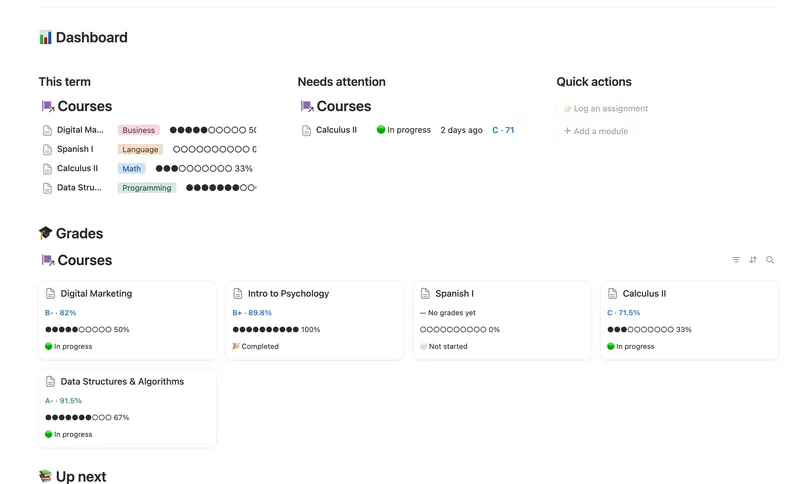
- 27 Course & Learning Tracker Track every course from syllabus to final grade — Modules in order, Assignments weighted into a live grade, and what's due next surfaced before it's late. 3 db · 12 formulas · 2 buttons
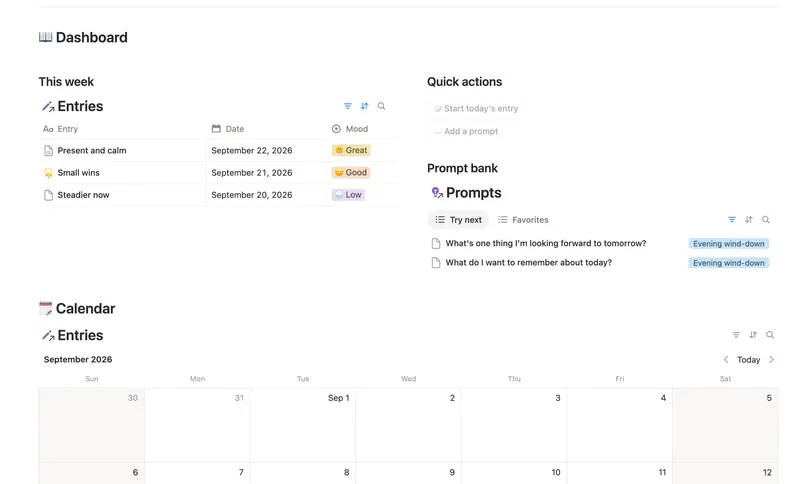
- 28 Daily Journal Capture how each day actually felt — a mood, a gratitude, a few honest lines — and watch a gentle streak build the moment two days land back-to-back. 2 db · 7 formulas · 2 buttons
- 26 Reading List & Book Notes Track every book alongside its Author, Genre and Highlights — with a live reading pace, a projected finish date and a yearly-goal count that updates the moment you turn a page. 4 db · 13 formulas · 2 buttons
§ The Bundle
Get the whole Bundle
Second Brain (PKM) plus 49 more templates, one payment.
One-time payment · Works on Notion Free · Instant Library access