
Updated Sep 24, 2026
How to Track Job Applications in Notion Without Losing the Thread
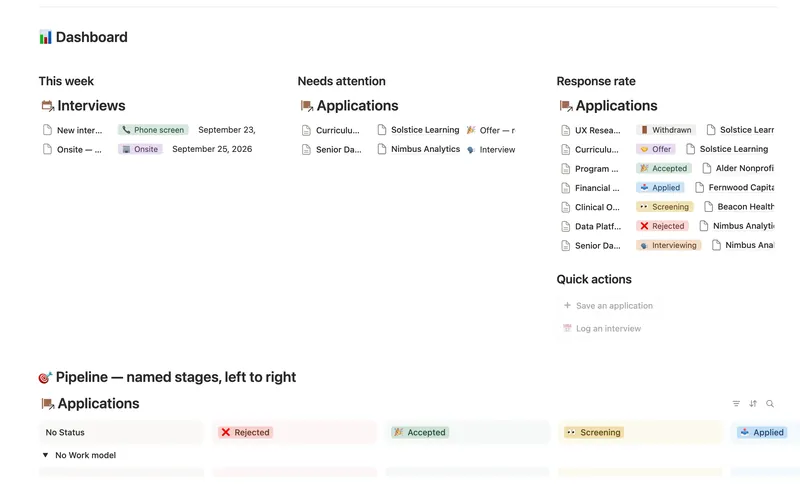
A Notion job application tracker works best as four linked databases, Companies, Contacts, Applications, and Interviews, not one flat table. Status moves through a named pipeline you set by hand, while days since applied, your next interview date, and your real response rate compute themselves from what you log.
How do I organize a job search in Notion?
- Start with Companies, not roles. A company can have several open roles over time, and you want its contacts and interview history to accumulate in one place rather than scatter across separate application rows.
- Log every role as its own Application, linked to its Company. Saved-but-not-applied-yet roles belong here too, with a Status that says so, so a bookmark and a submitted application never look the same.
- Add contacts as you meet them, tagging each one Recruiter, Hiring manager, Interviewer, or Referral, and link them to the right Application.
- Log every interview round as its own row in Interviews, linked back to the Application it belongs to. One application with three rounds should produce three rows, not three lines in a notes field.
- Move Status by hand; let everything else compute. Days since applied, Next interview date, and Rounds passed shouldn't be numbers you maintain yourself.
Does Notion have a job application tracker?
Not a built-in one. Notion ships databases, relations, and views as building blocks, not a pre-made job search pipeline. You can assemble the four-database structure above yourself in an afternoon, or start from one that's already built and computing, like Job Application Tracker.
What should a job application tracker actually include?
A tracker that's just "Company, Role, Status" answers one question and misses the rest. A tracker that actually helps includes:
- A named status pipeline, not just Applied/Rejected: Saved → Applied → Screening → Interviewing → Offer → Accepted / Rejected / Withdrawn reflects how a search actually moves.
- A primary contact per application, since who you're talking to changes what "follow up" means.
- Every interview round as its own linked row, so a phone screen and a final round aren't the same event with a note appended.
- Days since applied, computed, not counted by hand:
if(empty(prop("Date applied")), 0, dateBetween(today(), prop("Date applied"), "days"))- A response rate that's an actual percentage: replies (Screening or further) divided by applications you've actually submitted, not a bookmarked "Saved" role that doesn't count yet.
How do I know when to follow up on a job application?
The useful version of this isn't a reminder you set manually for every application; it's a formula that flags exactly the applications that need you and stays quiet about the ones that don't. A "stale" flag only fires for a genuinely open application, gone three or more weeks with no interview on the calendar:
if(prop("Status") == "📤 Applied" or prop("Status") == "👀 Screening" or prop("Status") == "🗣️ Interviewing",
if(prop("Days since applied") >= 21 and empty(prop("Next interview date")), true, false), false)
Next interview date itself is never typed in either. Notion's newer formula syntax can filter, map, and sort directly across a linked relation, so a formula can read the soonest still-scheduled row across every linked Interview and return just that date:
prop("Interviews").filter(current.prop("Upcoming?")).map(current.prop("Date")).sort().first()The moment you log a new interview and mark the old one's outcome, that date moves forward on its own. Nothing needs re-checking by hand.
Spreadsheet vs. a plain to-do list vs. a Notion job application tracker
| To-do list | Spreadsheet | Notion job application tracker | |
|---|---|---|---|
| Multiple interview rounds per application | One line, easy to lose | One row per round, no link back | A linked Interviews database |
| Follow-up flag | None | Manual, easy to forget | Computed from days since applied |
| Response rate | Not tracked | Manual formula, breaks on edits | Computed percentage |
| Contact history per company | No | No | Rolls up automatically |
| Interview prep tied to the application | No | No | Links out to a prep system |
Pair it with interview prep and a wins log
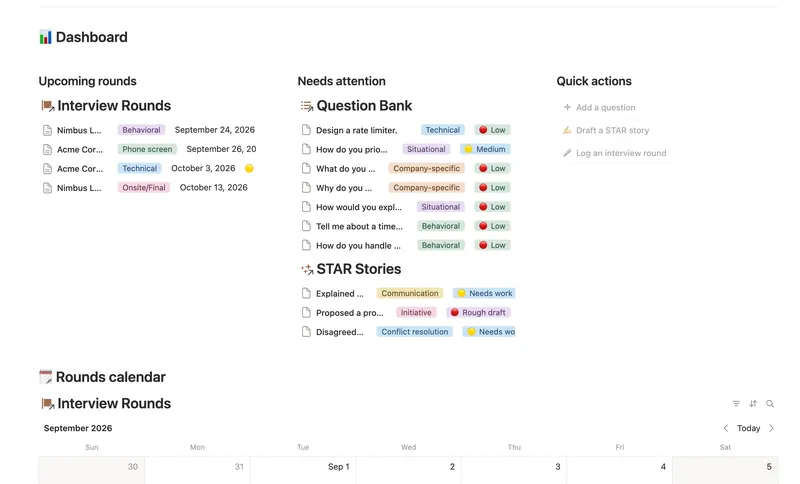
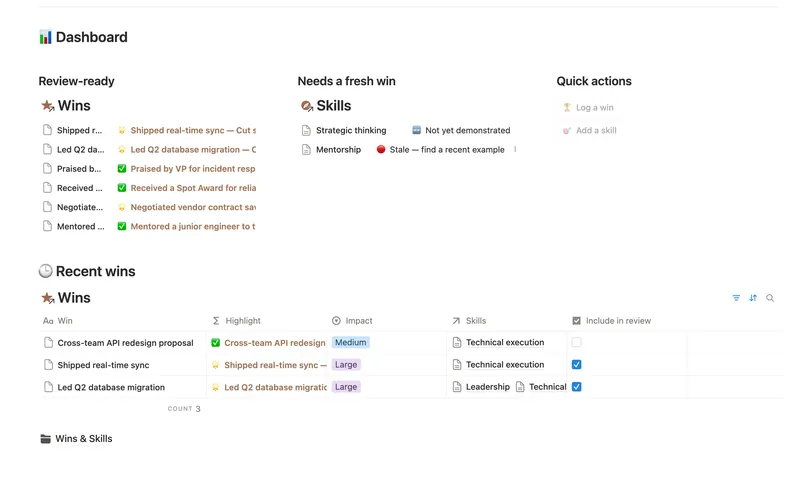
Tracking the pipeline is one job; getting ready for each round and remembering what actually happened are two more. Interview Prep builds a reusable bank of questions tied to the STAR stories that answer them, so you write a good answer once and reuse it. Career Wins logs what you actually accomplish once you land the role, tagged to the skills it proves, so your next review or resume update doesn't start from a blank page.
All three are part of the full 50-template bundle: $47 once for all 50, works on Notion's Free plan.
FAQ
How do I organize a job search? Four linked databases: Companies, Contacts, Applications, and Interviews, with Applications as the hub every other piece connects back to, and a named status pipeline instead of a flat Applied/Rejected list.
Does Notion have a job application tracker? Not a built-in one from Notion itself. You build the structure yourself with databases and relations, or start from a purpose-built template that already has the pipeline and formulas wired up.
How do I know when to follow up on a job application? A staleness formula can flag any open application that's gone three or more weeks with no reply and nothing scheduled, computed from Days since applied rather than a reminder you set by hand.
What should a job application tracker actually include? A named pipeline, a linked contact and company per application, every interview round as its own row, and computed fields, days since applied, next interview date, response rate, none of them re-typed.
Related templates
- 42 Job Application Tracker Run every application through a named pipeline linked to the right Company, Contact and Interviews — Days since applied, Next interview date, Rounds passed and your real Response rate are all computed straight from what you log, never re-typed. 4 db · 18 formulas · 2 buttons
- 43 Interview Prep Build a reusable bank of interview questions tied to the STAR stories that answer them, then track exactly how ready you are for each upcoming round before you walk in. 3 db · 6 formulas · 3 buttons
- 44 Career Wins Log every accomplishment the week it happens, tag it to the skills and competencies it proves, and walk into your next review with a Review-ready list of your best evidence already written for you. 2 db · 4 formulas · 2 buttons
§ The Bundle
Build it once, or start from a template
50 Notion templates, $197 value, $47 once.
One-time payment · Works on Notion Free · Instant Library access