
Updated Sep 24, 2026
Career Wins Notion Template
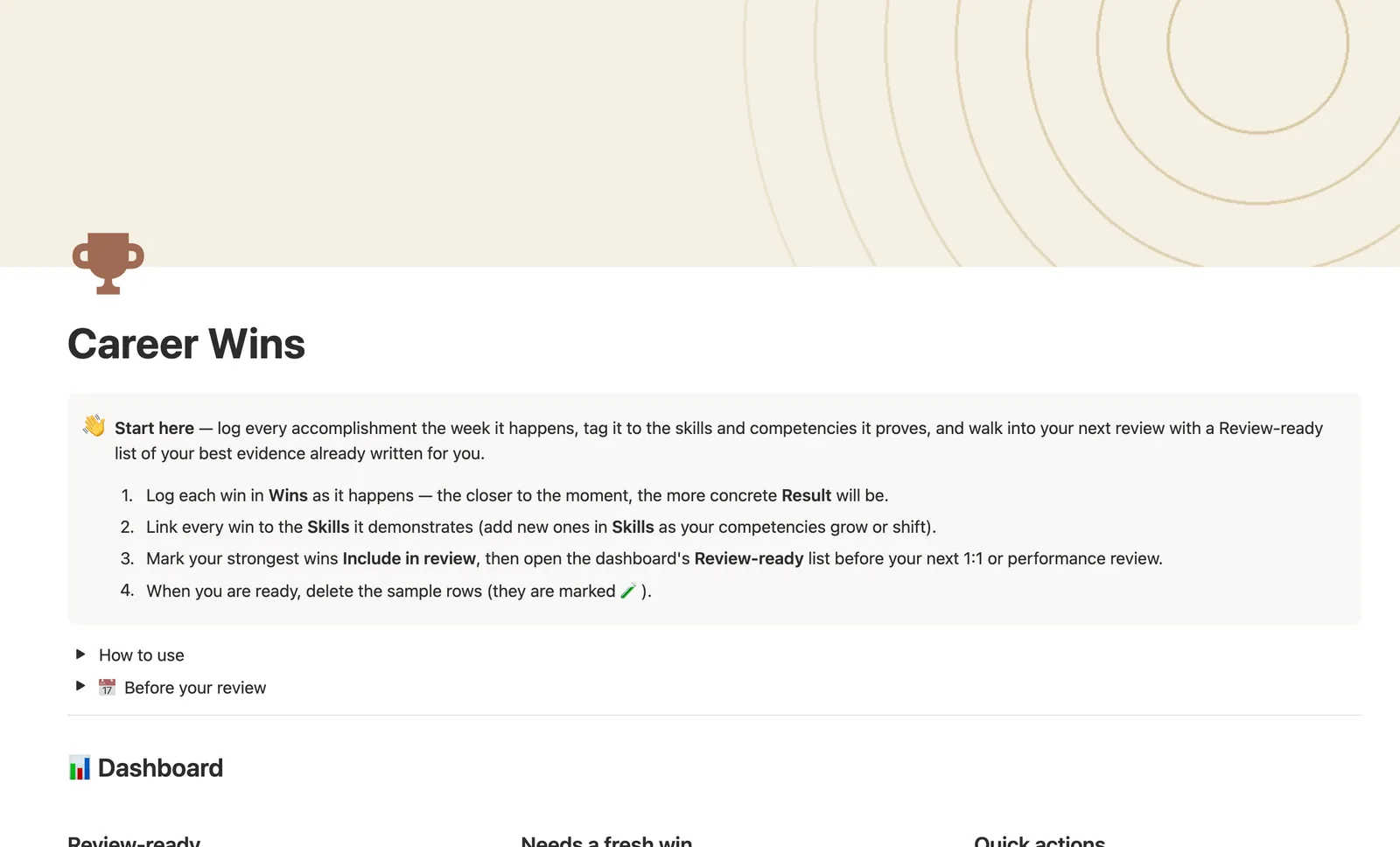
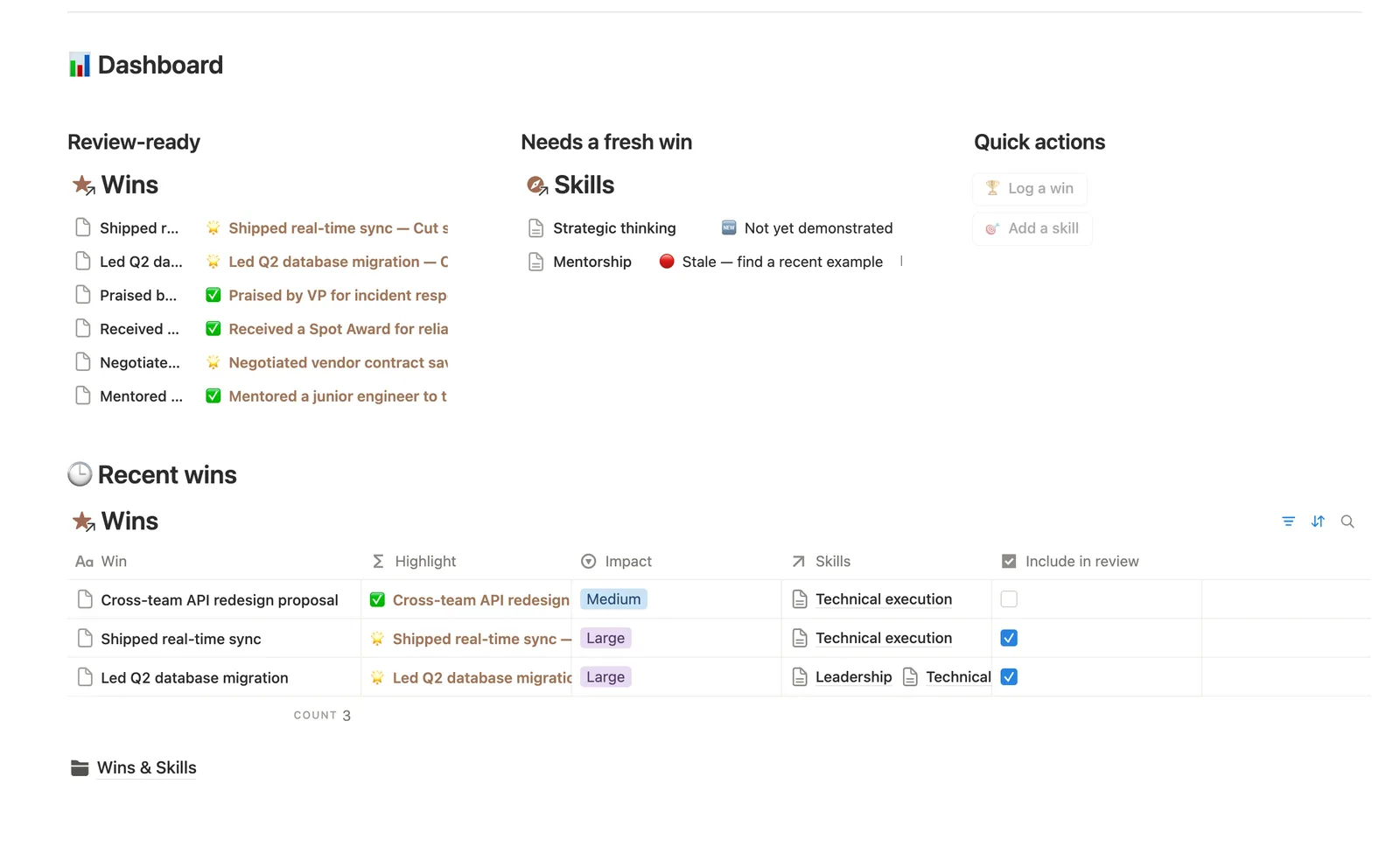
This Notion brag document logs every accomplishment as it happens and links it to the skills it proves. Highlight turns Impact and Result into one line you can paste into a self-review, and Skills flags any competency with no recent evidence, so you never walk into a review empty-handed.
One-time payment · Works on Notion Free · Instant Library access
Who it's for
Who it's for
- Anyone who forgets half their wins by the time review season arrives
- People building a case for promotion with concrete, dated evidence
- Managers who want direct reports keeping a running record between 1:1s
- Freelancers and job seekers who need resume bullets, not vague claims
What's inside
What's inside
One win, several skills at once
A single Win can link to more than one Skill. A shipped feature you led can count toward both Technical execution and Leadership without duplicating the row.
Highlight writes the bullet for you
Highlight folds Impact, the Win, and the Result into one styled line you can paste straight into a self-review or resume, no extra writing needed.
Freshness catches a competency going quiet
Freshness flags any Skill with no logged win in the last six months, or none at all yet, so a review never catches you scrambling for an example.
Progress against a target, or none at all
Set Target wins on any Skill you're tracking a quota for and Progress reads a real percentage. Leave it blank and it reads a dash, never a misleading 0%.
Review-ready, curated as you go
Mark your strongest wins Include in review, and the dashboard's Review-ready list is already written by the time a review comes around.
Total impact score, not just a count
Skills rank by the weighted Impact of their wins (Small, Medium, or Large), not just how many are logged, so one big win can outrank three small ones.
How it works
How it works
Wins and Skills share a many-to-many relation — one win regularly proves more than one competency. Impact score, a same-row number derived from the Impact select, rolls up to each Skill as Total impact score, and Date rolls up as Last used, feeding a Freshness formula that reads how long it's been since that skill last had evidence. Progress compares a Skill's linked Win count to its own Target wins, when you've set one.
Spec
- Databases
- 2
- Two-way relations
- 1
- Formulas
- 4
- Rollups
- 4
- Views
- 12
- One-click buttons
- 2
- Database templates
- 3
- Sample rows
- 15
- Databases Skills, Wins
- Entity pages Skills
- Buttons 🏆 Log a win, 🎯 Add a skill
How to use
- 01
Log a win the week it happens, not months later — Result should be a number or a named outcome ("cut load time 40%", "praised by the VP in the all-hands"), not just a task title.
- 02
Skills is how one win counts toward several competencies at once — link a shipped feature you led to both Technical execution and Leadership if it took both. The dashboard's Log a win button (and Wins' own New ▾ templates) can't pre-fill Skills — it's a relation — so check Wins → 🔗 Needs linking right after and link it by hand, or that win won't count toward any skill's Win count, Freshness or Total impact score.
- 03
Highlight turns Impact + Win + Result into one line you can paste straight into a self-review or resume bullet — no extra writing needed.
- 04
Check Skills → Needs a fresh win before a review catches you off guard: it flags any competency with no logged example in the last 6 months, or none at all yet.
- 05
Progress on each skill compares your linked wins there to a Target wins you set — leave Target wins blank for a skill you're not tracking a quota for; it shows —, not a misleading 0%.
- 06
Open a Skill's own page to see just the wins that prove it — a ready-made evidence list for that one competency.
Setup
Setup
- 01
Duplicate the Career Wins template into your workspace.
- 02
Log each win in Wins as it happens — the closer to the moment, the more concrete Result will be.
- 03
Link every win to the Skills it demonstrates, adding new ones as your competencies grow or shift.
- 04
Mark your strongest wins Include in review, then open the dashboard's Review-ready list before your next 1:1.
- 05
Delete the sample rows, marked 🧪, once you're set up.
Compared
| This template | Plain doc | |
|---|---|---|
| Skill evidence | Linked and rolled up per competency | Unstructured |
| Stale-skill detection | Freshness flag at 90/180 days | Not tracked |
| Review-ready list | Filtered automatically | Manually assembled |
| Resume-bullet drafting | Highlight formula writes it for you | You write it from scratch |
§ FAQ
FAQ
What is a brag document?
A running, dated log of your accomplishments, kept as they happen rather than reconstructed from memory at review time. This template is a structured version: every win links to the skills it proves, so it also shows what you're strong in, not just what you did.
Does Notion have a brag document template?
Yes — this one logs each win with a quantified Result, links it to the Skills it demonstrates, and turns your strongest entries into a ready-made Highlight line for a self-review or resume.
How do I track accomplishments for my performance review in Notion?
Log each one in Wins the week it happens, link it to the Skills it proves, and mark your best ones Include in review. The dashboard's Review-ready list collects exactly those, sorted by date.
Does this work on Notion's free plan?
Yes, including the Highlight formula and the two-tier Skills rollup. Nothing here needs a paid Notion plan.
Can one win count toward more than one skill?
Yes — Skills is a many-to-many relation, so a single win like leading a migration can link to both Technical execution and Leadership at once.
How is this different from Job Application Tracker?
They serve different moments. Job Application Tracker runs the job search itself. This template is for logging wins once you're employed, to build evidence for a performance review or a promotion case.
More from Career
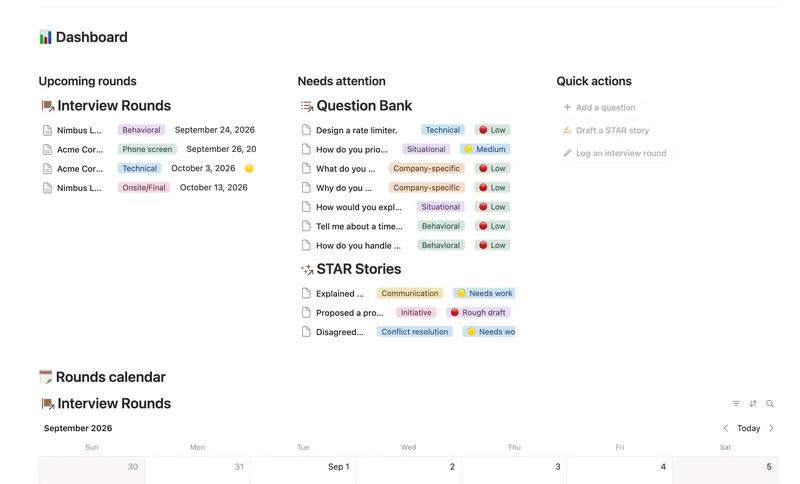
- 43 Interview Prep Build a reusable bank of interview questions tied to the STAR stories that answer them, then track exactly how ready you are for each upcoming round before you walk in. 3 db · 6 formulas · 3 buttons
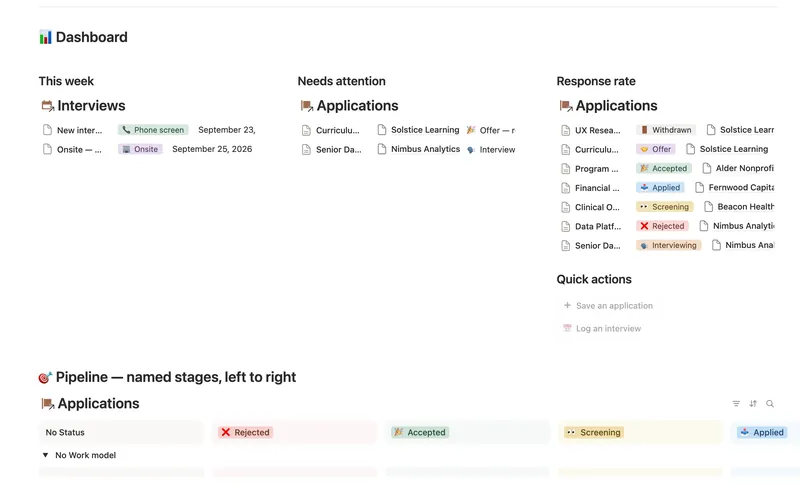
- 42 Job Application Tracker Run every application through a named pipeline linked to the right Company, Contact and Interviews — Days since applied, Next interview date, Rounds passed and your real Response rate are all computed straight from what you log, never re-typed. 4 db · 18 formulas · 2 buttons
§ The Bundle
Get the whole Bundle
Career Wins plus 49 more templates, one payment.
One-time payment · Works on Notion Free · Instant Library access