
Updated Sep 24, 2026
Interview Prep Notion Template
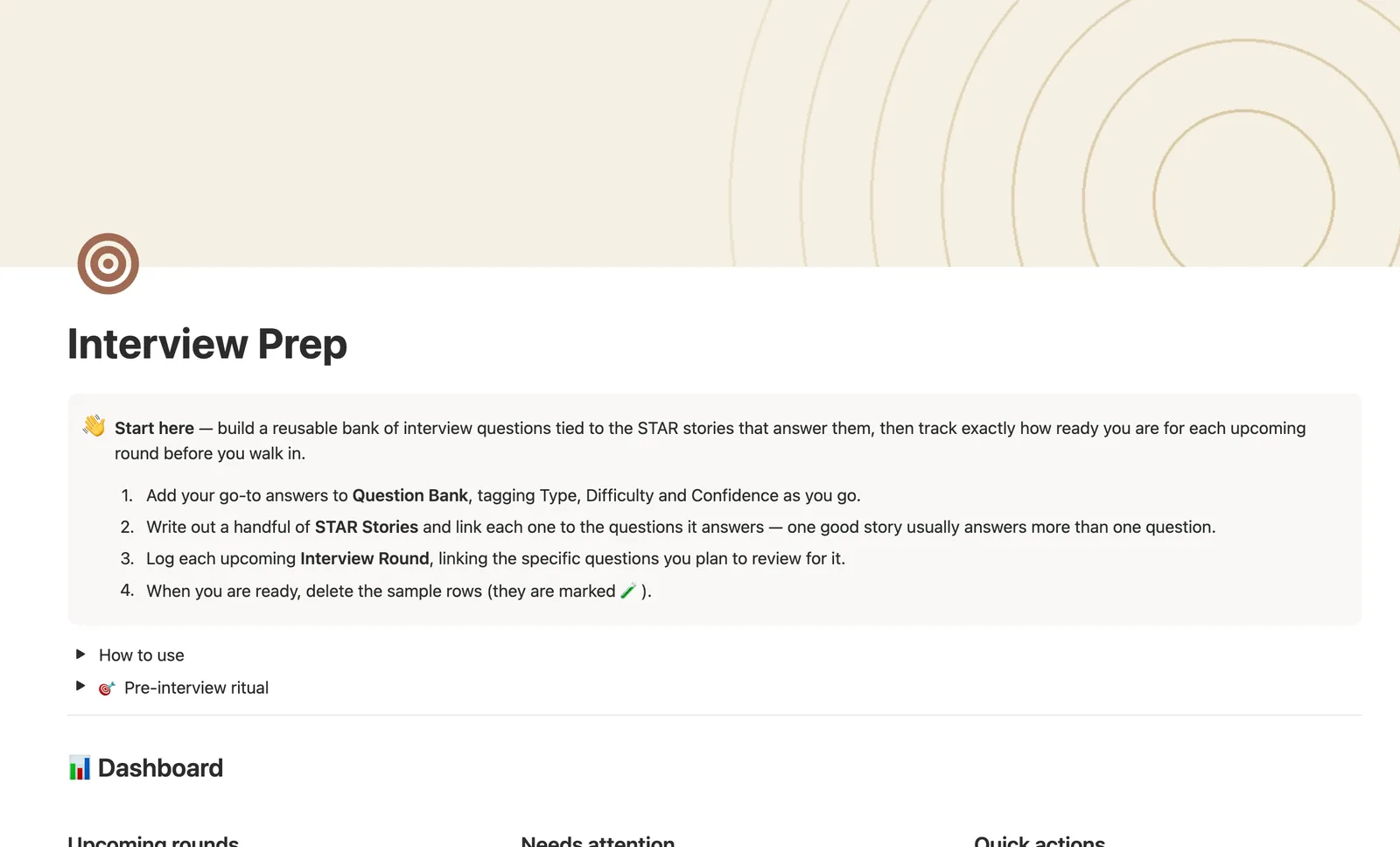
This Notion interview prep template ties a reusable bank of interview questions to the STAR stories that answer them, then tracks exactly how ready you are for each upcoming round. Readiness, Prep level, and Practiced percent all compute from your linked questions — never typed by hand.
One-time payment · Works on Notion Free · Instant Library access
Who it's for
Who it's for
- Job seekers interviewing at more than one company at once
- Anyone tired of rewriting the same story for three different questions
- People who want a clear read on readiness before a round, not a guess
- Career changers building a reusable answer bank from scratch
What's inside
What's inside
Write a story once, reuse it everywhere
Every Question can link to one STAR Story that answers it. Write the story once in STAR Stories, then reuse it across every question it fits.
Status computed from Practiced and Confidence
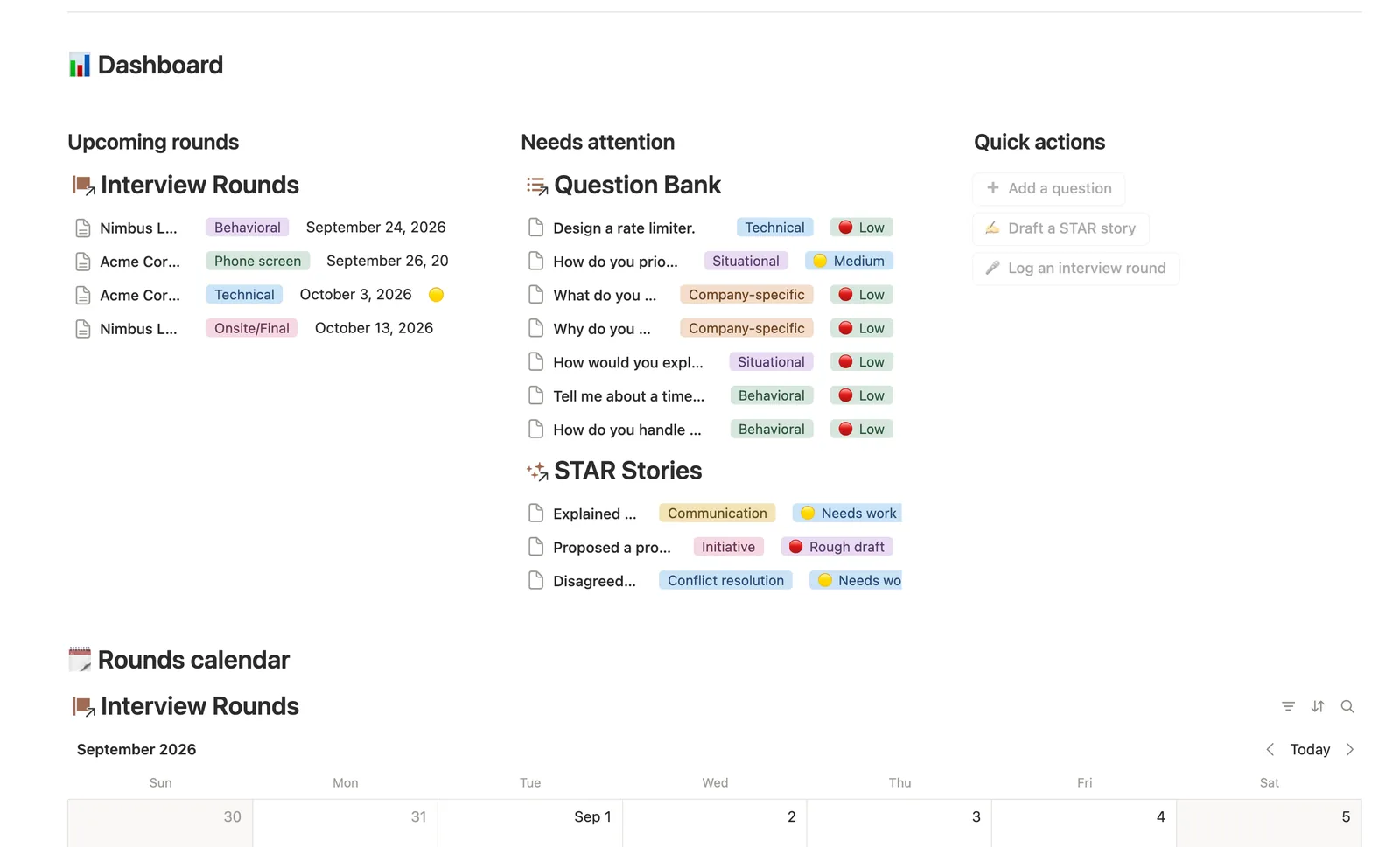
Question status is never typed. It's read from whether you've practiced it and how confident you feel, so Needs practice always shows exactly what's left.
Readiness that rolls up per round
Each Interview Round links the specific questions you plan to review for it. Practiced %, Prep level, and Readiness all roll up from how prepared you actually are on them.
STAR Stories flagged before they embarrass you
Needs polish flags anything still rough or needing work, so a shaky story doesn't show up as your answer three days before the interview.
A pre-interview ritual, built in
A Pre-interview ritual toggle walks you through the round's linked questions, flags anything unpracticed, and re-checks the stories behind them the night before, not the morning of.
A dashboard that separates upcoming from overdue
Upcoming rounds, questions needing practice, and stories needing polish sit in their own cards, so nothing gets missed between them.
How it works
How it works
Question Bank and STAR Stories share a many-to-one relation — several questions can point at one reusable story, which is the actual value here. Interview Rounds relates to Question Bank the other way, many-to-many: a round links every question you plan to review for it, and a rollup-to-formula chain reads Practiced % across those linked questions into a Prep level bar and a Readiness status, computed fresh every time you check a question off.
Spec
- Databases
- 3
- Two-way relations
- 2
- Formulas
- 6
- Rollups
- 3
- Views
- 17
- One-click buttons
- 3
- Database templates
- 3
- Sample rows
- 26
- Databases STAR Stories, Question Bank, Interview Rounds
- Entity pages Interview Rounds
- Buttons ➕ Add a question, ✍️ Draft a STAR story, 🎤 Log an interview round
How to use
- 01
Every Question can link to one STAR Story that answers it — write the story once in STAR Stories, then reuse it across every question it fits, instead of rewriting the same answer three different ways.
- 02
Status on each question is computed from Practiced and Confidence, never re-typed — so Question Bank → Needs practice always shows exactly what's left to run through.
- 03
Each Interview Round links the specific questions you plan to review for it. Open a round's own page to see just those questions — Practiced %, Prep level and Readiness all roll up from how prepared you actually are on them, not from a guess. Rounds you add — by the dashboard's 🎤 button or the New ▾ template — start with no questions linked (buttons and templates can't set relations), so open the round afterward and link the ones you plan to review yourself.
- 04
STAR Stories → Needs polish flags anything still 🟡/🔴 so a rough story doesn't show up as your answer three days before the interview.
- 05
Pair this with Job Application Tracker for the pipeline itself — this template stays focused on the answers and the prep, on purpose.
Setup
Setup
- 01
Duplicate the Interview Prep template into your workspace.
- 02
Add your go-to answers to Question Bank, tagging Type, Difficulty, and Confidence as you go.
- 03
Write out a handful of STAR Stories and link each one to the questions it answers.
- 04
Log each upcoming Interview Round, linking the specific questions you plan to review for it.
- 05
Delete the sample rows, marked 🧪, once you're set up.
Compared
| This template | Loose notes or docs | |
|---|---|---|
| Readiness per round | Computed from linked questions | Guesswork |
| Story reuse | One story, linked to many questions | Copy-pasted, drifts out of sync |
| Needs-practice list | Filtered automatically | Manual re-reading |
| Round-by-round prep tracking | Prep level bar per round | Not tracked |
§ FAQ
FAQ
Does Notion have an interview prep template?
Yes — this one ties a reusable Question Bank to the STAR Stories that answer each question, then computes a Readiness score per upcoming Interview Round from how much you've actually practiced.
What is the STAR method for interview answers?
STAR stands for Situation, Task, Action, Result — a structure for answering behavioral interview questions with a real example instead of a vague claim. This template gives each story its own row with all four parts, reusable across every question it answers.
How do I prepare for multiple interview rounds in Notion?
Log each round in Interview Rounds and link the specific questions you plan to review for it. Readiness and Prep level compute from how many of those linked questions you've actually practiced, so you can see which round needs more work.
Does this work on Notion's free plan?
Yes. Every database, relation, and formula here runs on Notion's Free plan.
Is this the same as Job Application Tracker?
No — pair them instead. Job Application Tracker runs the pipeline itself (companies, contacts, interviews, status). This template stays focused on the answers and the prep, on purpose.
Can one story answer more than one question?
Yes, and it's meant to. The sample data links one story to two different questions to show it. Write the story once in STAR Stories, then reuse it wherever it fits.
More from Career
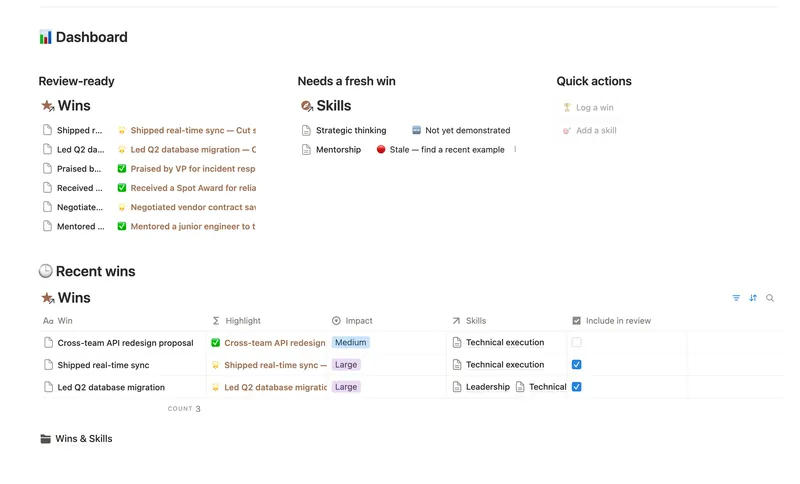
- 44 Career Wins Log every accomplishment the week it happens, tag it to the skills and competencies it proves, and walk into your next review with a Review-ready list of your best evidence already written for you. 2 db · 4 formulas · 2 buttons
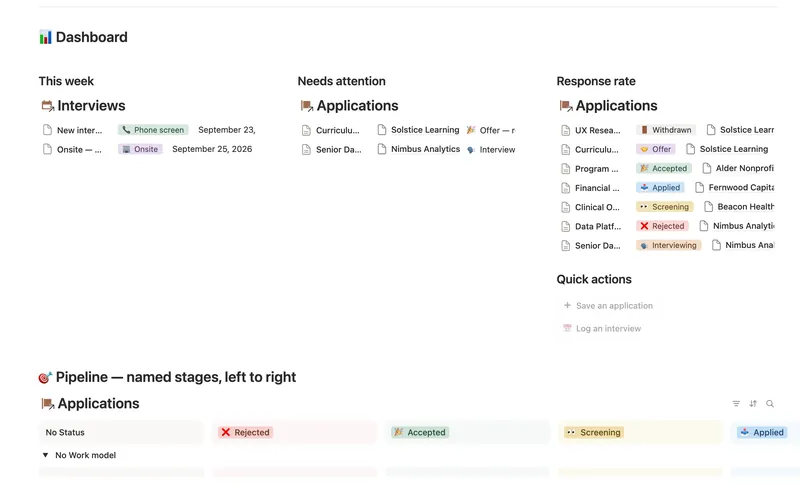
- 42 Job Application Tracker Run every application through a named pipeline linked to the right Company, Contact and Interviews — Days since applied, Next interview date, Rounds passed and your real Response rate are all computed straight from what you log, never re-typed. 4 db · 18 formulas · 2 buttons
§ The Bundle
Get the whole Bundle
Interview Prep plus 49 more templates, one payment.
One-time payment · Works on Notion Free · Instant Library access