
Updated Sep 24, 2026
Job Application Tracker Notion Template
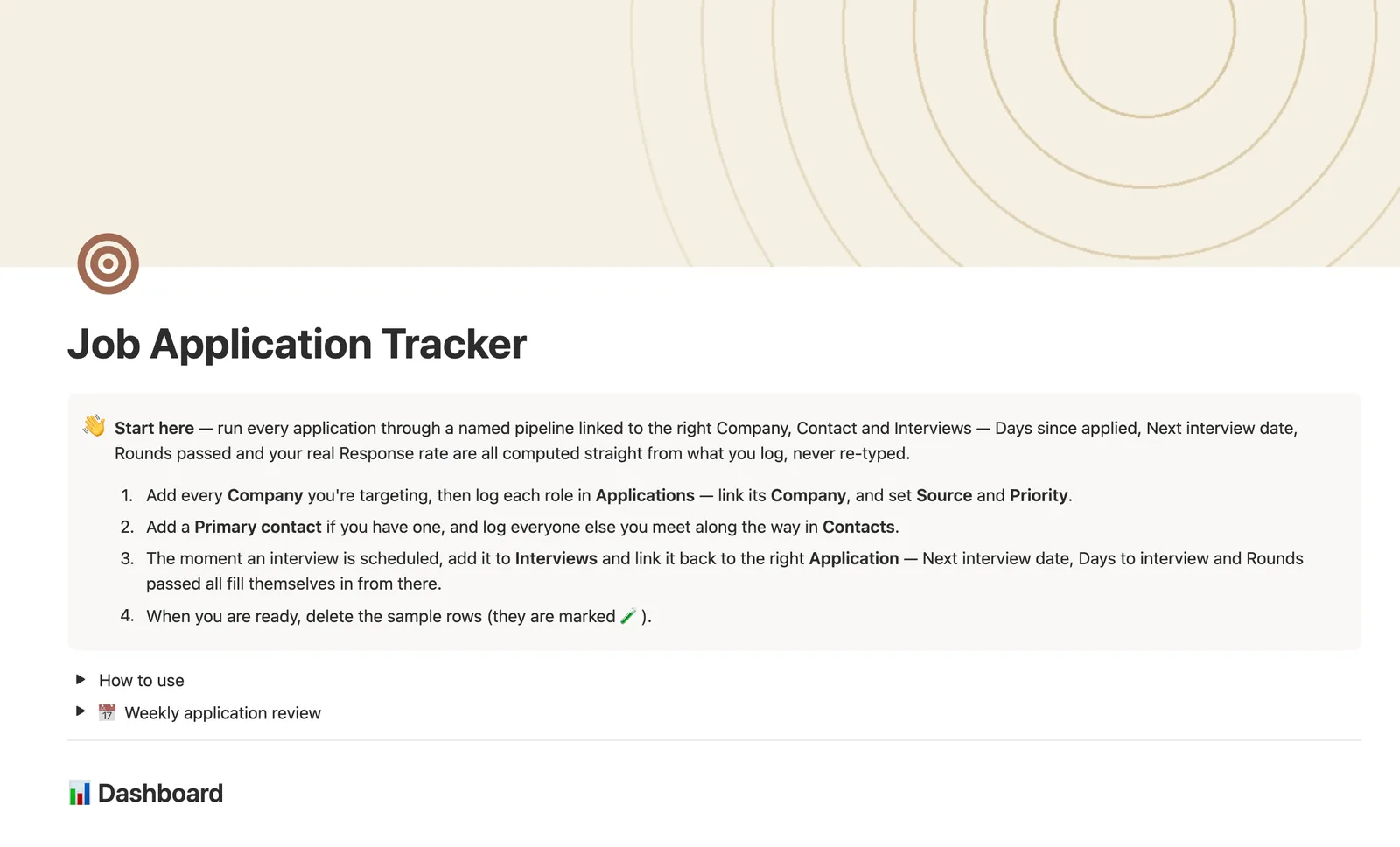
This Notion job application tracker runs every application through an 8-stage pipeline linked to its Company, Contact, and Interviews. Days since applied, Next interview date, Rounds passed, and your real Response rate are all computed from what you log — never re-typed, never guessed.
One-time payment · Works on Notion Free · Instant Library access
Who it's for
Who it's for
- Job seekers applying to more than a handful of roles at once
- Anyone who wants a nudge before an application quietly goes stale
- People tracking recruiters, referrals, and interviewers across companies
- Anyone who wants to know which application source actually gets replies
What's inside
What's inside
A real 8-stage pipeline
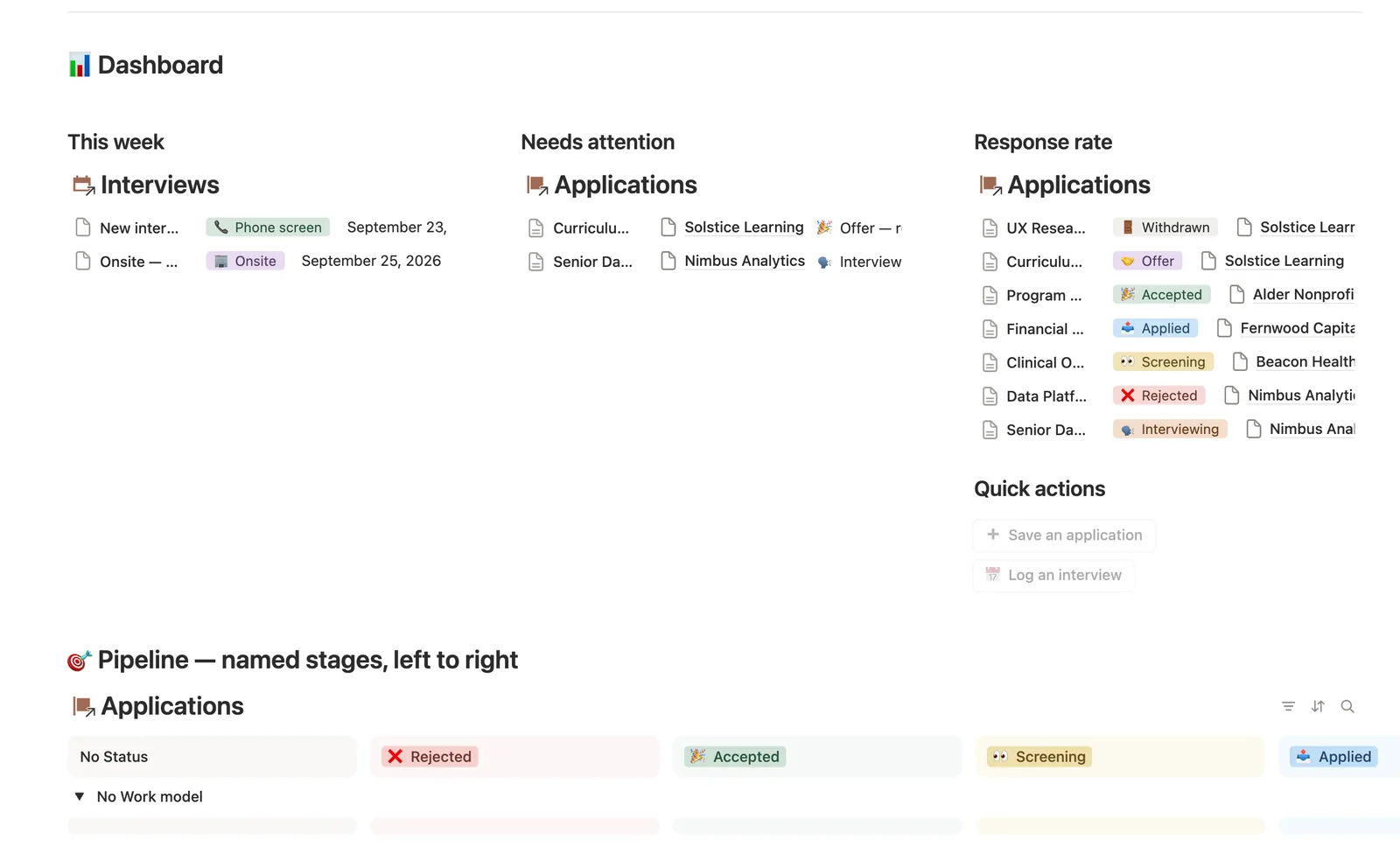
Status moves through Saved, Applied, Screening, Interviewing, Offer, and Accepted, Rejected, or Withdrawn — a real named pipeline, not a generic three-column board.
Interviews that compute the pipeline, not just log it
Next interview date and Days to interview are never typed — they're pulled from the soonest still-scheduled row in Interviews. Rounds passed and Interviews (#) roll up the same way.
Attention that only fires when it should
One formula flags an offer to respond to, an interview inside 5 days, or an application gone 3-plus weeks with no word, and stays quiet for anything already decided.
A real computed Response rate
On the dashboard and on every Company, Response rate divides replies (Screening or further) by applications actually submitted. A company with nothing submitted shows a dash, not a misleading 0%.
Every application's own hub page
Company, Primary contact, and every Interview link back to the Application, and its own page shows a live mini-dashboard of just that application's interviews and contact.
Needs linking, so nothing falls through
A quick-add Interview or Application lands unlinked, since a dashboard button can't know which application it belongs to — Needs linking views on both catch it until you connect it by hand.
How it works
How it works
Applications is the hub: Company, Primary contact, and every Interview all relate back to it. Interviews feeds two independent rollup chains — a same-row Passed flag rolls up into Rounds passed, and a formula reads the soonest still-scheduled interview into Next interview date. A second chain runs Company-wide: Interviews (#) rolls up through Applications into a Company's total interview load, while a Submitted and Responded flag pair rolls up into a real Response rate per company, guarded so an untouched company reads a dash instead of a false 0%.
Spec
- Databases
- 4
- Two-way relations
- 5
- Formulas
- 18
- Rollups
- 9
- Views
- 25
- One-click buttons
- 2
- Database templates
- 6
- Sample rows
- 32
- Databases Companies, Contacts, Applications, Interviews
- Entity pages Applications
- Buttons ➕ Save an application, 📅 Log an interview
How to use
- 01
Every Application is the hub — Company, Primary contact and every Interview all link back to it, and opening any Application's own page shows a live mini-dashboard of just that application's Interviews and Contact.
- 02
Status is a real 8-stage pipeline — 📥 Saved → 📤 Applied → 👀 Screening → 🗣️ Interviewing → 🤝 Offer → 🎉 Accepted / ❌ Rejected / 🚪 Withdrawn. Move it by hand as things change; the dashboard's Pipeline board groups every application by stage, sub-grouped by Work model.
- 03
Next interview date and Days to interview are never typed — they're the soonest still-⏳-Scheduled row in Interviews for that application. Interviews (#) and Rounds passed (#) roll up the same way, never re-typed.
- 04
Attention flags exactly what needs you and nothing else: 🎉 an offer to respond to, 🗣️ an interview inside 5 days, or 📌 an application that's gone 3+ weeks with no word and nothing scheduled — Needs attention on the dashboard catches all three, and stays quiet for anything already decided.
- 05
Response rate — on the dashboard and on every Company — is a real computed percentage: applications that got any reply (Screening or further) ÷ applications you actually submitted (a 📥 Saved bookmark doesn't count yet). A company with nothing submitted shows "—", not a misleading 0%.
- 06
Buttons can't set relations, so an interview added from 📅 Log an interview on the dashboard lands unlinked — check Interviews → 🔗 Needs linking and connect its Application.
- 07
Likewise, an application saved from the dashboard's ➕ Save an application button lands with no Company — check Applications → 🔗 Needs linking and connect it.
- 08
Pair this with Interview Prep for question banks and STAR stories once a round is on the calendar, and Career Wins to log the story once you land it.
Setup
Setup
- 01
Duplicate the Job Application Tracker template into your workspace.
- 02
Add every Company you're targeting, then log each role in Applications — link its Company, and set Source and Priority.
- 03
Add a Primary contact if you have one, and log everyone else you meet along the way in Contacts.
- 04
The moment an interview is scheduled, add it to Interviews and link it back to the right Application.
- 05
Delete the sample rows, marked 🧪, once you're set up.
Compared
| This template | Spreadsheet | |
|---|---|---|
| Stale-application detection | Automatic flag at 3 weeks | You have to remember |
| Next interview date | Pulled from linked Interviews | Re-typed by hand |
| Response rate per company | Computed, guarded against false 0% | Manual formula |
| Interview rounds | Separate linked rows per round | One cell per application |
§ FAQ
FAQ
Does Notion have a job application tracker?
Yes — this one runs every application through a real 8-stage pipeline linked to its Company, Contact, and Interviews, with Days since applied, Next interview date, and a real Response rate all computed from what you log.
Is there a free Notion job application tracker?
There's no separate free download of this exact template. It's one of 50 in the $47 Templitize Bundle, bought once. The template itself runs on Notion's Free plan, so no paid Notion account is required to use it.
Can Notion tell me when I haven't heard back from a job?
Yes. Attention flags Follow up on any application that's gone 3-plus weeks with no reply and nothing scheduled. It stays quiet for anything already decided, so the flag only means something.
Does this work on Notion's free plan?
Yes, including the full rollup chain and the Response rate formula. Nothing here needs a paid Notion plan.
Can it track multiple interview rounds per application?
Yes. Interviews is its own database linked to Applications, so a single role can have a phone screen, a technical round, and an onsite each logged as its own row with its own outcome.
How is this different from Interview Prep?
This template runs the pipeline itself: companies, contacts, interviews, status. Interview Prep is the question bank and STAR stories you pull from once a round is on the calendar. They're built to pair together.
More from Career
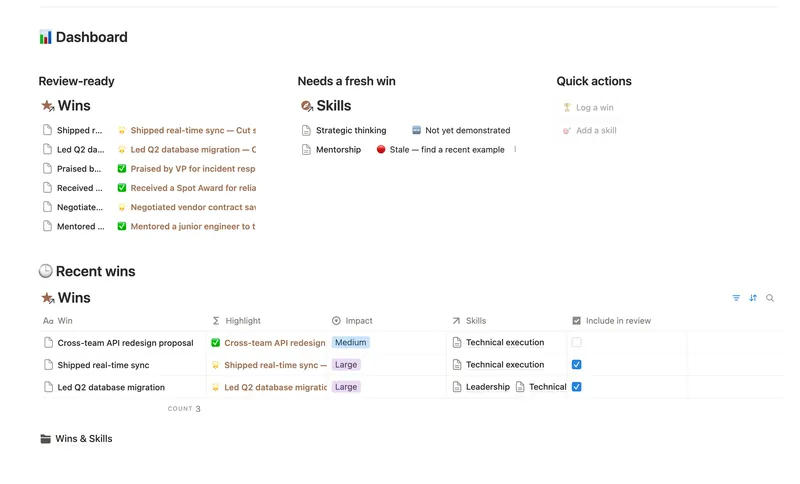
- 44 Career Wins Log every accomplishment the week it happens, tag it to the skills and competencies it proves, and walk into your next review with a Review-ready list of your best evidence already written for you. 2 db · 4 formulas · 2 buttons
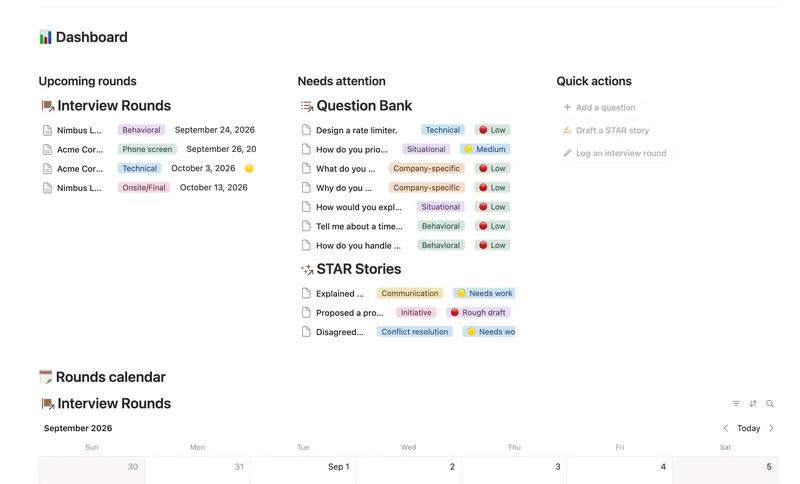
- 43 Interview Prep Build a reusable bank of interview questions tied to the STAR stories that answer them, then track exactly how ready you are for each upcoming round before you walk in. 3 db · 6 formulas · 3 buttons
§ The Bundle
Get the whole Bundle
Job Application Tracker plus 49 more templates, one payment.
One-time payment · Works on Notion Free · Instant Library access