
Updated Sep 24, 2026
Notion CRM for Freelancers: What It Can (and Can't) Replace
Notion can be a real CRM for a freelancer or small studio: a named pipeline, linked contacts, logged calls and emails, and follow-up dates that update themselves. What it can't do is sync your inbox, dial a phone, or run marketing automation sequences. For that, you're pairing it with, or eventually replacing it with, dedicated CRM software.
Is Notion good enough to use as a CRM?
For a solo freelancer or a two-to-five-person studio, yes. A CRM's real job is keeping every client, every conversation, and every open deal in one place you'll actually open. A Notion database does that natively: relations connect Clients to Contacts, Interactions, and Deals, and a status field turns "where's this lead at" into a single glance instead of a memory test.
What makes it a CRM and not just a client list is the computed layer sitting on top of those relations. A well-built Notion CRM template doesn't ask you to remember who you're supposed to follow up with next. It computes that from what you've already logged, so nothing depends on you checking a spreadsheet before it goes stale.
Can Notion replace a dedicated CRM like HubSpot?
Not fully, and the honest answer matters more than a sales pitch. Notion has no native email sync, so nothing shows up in a client's record until you paste it in yourself. It has no built-in dialer or call logging, no drip-sequence automation, and its Free plan caps a workspace at one chart block as of September 2026, so any pipeline "chart" has to be a formula rendered as a progress bar instead of a native chart.
What Notion does well instead is structure and computation. A client's page can show their contacts, every interaction, and every deal in one live view, with pipeline value and won value totaled from the deals themselves rather than typed in by hand. For a freelancer whose "sales team" is one person and whose active relationships number in the dozens, that trade usually holds up. For a team running hundreds of outbound emails a week, it doesn't; that volume needs the automation a dedicated CRM is built around.
How do freelancers track clients in Notion?
- Build a Clients database as the hub. Every other database, Contacts, Interactions, Deals, relates back to Clients, so opening one client's page shows everything about them instead of three separate searches.
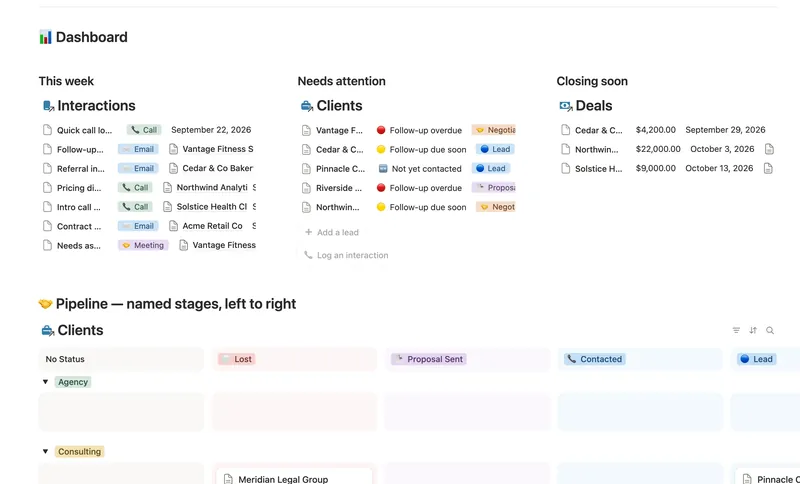
- Give the pipeline named stages, not a to-do list. Lead → Contacted → Proposal Sent → Negotiating → Won/Lost reads at a glance. "In progress" doesn't.
- Log every call and email as its own row in Interactions, linked to the right Client and Contact, with a Follow-up date whenever one's actually needed.
- Let the next action compute itself. Instead of a hand-maintained "who do I need to call" list, a formula can read the Follow-up date off your most recent still-open Interaction:
if(empty(prop("Next follow-up")), "⚪ None set",
if(dateBetween(prop("Next follow-up"), today(), "days") < 0, "🔴 Overdue",
if(dateBetween(prop("Next follow-up"), today(), "days") <= 3, "🟡 Due soon", "🟢 On track")))- Roll deal value up to the client, not the other way around. A Deal's own Value stays where it's entered; Pipeline value and Won value on the Client are rollups that total it the moment a deal changes stage.
- Track referrals as a real link, not a note. A self-relation, "Referred by" pointing at another row in the same Clients database, lets a Referrals count roll up to whoever's actually sending you business, instead of sitting in a text field nobody re-reads.
Does Notion have a sales pipeline template?
Notion itself ships general databases and board views, not a pre-built sales pipeline. You either build the Clients/Contacts/Interactions/Deals structure above yourself, or start from a template that already has it wired up. Client CRM is that structure prebuilt: a hub-and-spoke database with a six-stage pipeline, a follow-up date computed from your logged calls and emails, and pipeline and won value rolled up from Deals rather than typed in.
Notion CRM vs. a spreadsheet vs. dedicated CRM software
| Spreadsheet | Notion CRM template | Dedicated CRM (HubSpot, Pipedrive) | |
|---|---|---|---|
| Named pipeline stages | Manual column, drifts over time | Built-in select field | Built-in |
| Follow-up reminders | None, unless you build one | Computed from logged interactions | Built-in, often automated |
| Deal value totals | Manual formula, breaks on edits | Rollup, recalculates itself | Built-in |
| Email sync | No | No | Yes |
| Phone dialer | No | No | Often, as an add-on |
| Cost | Free | One-time | Recurring, per seat |
The rest of the client-ops stack
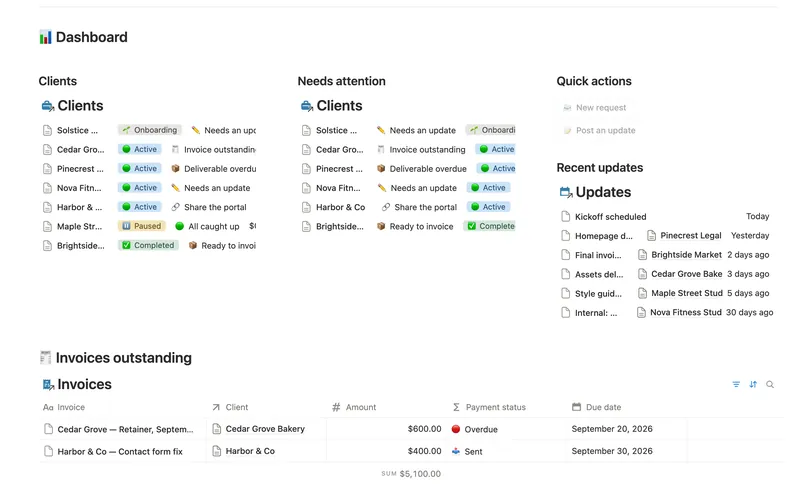
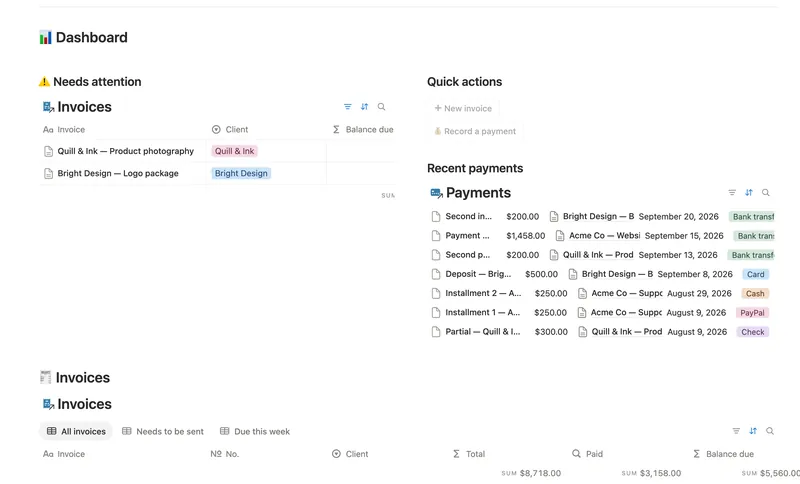
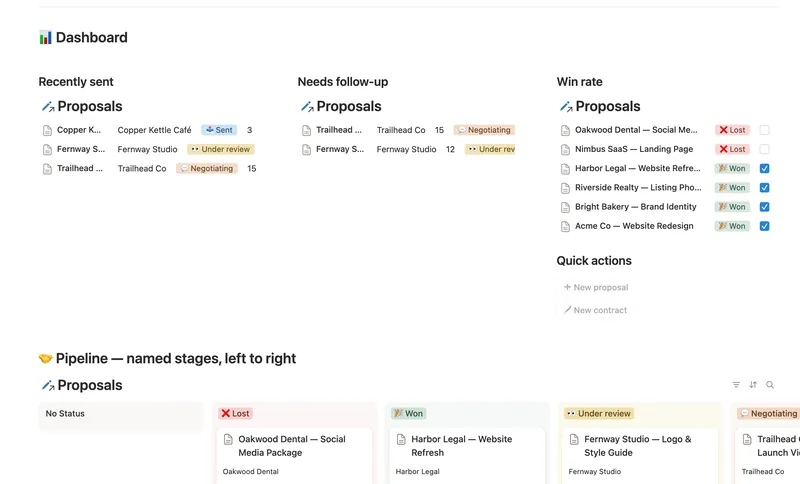
A CRM tracks the relationship before a deal closes. Once someone's an actual client, three more jobs show up: giving them a place to see their own work, invoicing them, and sending a proposal with a real contract behind it. Client Portal gives each client their own filtered view of requests, deliverables, and invoices, shared view-only, with nothing to configure per client. Invoices & Payments tracks partial payments against the balance still owed instead of a single paid/unpaid checkbox. Proposals & Contracts turns a sent proposal into a real win-rate percentage and flags a renewal before it's overdue.
All three pair naturally with Client CRM, and all four are part of the full 50-template bundle: $47 once for the whole set, not a subscription.
FAQ
Is Notion good enough to use as a CRM? For a freelancer or small studio tracking a few dozen active relationships, yes. Relations, a named pipeline, and a computed follow-up date cover what most solo CRM use actually needs.
Can Notion replace a dedicated CRM like HubSpot? Not for email sync, automated sequences, or a built-in dialer; Notion has none of those. For structuring contacts, deals, and follow-ups by hand, it holds up well at freelancer scale.
How do freelancers track clients in Notion? A Clients database as the hub, with Contacts, Interactions, and Deals all relating back to it, a named pipeline status, and a follow-up date computed from the most recent open interaction rather than typed in by hand.
Does Notion have a sales pipeline template? Not a built-in one from Notion itself. You build the database structure yourself, or start from a purpose-built template like Client CRM, which ships with the pipeline, follow-up logic, and rollups already wired up.
Related templates
- 31 Client CRM Run every Lead and Client through a named pipeline, log every call and email against the right Contact, and never miss a follow-up — Pipeline value, Won value and Next follow-up are computed straight from your Deals and Interactions, never re-typed, with a live hub page the moment you add someone. 4 db · 10 formulas · 2 buttons
- 36 Client Portal Give every client their own living portal page — Requests, Deliverables and Invoices already filtered to just them, shared view-only, with nothing to configure by hand. 5 db · 15 formulas · 2 buttons
- 33 Invoices & Payments Invoice clients, track every partial payment against the balance still owed, and catch what's overdue — and by how long — before a client has to ask. 3 db · 10 formulas · 2 buttons
- 34 Proposals & Contracts Track every proposal from draft to signed, see your real win rate, and never miss a contract renewal. 2 db · 7 formulas · 2 buttons
§ The Bundle
Build it once, or start from a template
50 Notion templates, $197 value, $47 once.
One-time payment · Works on Notion Free · Instant Library access