
Updated Sep 24, 2026
Client CRM Notion Template
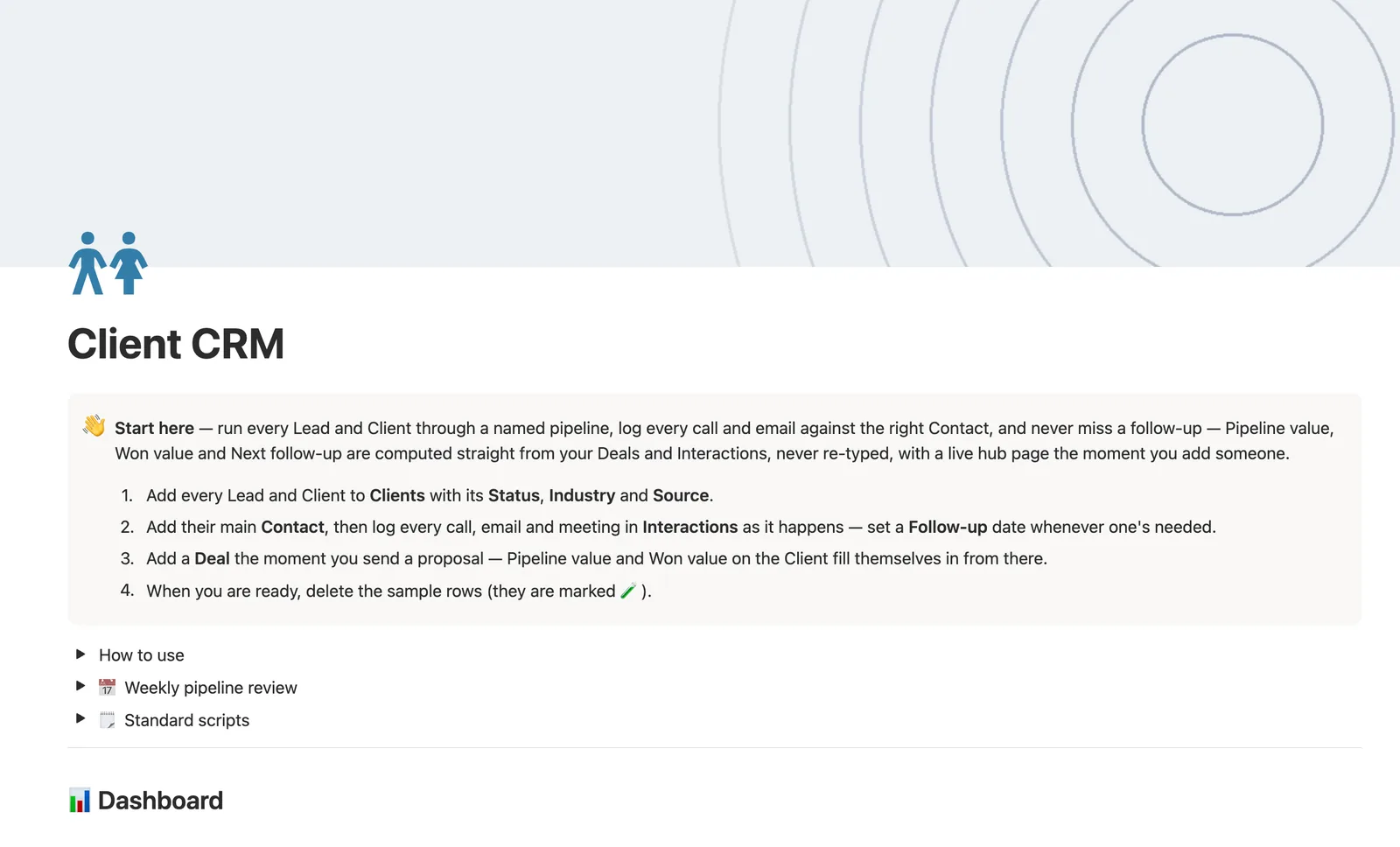
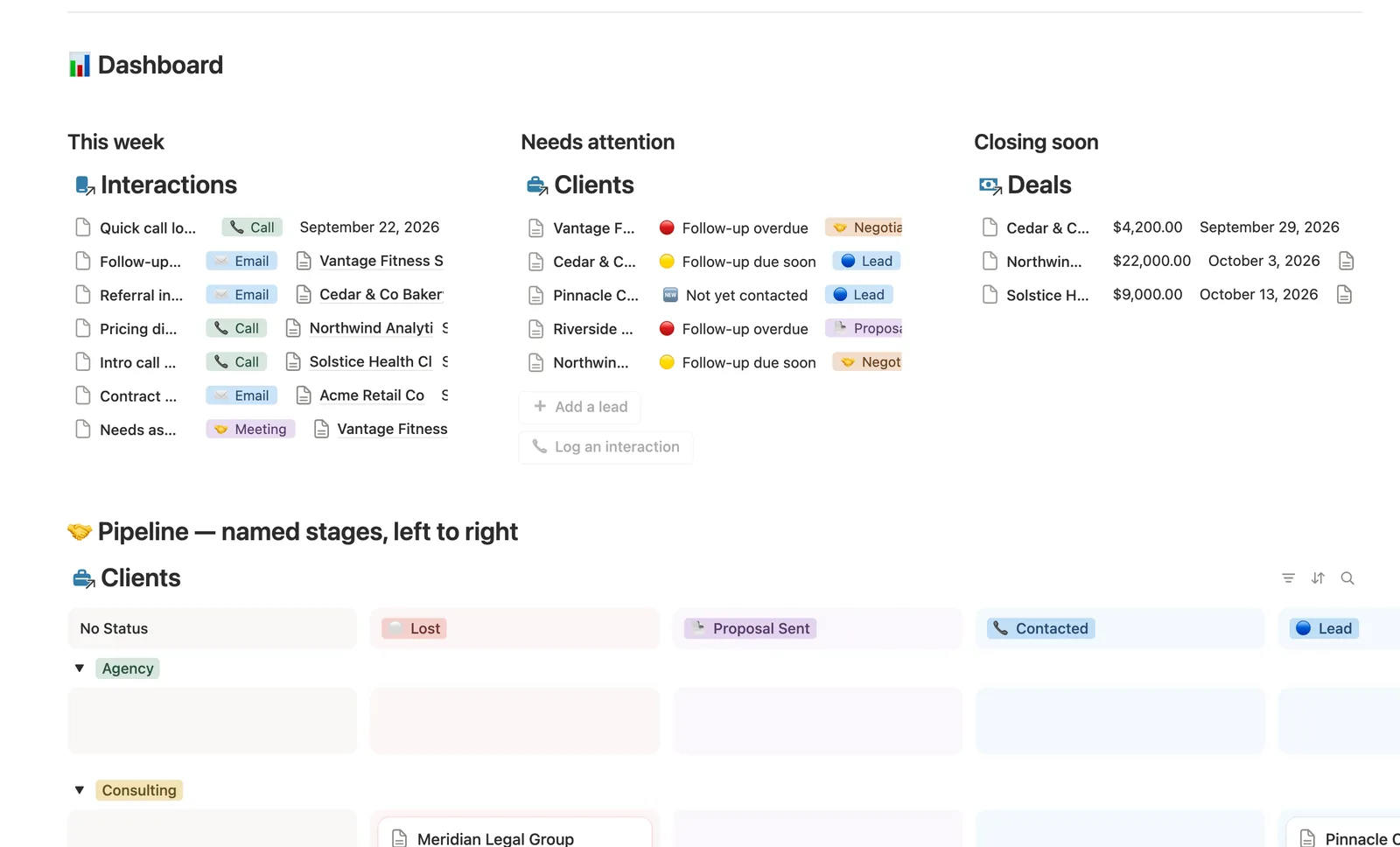
This Notion template runs every Lead and Client through a named pipeline: Lead, Contacted, Proposal Sent, Negotiating, Won, or Lost. Every Client gets its own page showing its Contacts, Interactions, and Deals, with Next follow-up and Pipeline value computed from what you actually log, never typed by hand.
One-time payment · Works on Notion Free · Instant Library access
Who it's for
Who it's for
- Freelancers and small agencies who want a real sales pipeline inside Notion
- Anyone tired of forgetting to follow up on a lead
- People who want pipeline value and won revenue totaled automatically, not tallied by hand
- Businesses that get referrals and want to see who's actually sending business their way
What's inside
What's inside
A named, six-stage pipeline
Status moves Lead → Contacted → Proposal Sent → Negotiating → Won / Lost, and the dashboard's Pipeline board groups every client by stage automatically.
Next follow-up, never typed
It's the Follow-up date on a Client's most recent open Interaction, so it moves forward the instant you log a new call or email; Follow-up status flags it 🔴 Overdue, 🟡 Due soon, or 🟢 On track.
Pipeline value and Won value, rolled up
Both total straight from a Client's linked Deals and update the moment a deal turns 🟢 Won, no manual math.
A live hub page per client
Every Client's own page shows its Contacts, Interactions, and Deals filtered to just that client, automatically, from the moment you add them.
Referral tracking
Link Referred by when a lead comes from an existing client and Referrals (#) rolls back up, so you can see who's actually sending you business.
A public lead intake form
Clients → New lead intake is a shareable form view; every submission lands as a new row to triage, with the pipeline Status and client list hidden from anonymous submitters.
How it works
How it works
Contacts, Interactions, and Deals all link back to one Client, and Clients self-link to track referrals. Next follow-up reads the Follow-up date off a Client's own latest still-open Interaction, and Pipeline value and Won value roll straight up from that Client's Deals, so moving a deal to Won or logging a new call updates the client's numbers without you touching them.
Spec
- Databases
- 4
- Two-way relations
- 5
- Formulas
- 10
- Rollups
- 5
- Views
- 24
- One-click buttons
- 2
- Database templates
- 7
- Sample rows
- 38
- Databases Clients, Contacts, Interactions, Deals
- Entity pages Clients
- Buttons ➕ Add a lead, 📞 Log an interaction
How to use
- 01
Every Client is the hub — Contacts, Interactions and Deals all link back to it, and opening any Client's own page shows a live mini-dashboard of just that client's three (the same page a brand-new Client gets automatically).
- 02
Status is your named pipeline — 🔵 Lead → 📞 Contacted → 📄 Proposal Sent → 🤝 Negotiating → 🟢 Won / ⚪ Lost. Move it by hand as things progress; the dashboard's Pipeline board groups every client by stage automatically.
- 03
Next follow-up is never typed — it's the Follow-up date on that Client's most recent Interaction, so it moves forward the instant you log a new one. Follow-up status turns that into 🔴 Overdue / 🟡 Due soon / 🟢 On track / ⚪ None set.
- 04
Pipeline value and Won value on each Client roll up straight from their Deals — never re-typed, and they total automatically the moment a deal turns 🟢 Won.
- 05
Link Referred by when a new lead comes from an existing client — Referrals (#) rolls back up so you can see who's actually sending you business — both show in All clients.
- 06
Clients → New lead intake is a public form view — share its link anywhere and every submission lands as a new row here to triage, no manual typing. New submissions arrive with no Status set (the form hides it on purpose, along with Referred by, so a stranger can't set their own pipeline stage or browse your client list) — set Status to 🔵 Lead by hand.
- 07
The dashboard's 📞 Log an interaction button (and this db's own New ▾ templates) can't pre-fill which Client or Contact a row belongs to — check Interactions → 🔗 Needs linking and tag both by hand right after logging, or it won't count toward that client's Next follow-up or show on that client's own hub page.
Setup
Setup
- 01
Duplicate the Client CRM template into your workspace.
- 02
Add every Lead and Client to Clients with its Status, Industry, and Source.
- 03
Add their main Contact, then log calls and emails in Interactions as they happen, setting a Follow-up date whenever one's needed.
- 04
Add a Deal the moment you send a proposal, then delete the 🧪 sample rows.
Compared
| This template | Spreadsheet pipeline | |
|---|---|---|
| Next follow-up | Computed from your latest interaction | Tracked in a separate column by hand |
| Pipeline value | Rolled up from linked deals automatically | Manually summed |
| Lead intake | Public form feeds straight into your pipeline | Copy-pasted from email or another tool |
§ FAQ
FAQ
Does Notion have a CRM template?
Not built in, but this template adds one. Clients run through a named pipeline, and Contacts, Interactions, and Deals all link back to each client with Pipeline value, Won value, and Next follow-up computed automatically.
Is Notion good enough to use as a real CRM?
For a freelancer or small team tracking a handful of clients and a straightforward pipeline, yes; this template covers the pipeline stages, contact history, interaction log, and deal values that matter most. If you need email sync, call logging, or marketing automation, a dedicated CRM tool still does more.
Is there a free Notion CRM template?
Yes. Client CRM ships as a free Lite version — Clients and Interactions, with the same named pipeline and a computed Next follow-up. The full version adds Contacts, Deals with Pipeline and Won value, referral tracking, per-client hub pages, and a public intake form, and is part of the $47 bundle of all 50 templates.
Can Notion track my sales pipeline?
Yes, in this template. Clients' Status moves through six named stages, and the dashboard's Pipeline board groups every client by stage so you can see the whole funnel at a glance.
Does this CRM template work on Notion's Free plan?
Yes, every database, formula, relation, and the public intake form all run on Notion's Free plan.
More from Freelance & Clients
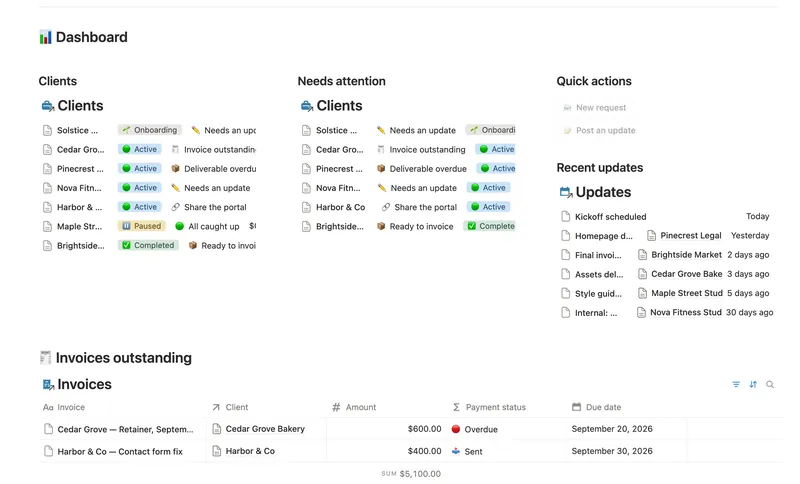
- 36 Client Portal Give every client their own living portal page — Requests, Deliverables and Invoices already filtered to just them, shared view-only, with nothing to configure by hand. 5 db · 15 formulas · 2 buttons
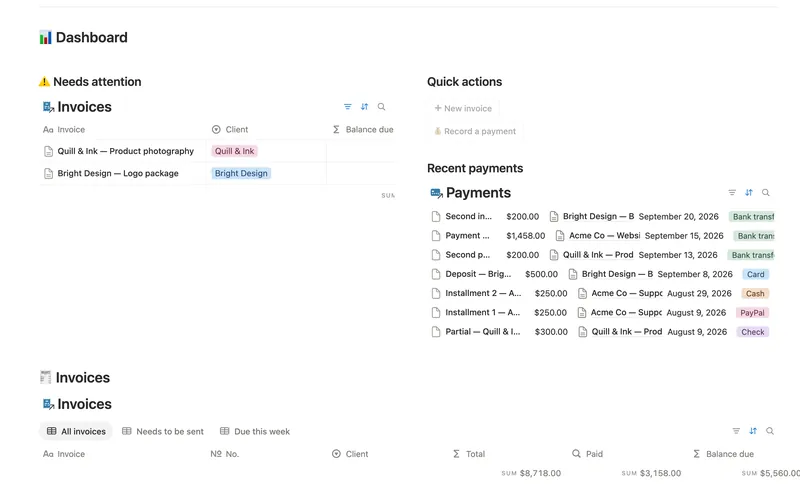
- 33 Invoices & Payments Invoice clients, track every partial payment against the balance still owed, and catch what's overdue — and by how long — before a client has to ask. 3 db · 10 formulas · 2 buttons
- 32 Projects & Deliverables See every Client's Projects and every Project's Deliverables in one connected system — with Progress, Health and a live Timeline computed automatically, never re-typed. 3 db · 7 formulas · 2 buttons
§ The Bundle
Get the whole Bundle
Client CRM plus 49 more templates, one payment.
One-time payment · Works on Notion Free · Instant Library access