
Updated Sep 24, 2026
SOPs & Team Wiki Notion Template
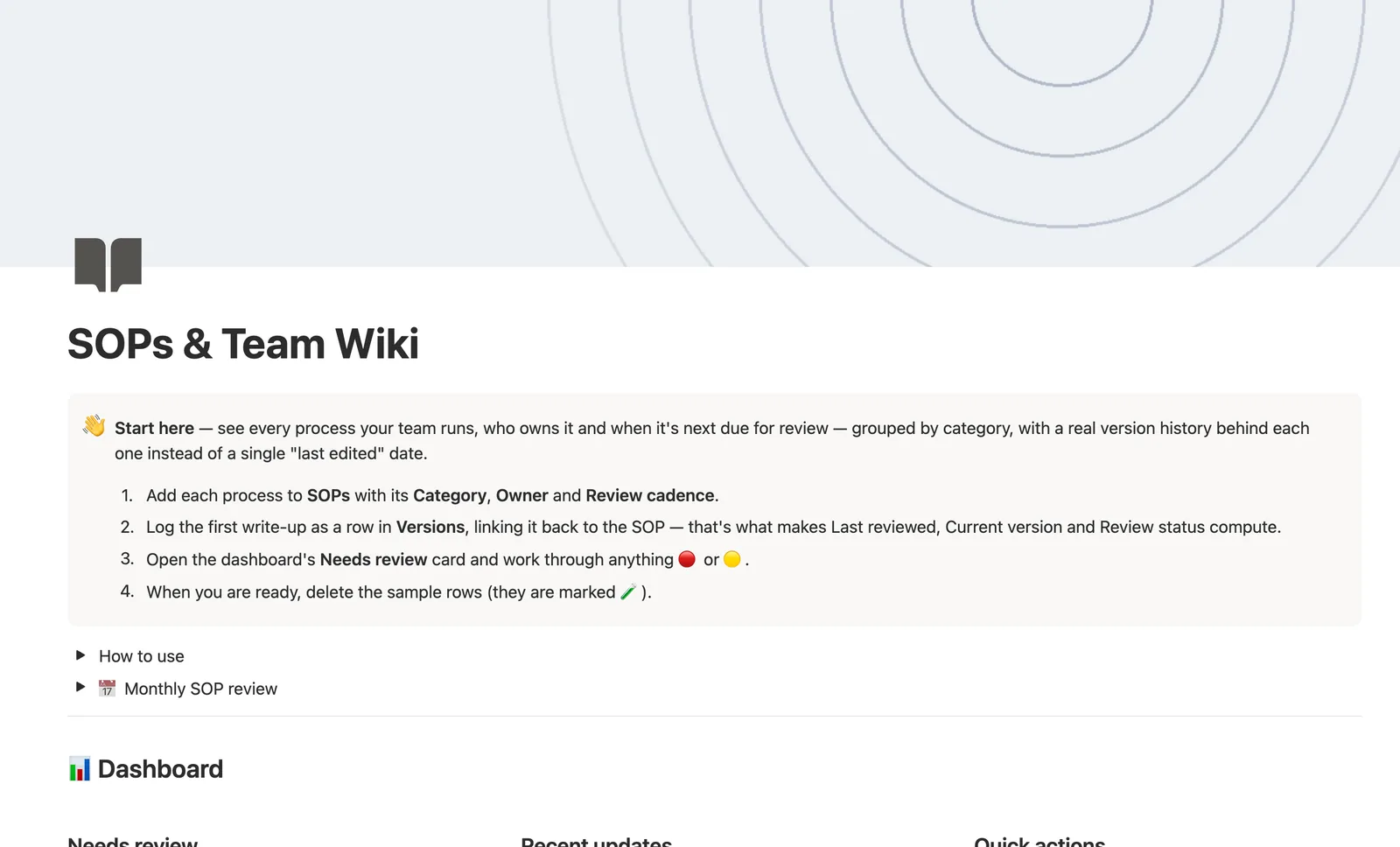
This Notion SOP template tracks every process your team runs, who owns it, and when it's due for review. Versions is a real dated log of write-ups behind each SOP, not a single last-edited date, and Review status computes itself from Review cadence and the latest version you've logged.
One-time payment · Works on Notion Free · Instant Library access
Who it's for
Who it's for
- Small teams documenting how things actually get done, not just intentions
- Anyone who needs to know which process is overdue for a review
- Teams tracking who owns which SOP, by department and by person
- Founders formalizing processes that used to live in one person's head
What's inside
What's inside
Version history, not a last-edited date
Log every real change as its own row in Versions, bumping Version number and describing the change. That's your audit trail, and it's what Current version and Latest change notes read from.
Review status, computed from cadence and history
Set a Review cadence (Monthly, Quarterly, Biannual, or Annual). Review status turns Overdue or Due soon automatically once Last reviewed, pulled from Versions, plus that cadence says it's time.
A brand-new SOP never lies about being reviewed
A SOP with zero Versions rows stays Draft, log first version, no matter what its Review cadence says, so nothing looks reviewed before it actually is.
Owners and Categories both roll up who's falling behind
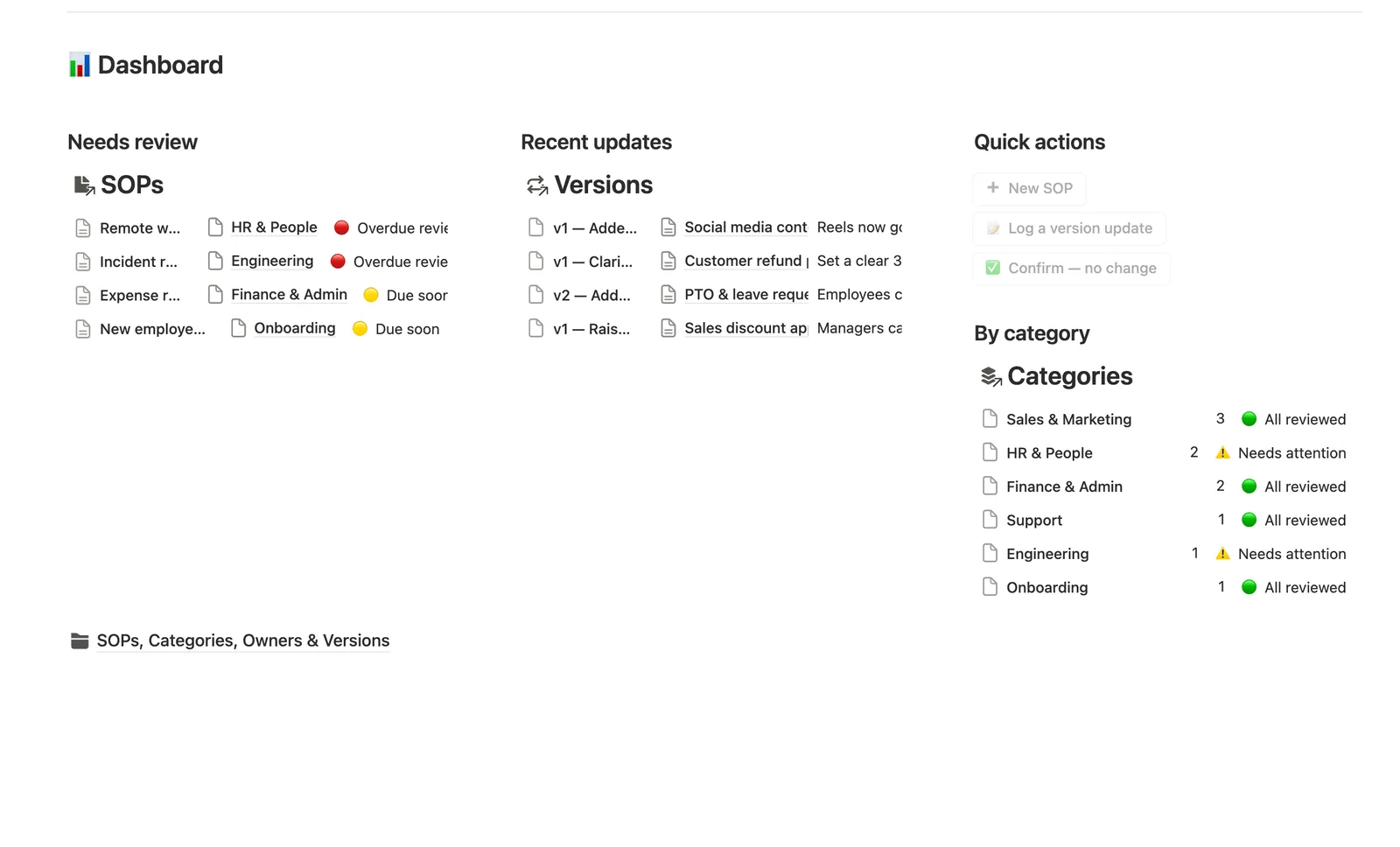
Both databases roll up their own SOP count and Overdue count, with an Up to date progress bar, so a department or a person piling up overdue processes surfaces before it's a problem.
A SOP's own page is the thing a teammate actually opens
Its page shows just that SOP's own Version history, the current process, not the flat Versions log across every SOP.
Confirm — no change, logged in one click
A dashboard button pre-fills a Versions row with "No change, confirmed accurate," so a review cycle that changes nothing still resets the clock without retyping it.
How it works
How it works
SOPs relates to both Categories and Owners, and Versions relates back to SOPs, a real four-database graph. Nothing about a SOP's freshness is typed by hand: Last reviewed rolls up from Versions (latest date), Current version rolls up from Versions (highest number), and Review status is a formula reading Last reviewed against Review cadence, checking Lifecycle and an empty Versions history first so a Draft or Retired SOP never reads as overdue or reviewed by accident.
Spec
- Databases
- 4
- Two-way relations
- 3
- Formulas
- 11
- Rollups
- 7
- Views
- 17
- One-click buttons
- 3
- Database templates
- 3
- Sample rows
- 34
- Databases Categories, Owners, SOPs, Versions
- Entity pages Owners, SOPs
- Buttons ➕ New SOP, 📝 Log a version update, ✅ Confirm — no change
How to use
- 01
Last reviewed, Current version and Review status are never typed by hand — they're read from the latest row you log in Versions. A SOP with no Versions row yet stays ⚪ Draft — log first version no matter what its Review cadence says.
- 02
Review cadence (Monthly/Quarterly/Biannual/Annual) plus Last reviewed compute Next review date: 🔴 Overdue once that date has passed, 🟡 Due soon inside the next 14 days, 🟢 Reviewed recently otherwise. Set Lifecycle to ⚪ Retired to stop tracking a process — a retired SOP never shows as overdue.
- 03
Log every real change as its own row in Versions, bumping Version number by one and describing the change in Change notes — that's your audit trail, and it's what Current version and Latest change notes read from, not a property you edit on the SOP itself.
- 04
Categories and Owners each roll up their own SOP count and overdue count, so Needs attention on either one catches a department or a person falling behind before it piles up.
- 05
Open a SOP's own page to see just its Version history — the thing a teammate actually opens when they need to follow the current process, not the flat Versions log.
- 06
Buttons and database templates can't pre-fill a relation: a SOP or Version created from the dashboard's quick-add buttons needs its Category/Owner or SOP link added by hand right after — the New SOP and version-update templates (New ▾ on each database) are the fully pre-filled path when you want that filled in from the start.
- 07
Pair this with Meeting Notes for the discussions that lead to a process changing, and Task & Project Manager for the work a new SOP creates.
Setup
Setup
- 01
Duplicate the SOPs & Team Wiki template into your workspace.
- 02
Add each process to SOPs with its Category, Owner, and Review cadence.
- 03
Log the first write-up as a row in Versions, linking it back to the SOP — that's what makes Last reviewed and Review status compute.
- 04
Open the dashboard's Needs review card and work through anything flagged Overdue or Due soon.
- 05
Delete the sample rows, marked 🧪, once you're set up.
Compared
| This template | Shared doc | |
|---|---|---|
| Review status | Computed from cadence and history | Nobody tracks it |
| Version history | Dated rows, one per change | Overwritten in place |
| Who owns what's overdue | Rolled up by Category and Owner | Not visible |
| New process, no review claimed yet | Reads Draft until first version logged | Looks done from day one |
§ FAQ
FAQ
Does Notion have an SOP template?
Yes — this one tracks every process with a Category, an Owner, a Review cadence, and a real version history in a separate Versions database, so Review status and Current version compute from what you've actually logged, not a single edited-on date.
How do I keep a version history of a process in Notion?
Log every change as its own row in the linked Versions database. Bump Version number, describe the change in Change notes, and Current version and Latest change notes on the SOP itself read straight from that log.
Does Notion have a team wiki template?
Yes — this template covers both jobs at once: versioned SOPs with review dates, and a wiki structure organized by Category and Owner so a teammate can find and follow the current process.
Does this work on Notion's free plan?
Yes, including the version rollups and the Review status formula. Nothing here needs a paid Notion plan.
What happens to a process we no longer use?
Set its Lifecycle to Retired. A retired SOP stops being tracked for review entirely, so it never shows up as overdue while staying in the wiki for reference.
Is this the same as Meeting Notes?
No — pair them instead. Meeting Notes captures the discussion that leads to a process changing. This template is where that change becomes a standing, versioned SOP once it's no longer a one-off decision.
More from Business Ops
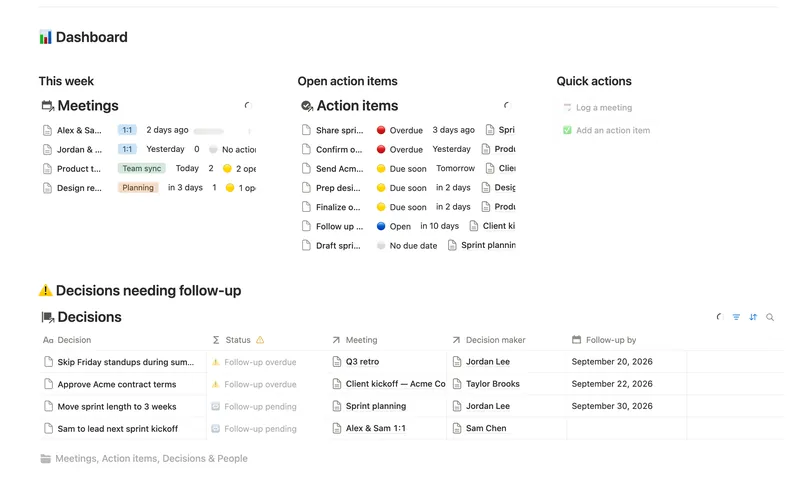
- 47 Meeting Notes & Decisions Capture every meeting's notes, decisions and action items in one connected place — see who owns what, what's overdue, and which decisions still need a follow-up, without re-typing any of it by hand. 4 db · 8 formulas · 2 buttons
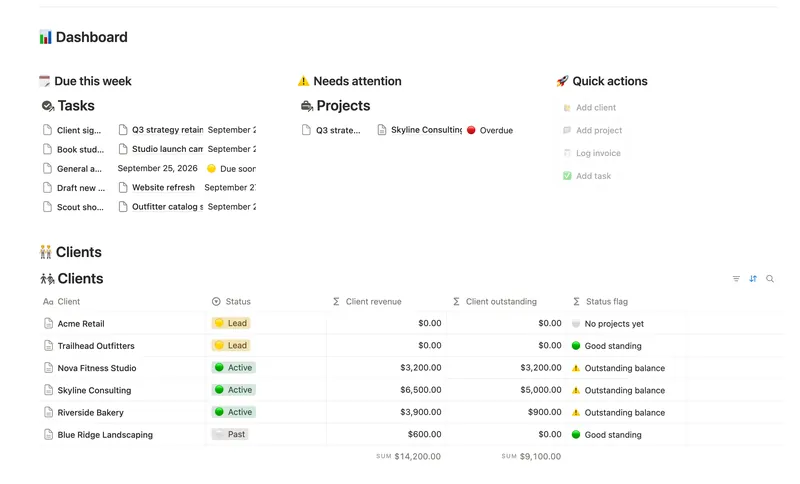
- 45 Small Business Dashboard See every client, project, invoice and task in one weekly dashboard — with revenue and what's owed rolling up automatically from invoice to project to client, so nothing is ever typed in two places. 4 db · 18 formulas · 4 buttons
- 46 Task & Project Manager Break every Project into Tasks with real sub-items and dependencies, then let Progress, Health and a dependency-aware Timeline compute themselves — with a My work view that always shows exactly what's yours to do next. 3 db · 11 formulas · 2 buttons
§ The Bundle
Get the whole Bundle
SOPs & Team Wiki plus 49 more templates, one payment.
One-time payment · Works on Notion Free · Instant Library access