
Updated Sep 24, 2026
Meeting Notes & Decisions Notion Template
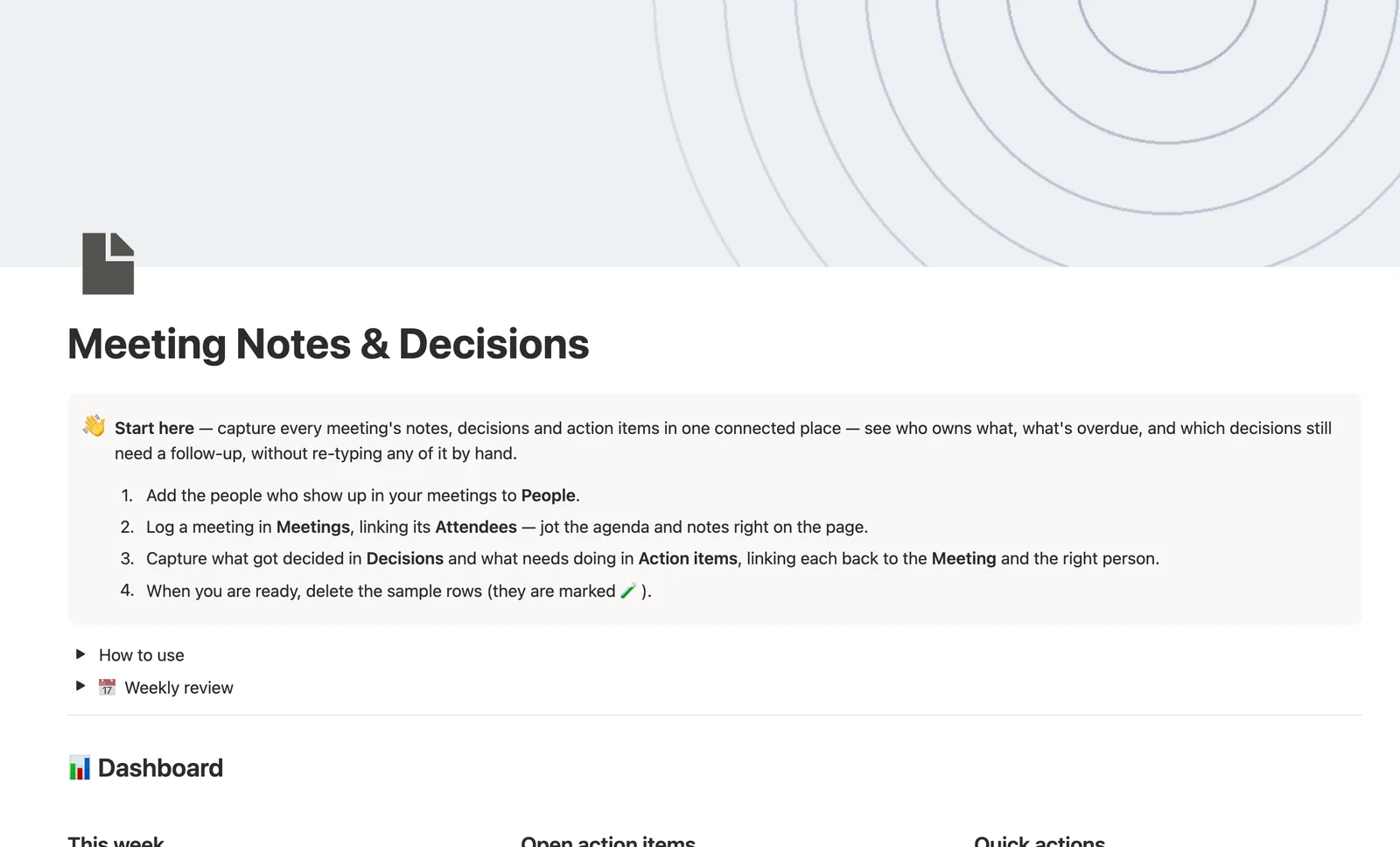
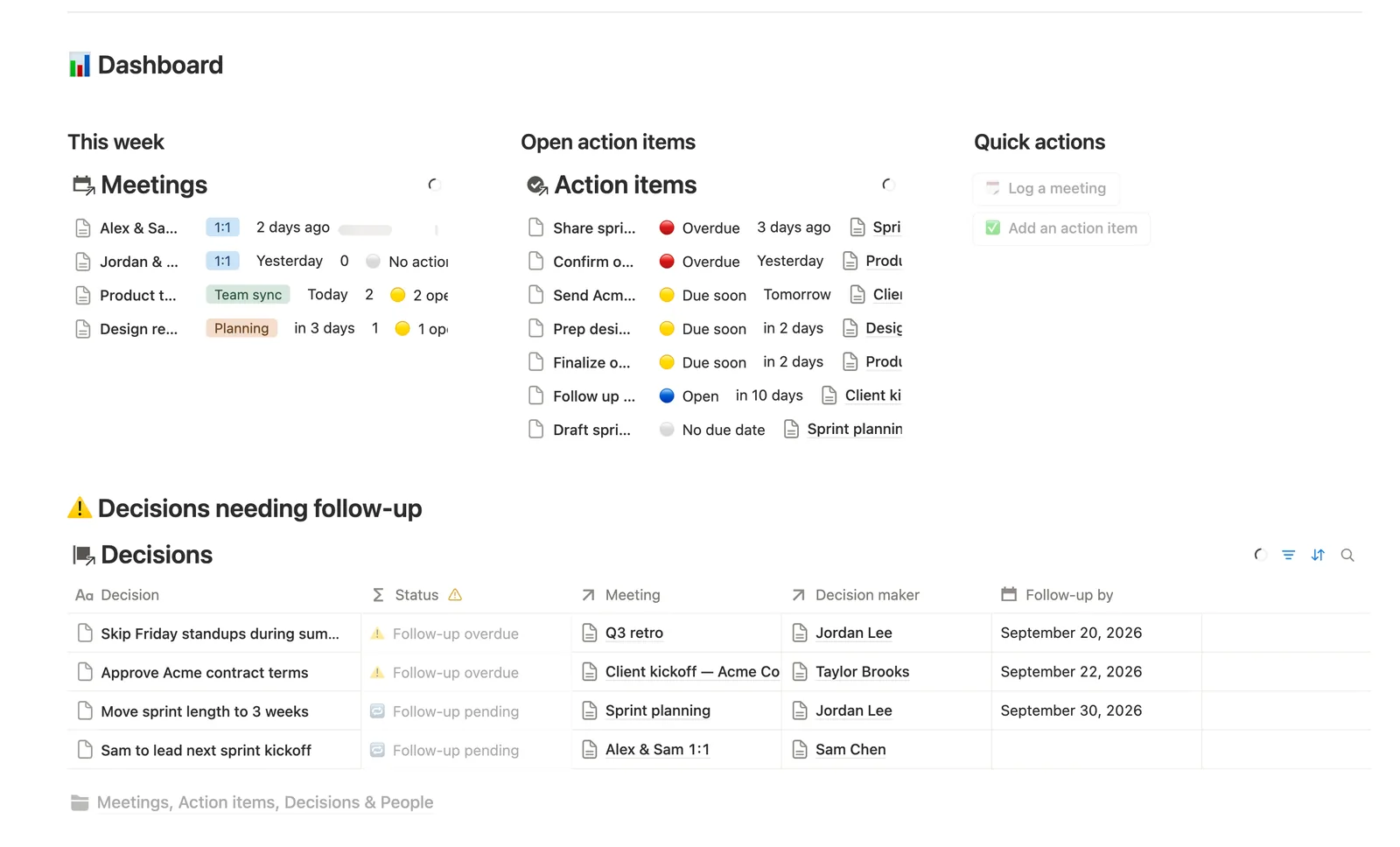
This Notion meeting notes template links every Action item and Decision back to the Meeting it came from and the Person who owns it. A meeting's Follow-up status rolls up from its own open action items, and a Person's page shows everything currently on their plate — nothing re-typed.
One-time payment · Works on Notion Free · Instant Library access
Who it's for
Who it's for
- Teams who want action items to actually get followed up on, not just written down
- Managers tracking what's on each report's plate across every meeting
- Anyone who needs a record of what was decided and by whom
- Teams replacing a shared doc that nobody re-reads after the meeting ends
What's inside
What's inside
Everything hangs off the Meeting it happened in
Attendees, Action items, and Decisions all link back to Meetings. Open any meeting's own page and both lists are already filtered to just that meeting.
Status that turns overdue on its own
Action items go Overdue the moment their Due date passes, and Decisions marked Needs follow-up go overdue the moment their Follow-up by date passes — never a status you update yourself.
A meeting's Follow-up status, rolled up not typed
Follow-up status reads straight off that meeting's own linked Action items: clear once every one is done, open while any are pending, and blank if it never generated any.
Everyone's plate, in one place
Open a Person's own page to see every open Action item and every Decision they own, across every meeting, without hunting through each one separately.
Owner and Decision maker, single relations on purpose
One person is accountable per row, matching how a real follow-up list actually gets worked, not a multi-select nobody's responsible for.
A meeting template that starts pre-structured
The New menu on Meetings opens straight into an Agenda and Notes skeleton, so every future meeting starts from the same shape the sample data models.
How it works
How it works
People is the earliest database created, so Meetings' Attendees, Action items' Owner, and Decisions' Decision maker can all reference existing People rows. Action items and Decisions each relate back to one Meeting and one Person. A Meeting's Follow-up status is a rollup-fed formula reading Open action items straight off its own linked Action items, and a Person's Status rolls up both their open Action items and any Decision they own that still needs follow-up, so nothing on their plate is invisible from their own page.
Spec
- Databases
- 4
- Two-way relations
- 5
- Formulas
- 8
- Rollups
- 9
- Views
- 24
- One-click buttons
- 2
- Database templates
- 8
- Sample rows
- 30
- Databases People, Meetings, Action items, Decisions
- Entity pages People, Meetings
- Buttons 🗓️ Log a meeting, ✅ Add an action item
How to use
- 01
Everything hangs off Meetings: link a meeting's Attendees, then log its Action items and Decisions — open any meeting's own page and both lists are already filtered to just that meeting.
- 02
Action items → Status and Decisions → Status are never typed by hand — Status turns 🔴/⚠️ the moment a Due date (or a Follow-up by date) has passed, and 🟡/🔁 while there's still time, so Needs follow-up always reflects today, not the day you logged the row.
- 03
Meetings → Follow-up status rolls up straight from that meeting's own Action items: ✅ once every one is done, 🟡 while any are still open, ⚪ if the meeting never generated any.
- 04
Open a Person's own page to see everything on their plate — every open Action item and every Decision they own, across every meeting, in one place.
- 05
Owner and Decision maker are single relations — buttons and database templates can't set them (see SPEC_GUIDE gotchas), so a quick-added Action item or Decision starts unlinked; check Action items → 🔗 Needs linking and Decisions → 🔗 Needs linking for anything still missing one and link it by hand (the page body of every template says so too).
- 06
Pair this with Task & Project Manager for work that outlives a single meeting, and SOPs & Team Wiki for anything that turns into a standing process.
Setup
Setup
- 01
Duplicate the Meeting Notes & Decisions template into your workspace.
- 02
Add the people who show up in your meetings to People.
- 03
Log a meeting in Meetings, linking its Attendees — jot the agenda and notes right on the page.
- 04
Capture what got decided in Decisions and what needs doing in Action items, linking each back to the Meeting and the right person.
- 05
Delete the sample rows, marked 🧪, once you're set up.
Compared
| This template | Shared doc | |
|---|---|---|
| Action item follow-up | Auto-overdue flag by Due date | Easy to lose in a long doc |
| Who owns what | Linked Owner, rolled up per person | Buried in text |
| Meeting status at a glance | Computed Follow-up status | Re-read the whole doc |
| Decision history | Own database, searchable, dated | Scattered across docs |
§ FAQ
FAQ
Does Notion have a meeting notes template?
Yes — this one links every Action item and Decision back to the Meeting it came from and the Person who owns it, with a Follow-up status that rolls up automatically instead of a note nobody checks again.
Can Notion track action items and decisions from a meeting?
Yes. Action items and Decisions are their own linked databases here, each relating back to the Meeting and the Owner or Decision maker. Open the meeting's own page and both lists are already filtered to it.
Does Notion have AI meeting notes?
Not in this template — it's a structured set of databases (People, Meetings, Action items, Decisions) you fill in yourself, not an AI transcription tool. Notion's own separate AI features can transcribe a call; this template is where the structured follow-up lives afterward.
Does this work on Notion's free plan?
Yes, including every rollup and computed Status formula. Nothing here needs a paid Notion plan.
How do I know who's overloaded?
Open People. Status reads red with a count the moment a person's open Action items plus open Decisions add up to more than zero, and Needs follow-up filters straight to anyone carrying something.
Is this the same as SOPs & Team Wiki?
No — pair them instead. This template captures what happened in a specific meeting. SOPs & Team Wiki is for the standing process a decision turns into once it's no longer a one-off.
More from Business Ops
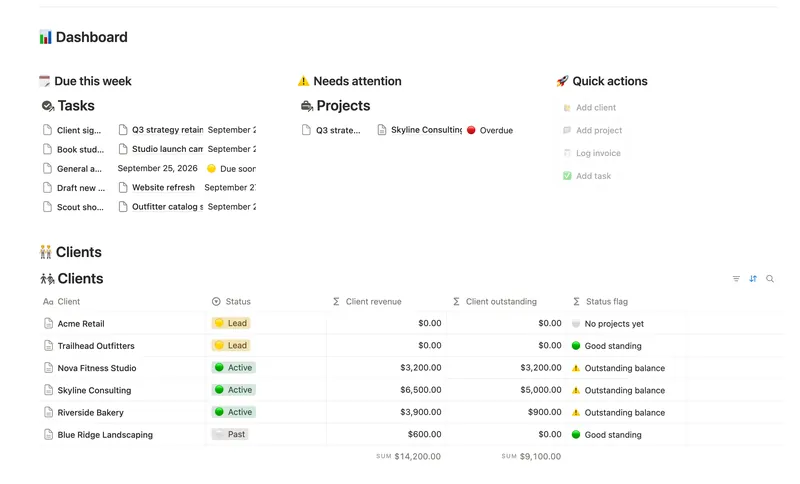
- 45 Small Business Dashboard See every client, project, invoice and task in one weekly dashboard — with revenue and what's owed rolling up automatically from invoice to project to client, so nothing is ever typed in two places. 4 db · 18 formulas · 4 buttons
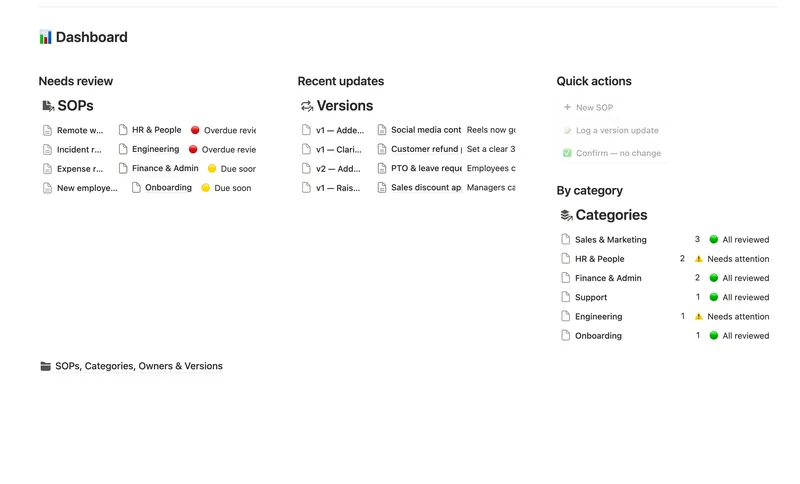
- 48 SOPs & Team Wiki See every process your team runs, who owns it and when it's next due for review — grouped by category, with a real version history behind each one instead of a single "last edited" date. 4 db · 11 formulas · 3 buttons
- 46 Task & Project Manager Break every Project into Tasks with real sub-items and dependencies, then let Progress, Health and a dependency-aware Timeline compute themselves — with a My work view that always shows exactly what's yours to do next. 3 db · 11 formulas · 2 buttons
§ The Bundle
Get the whole Bundle
Meeting Notes & Decisions plus 49 more templates, one payment.
One-time payment · Works on Notion Free · Instant Library access