
Updated Sep 24, 2026
Household Hub Notion Template
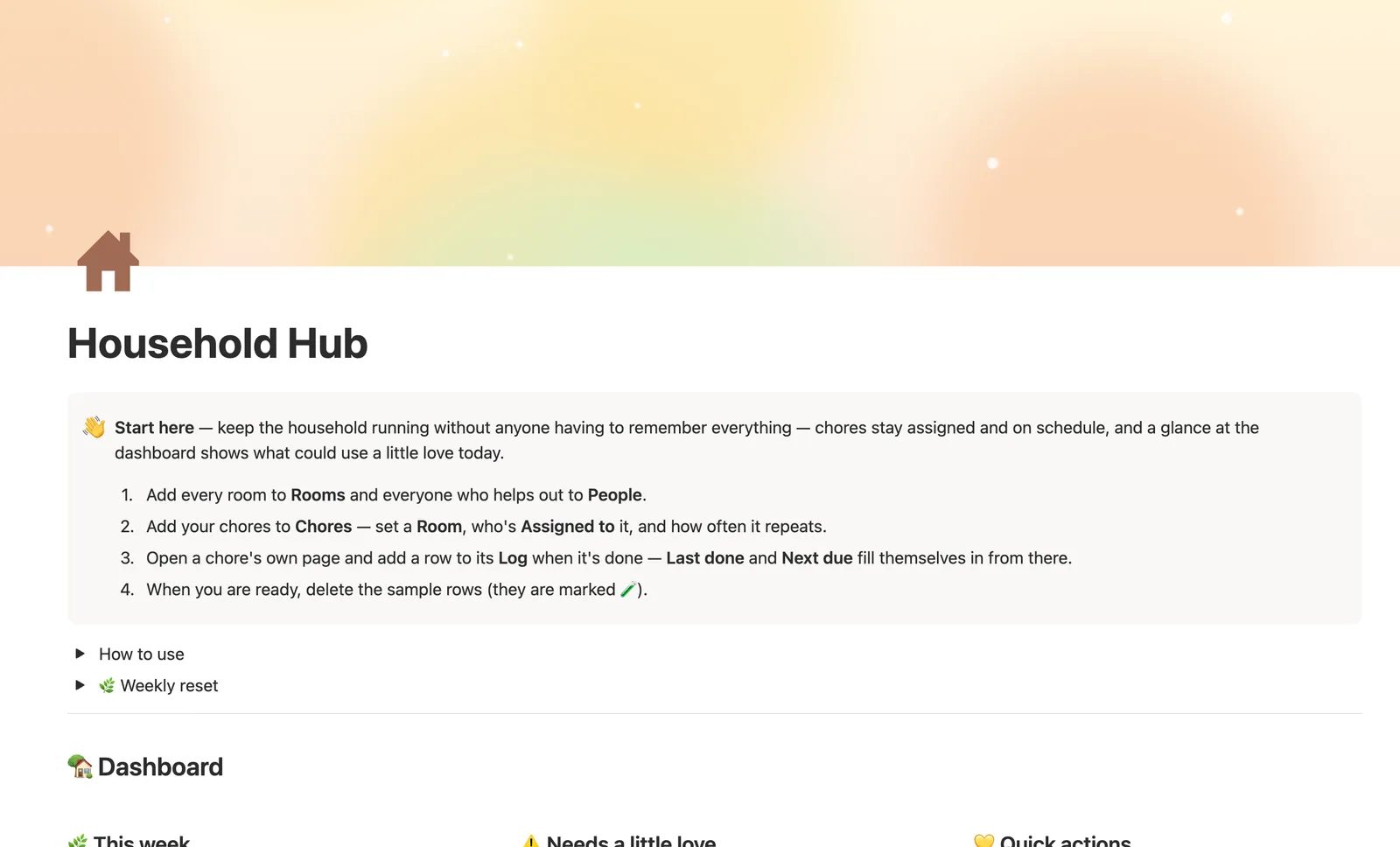
Household Hub is a Notion template for running chores across a home. Log a chore once in Chore Log and its Last done and Next due dates update on their own — no resetting by hand. Rooms and People each show what's overdue, due soon, or never done, without turning it into a scoreboard.
One-time payment · Works on Notion Free · Instant Library access
Who it's for
Who it's for
- Families splitting chores across multiple people
- Roommates who want a fair, visible chore rotation
- Anyone who keeps forgetting who did what last
- Households juggling daily chores alongside less-frequent maintenance (filters, gutters, detectors)
What's inside
What's inside
Chore Log resets nothing by hand
Mark a chore done by adding a row to Chore Log, not by checking a box on the chore itself. Last done and Next due recalculate from that log every time.
A status that reads as a heads-up, not a scoreboard
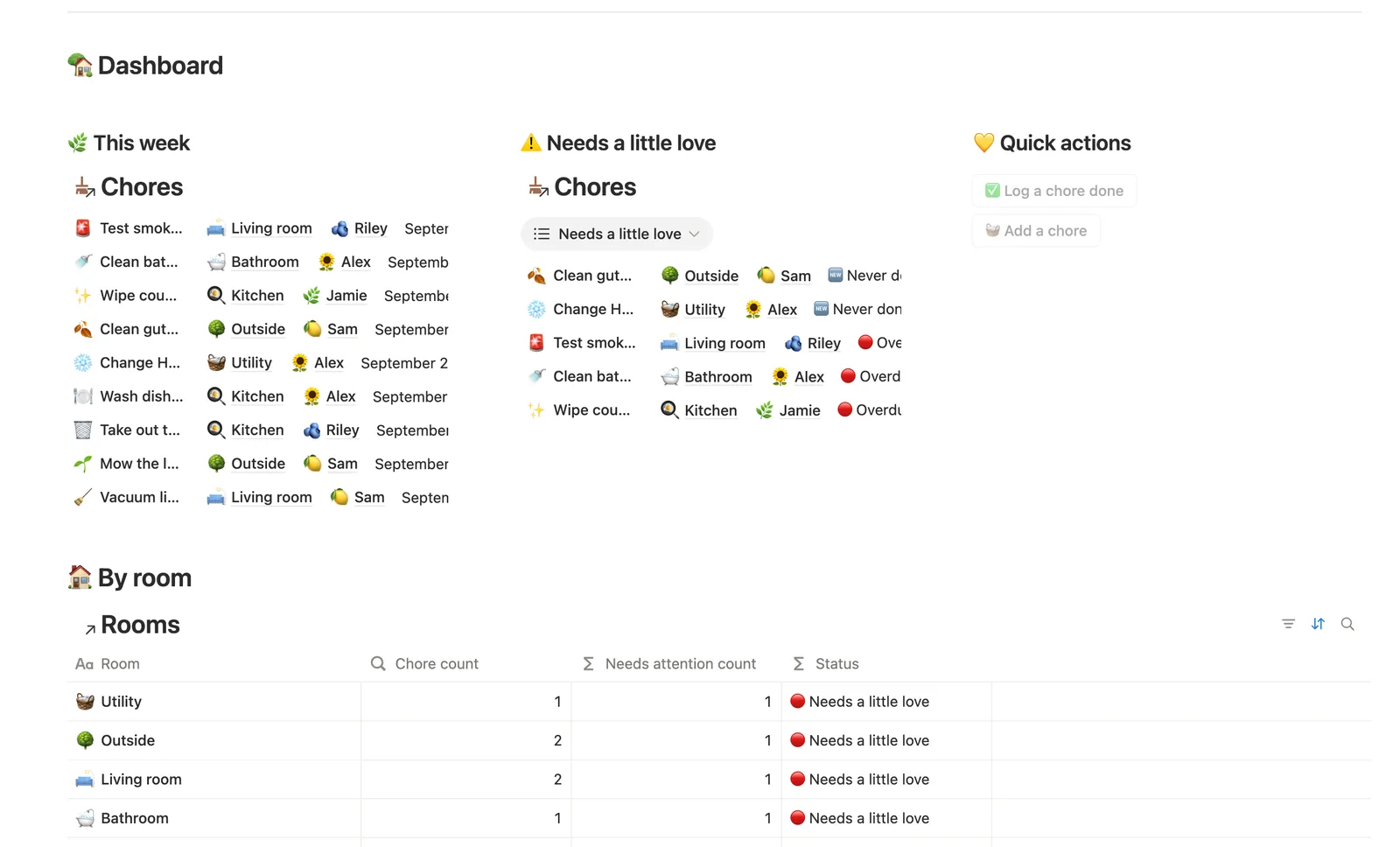
Each chore shows 🔴 Overdue, 🟡 Due soon, 🟢 On track, or 🆕 Never done. People get their own gentle status too — 🔆 A few waiting or 🟢 All caught up.
Rooms and People roll up automatically
Link a chore to a Room and to who's Assigned to it, and both roll up how many chores need attention, so you can see whether one room or person is carrying more than the others.
A separate schedule for the less-frequent stuff
Set a chore's Type to Maintenance for HVAC filters, smoke detectors, and gutters — they get their own Maintenance schedule view with a longer Frequency instead of getting lost among daily chores.
Log straight from a chore's own page
Open any chore to see just its history and add a new log entry right there — Notion links it automatically, which skips the extra linking step the dashboard's quick-add button leaves behind.
A weekly reset checklist
A built-in weekly reset toggle walks you through what's overdue, what's never been done, and what maintenance is coming up this month.
How it works
How it works
Chores relate to both Rooms and People, and a chore is marked done by adding a row to the separate Chore Log, never by checking a box on the chore itself. That log rolls up to the chore as Last done, which feeds a Next due formula built from the chore's Frequency, which drives its Status badge. Rooms and People each roll up a count of their own chores that need attention, so a room's or person's status can never disagree with what actually shows up on the dashboard.
Spec
- Databases
- 4
- Two-way relations
- 4
- Formulas
- 12
- Rollups
- 5
- Views
- 20
- One-click buttons
- 2
- Database templates
- 3
- Sample rows
- 30
- Databases Rooms, People, Chores, Chore Log
- Entity pages Chores
- Buttons ✅ Log a chore done, 🧺 Add a chore
How to use
- 01
Nothing here gets typed twice: log a chore once in Chore Log, and that chore's Last done and Next due update themselves — no date to reset by hand.
- 02
Status gives every chore a gentle heads-up: 🔴 Overdue, 🟡 Due soon, 🟢 On track, or 🆕 Never done yet. Check the dashboard's Needs a little love card for anything worth doing today.
- 03
Open any chore's own page for just its history — the fastest way to settle a 'who did this last' question, and the easiest way to log it: add the row right there and it links itself.
- 04
Rooms and People each get their own gentle rollup: a room shows how many of its chores are overdue, a person shows how many they're on and how many they've logged this week — a nudge, never a scoreboard.
- 05
Maintenance schedule (on Chores, set Type to Maintenance) is for the less-frequent stuff — HVAC filters, smoke detectors, gutters — with a longer Frequency so it doesn't get lost among the daily chores.
- 06
The dashboard's ✅ Log a chore done button is the fast path when you're not on a specific chore's page — it can't link itself to a Chore (buttons can't set relations), so it lands in Chore Log → Needs linking until you tag it; logging from the chore's own page skips that step entirely.
Setup
Setup
- 01
Duplicate Household Hub into your Notion workspace.
- 02
Add your rooms to Rooms and everyone who helps out to People.
- 03
Add your chores to Chores — set a Room, who's Assigned to it, and how often it repeats.
- 04
Open a chore's own page and log it done there once it's finished, so Last done and Next due fill themselves in.
- 05
Delete the sample rows once you're set up — they're marked 🧪.
Compared
| This template | Paper chart | |
|---|---|---|
| Who did it last | Logged automatically from Chore Log | Written by hand, easy to forget |
| Next due date | Computed from frequency + last done | You do the math yourself |
| Per-room / per-person view | Built in | Not really possible |
§ FAQ
FAQ
Does Notion have a chore chart template?
Not a built-in one — Notion doesn't ship a chore chart out of the box. Household Hub is a Notion template that adds one: Chores link to Rooms and People, and a separate Chore Log tracks who did what and when, so Last done and Next due never need resetting by hand.
How do I track chores for the whole family in Notion?
Add each family member to People and each chore to Chores, linking who's Assigned to it. Log a chore done by adding a row to Chore Log — that's what updates Last done, Next due, and the chore's Status, instead of a checkbox you'd have to remember to uncheck.
Can Notion show who did a chore last?
Yes. Open any chore's own page to see its full Chore Log history — who logged it and when, most recent first. That same log is what computes the chore's Last done date.
Does it work on Notion's Free plan?
Yes. Household Hub doesn't use anything beyond what Notion's Free plan supports — databases, relations, rollups, formulas, and buttons all work without upgrading to a paid Notion plan.
Is this a free Notion template?
Household Hub isn't a free standalone download, but it's part of the $47 one-time Templitize Bundle, which includes all 50 templates and lifetime updates — no subscription.
More from Home & Family
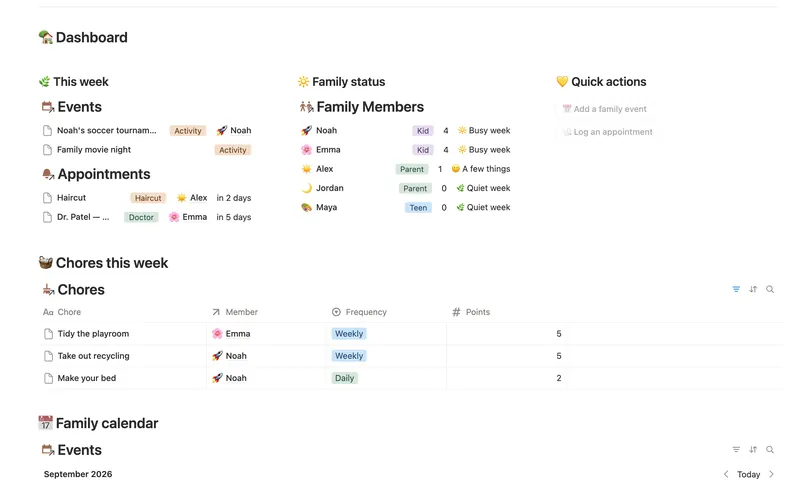
- 18 Family Organizer Give every event, chore, appointment and school thing a home next to the right person — so one look at Family Members tells you how everyone's week is actually going. 5 db · 18 formulas · 2 buttons
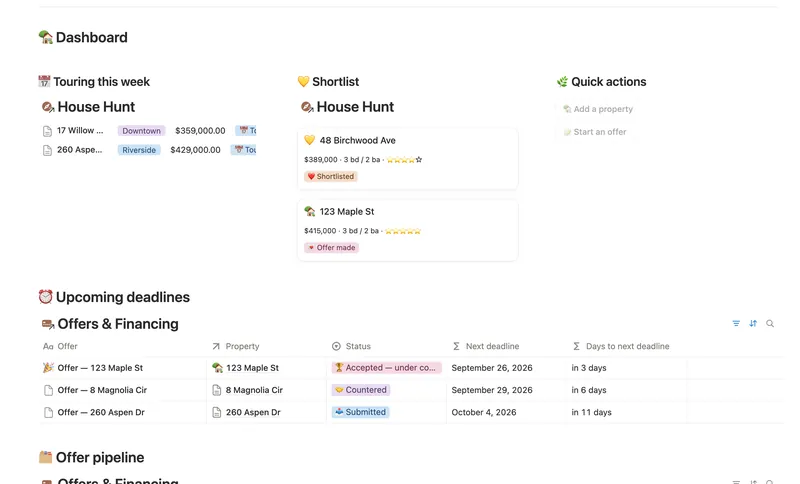
- 20 First Home Tracker Log every property you tour, turn your favorite into a real offer, and keep financing, costs and the closing checklist in one place — all the way to the keys. 2 db · 9 formulas · 2 buttons
- 21 Home Inventory See everything you own — by room, by category, with warranty countdowns and an estimated value that keeps itself current — so you're ready the day you actually need it. 3 db · 7 formulas · 1 button
§ The Bundle
Get the whole Bundle
Household Hub plus 49 more templates, one payment.
One-time payment · Works on Notion Free · Instant Library access