
Updated Sep 24, 2026
Recipe Box Notion Template
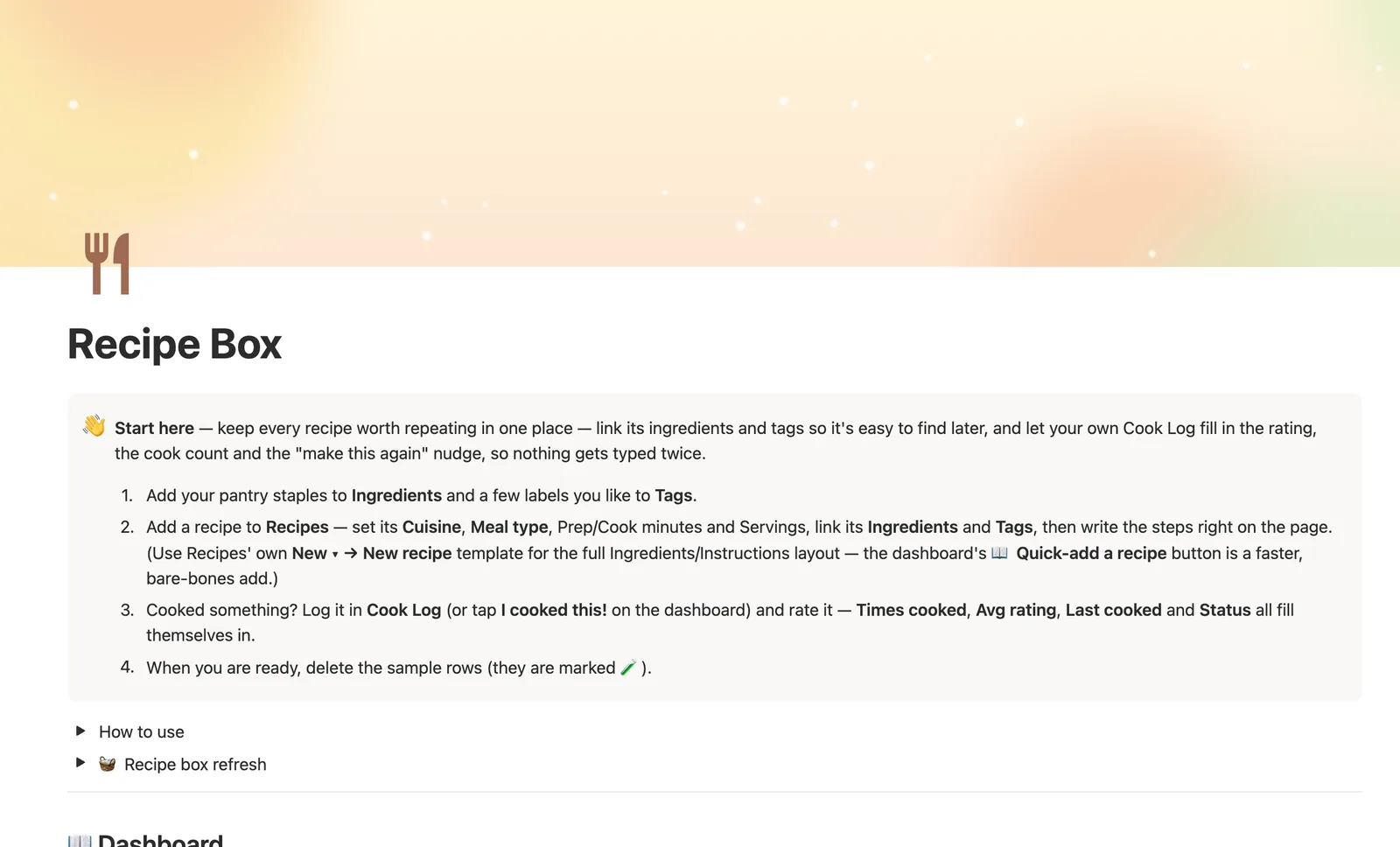
Recipe Box is a Notion template for the recipes worth making again. Link Ingredients and Tags for reference, and log every cook in Cook Log with a star rating — Times cooked, Avg rating, and Last cooked all compute themselves, so nothing gets typed onto the recipe twice.
One-time payment · Works on Notion Free · Instant Library access
Who it's for
Who it's for
- Home cooks building a personal collection of recipes worth repeating
- Anyone who wants to remember which recipes were actually good, not just tried once
- Households sorting recipes by cuisine, meal type, or how long they take
- Cooks who want a real recipe library to pair with a weekly Meal Planner
What's inside
What's inside
Ratings live in Cook Log, not on the recipe
Every time you cook something, log it in Cook Log with a star rating, and that recipe's Times cooked, Avg rating, Last cooked, and Status all compute themselves from that log.
A status that nudges, not scores
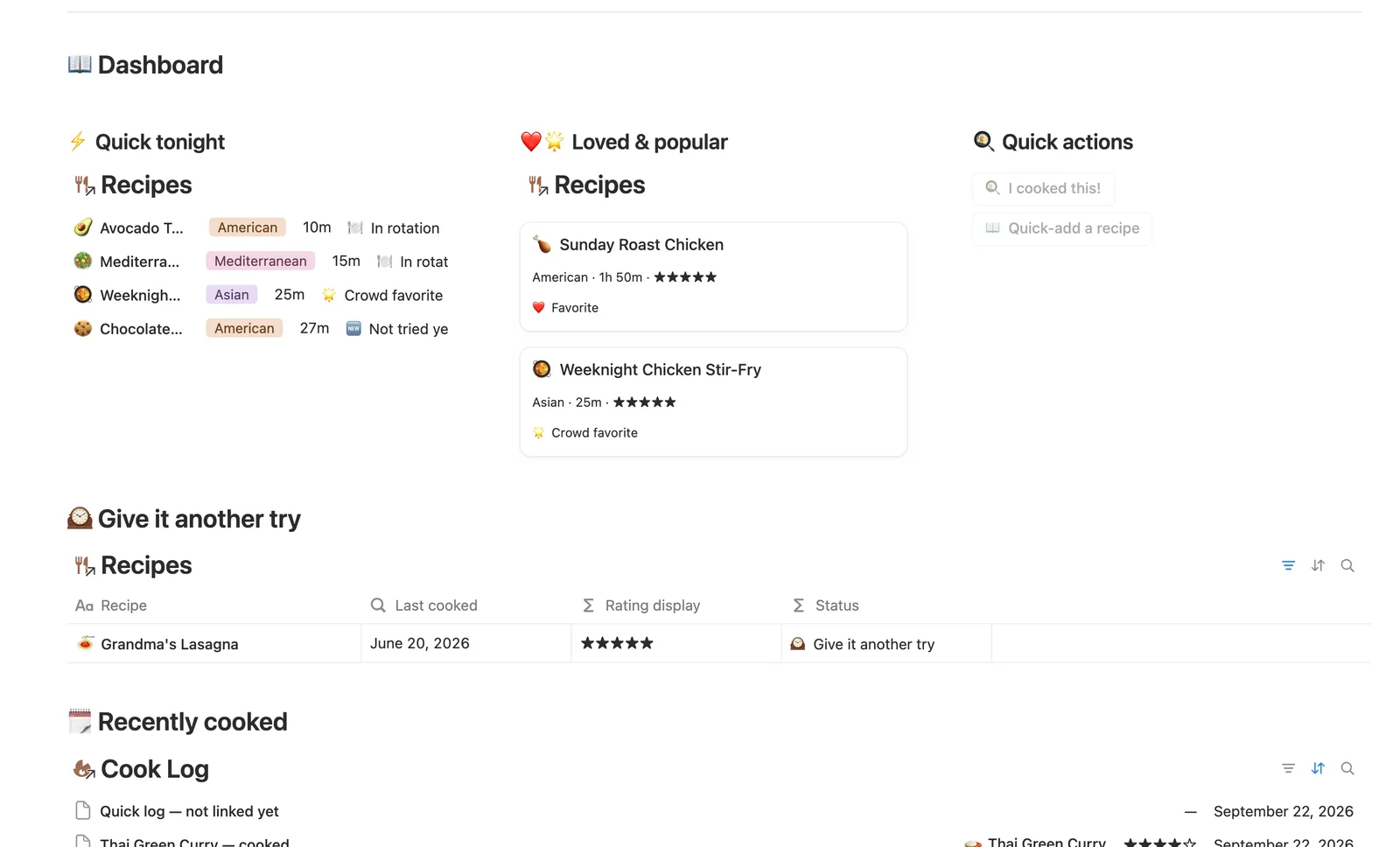
❤️ Favorite is a flag you set; 🌟 Crowd favorite is earned (rated 4.5★+ across 2+ cooks); 🕰️ Give it another try flags something great you haven't made in 2+ months; 🆕 Not tried yet is anything still waiting on its first cook.
Total time and Speed, computed
Prep and Cook minutes combine into a Total time and a Speed label (⚡ Quick, 🕐 Weeknight, 🍲 Weekend project) — check the dashboard's Quick tonight card for something fast without scanning.
Ingredients and Tags for finding things later
Link a recipe's Ingredients and Tags, and Tags rolls up the average rating of everything tagged with it, so you can see which style of cooking is actually landing.
Open a recipe's own page for its full cook history
Every recipe has its own page showing just its cook log — the fastest way to remember what you rated it last time, and the easiest way to log a new cook.
A recipe box refresh ritual
A built-in refresh checklist points you at recipes worth revisiting and any 🆕 Not tried yet you added on a whim and forgot about.
How it works
How it works
Recipes link to Ingredients and Tags for reference, and every cook gets logged as its own row in Cook Log instead of being typed onto the recipe. That log rolls up to the recipe as Times cooked, Avg rating, and Last cooked, which together drive a Status badge (❤️ Favorite, 🌟 Crowd favorite, 🕰️ Give it another try, 🆕 Not tried yet). Tags roll up the average rating of every recipe tagged with them, so you can see which style of cooking is actually landing.
Spec
- Databases
- 4
- Two-way relations
- 3
- Formulas
- 9
- Rollups
- 6
- Views
- 20
- One-click buttons
- 2
- Database templates
- 3
- Sample rows
- 38
- Databases Ingredients, Tags, Recipes, Cook Log
- Entity pages Recipes
- Buttons 🍳 I cooked this!, 📖 Quick-add a recipe
How to use
- 01
Ratings live in Cook Log, not on the recipe itself — every time you cook something, log it there with a star rating, and that recipe's Times cooked, Avg rating, Last cooked and Status all compute themselves from that log. Nothing gets typed twice.
- 02
Status reads the room for you: ❤️ Favorite is a flag you set yourself, 🌟 Crowd favorite is earned (rated 4.5★+ across 2 or more cooks), 🕰️ Give it another try flags something great you haven't made in 2+ months, and 🆕 Not tried yet is anything still waiting on its first cook.
- 03
Total time and Speed come straight from Prep + Cook minutes — check the dashboard's ⚡ Quick tonight card whenever you need something fast, no scanning required.
- 04
Link a recipe's Ingredients and Tags so it's easy to find later — Ingredients → Used in (#) shows your most-relied-on staples, and Tags → Avg rating shows which style of cooking (comfort food, quick, healthy…) is actually landing.
- 05
Open any recipe's own page for just its cook history — the fastest way to remember what you rated it last time and what you'd change, and the easiest way to log a new cook: add the row right there and it links itself.
- 06
Pair this with Meal Planner & Grocery List for the week's actual cooking schedule and a pantry-aware grocery list — Recipe Box is your reference shelf, Meal Planner is where the week gets planned.
Setup
Setup
- 01
Duplicate Recipe Box into your workspace.
- 02
Add your pantry staples to Ingredients and a few labels you like to Tags.
- 03
Add a recipe to Recipes — set its Cuisine, Meal type, and Prep/Cook minutes, then link its Ingredients and Tags.
- 04
Log your first cook in Cook Log with a star rating — Times cooked, Avg rating, and Status fill themselves in.
- 05
Delete the sample rows once you're set up — they're marked 🧪.
Compared
| This template | Bookmarks folder | |
|---|---|---|
| Rating & cook count | Computed from your Cook Log | Not tracked |
| Find something quick | ⚡ Quick tonight filters by total time | Scroll and guess |
| What's actually good | 🌟 Crowd favorite flags recipes rated 4.5★+ across 2+ cooks | No way to tell |
§ FAQ
FAQ
Does Notion have a recipe template?
Not built in. Recipe Box is a Notion template that adds one: Recipes link to Ingredients and Tags, and a separate Cook Log tracks every time you actually make something, with a star rating.
How do I organize recipes in Notion?
Add each recipe to Recipes with its Cuisine, Meal type, and Prep/Cook time, then link its Ingredients and Tags. Filtered views (By cuisine, By meal type, Quick weeknight) and Status (❤️ Favorite, 🌟 Crowd favorite) do the sorting for you.
Can Notion track how often I've cooked a recipe and rate it?
Yes. Log each cook in Cook Log with a 1–5 star rating, and the recipe's Times cooked, Avg rating, and Last cooked all compute themselves from that log — nothing typed twice.
What's the difference between this and Meal Planner & Grocery List?
Recipe Box is a reference and rating library — no weekly plan, no grocery list. Meal Planner handles the weekly rotation and builds a grocery list from what's missing in Pantry. They're built to pair together.
Does it work on Notion's Free plan?
Yes. Recipe Box only uses databases, relations, rollups, and formulas that work on Notion's Free plan.
More from Home & Family
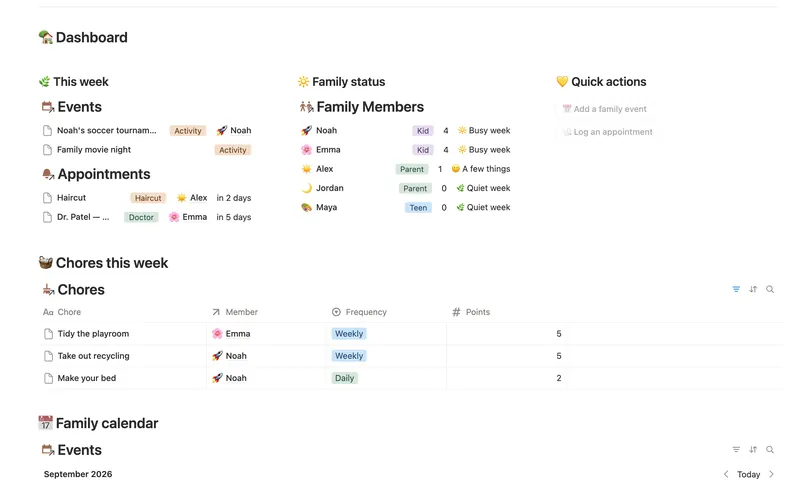
- 18 Family Organizer Give every event, chore, appointment and school thing a home next to the right person — so one look at Family Members tells you how everyone's week is actually going. 5 db · 18 formulas · 2 buttons
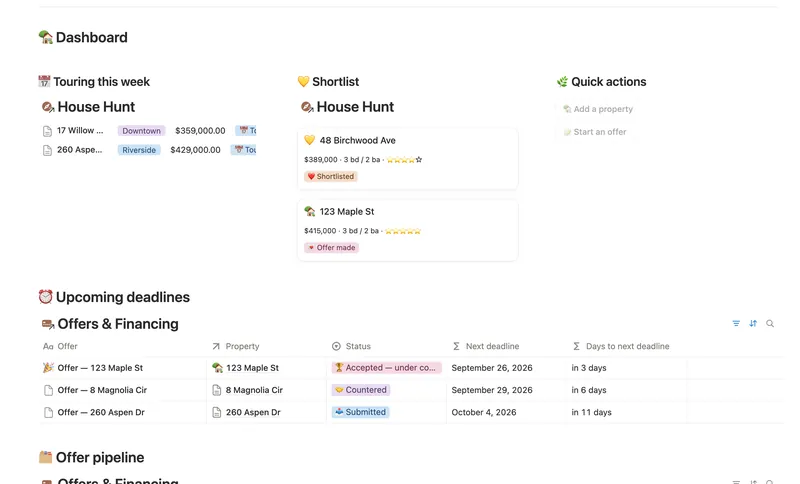
- 20 First Home Tracker Log every property you tour, turn your favorite into a real offer, and keep financing, costs and the closing checklist in one place — all the way to the keys. 2 db · 9 formulas · 2 buttons
- 21 Home Inventory See everything you own — by room, by category, with warranty countdowns and an estimated value that keeps itself current — so you're ready the day you actually need it. 3 db · 7 formulas · 1 button
§ The Bundle
Get the whole Bundle
Recipe Box plus 49 more templates, one payment.
One-time payment · Works on Notion Free · Instant Library access