
Updated Sep 24, 2026
Goals & OKRs Notion Template
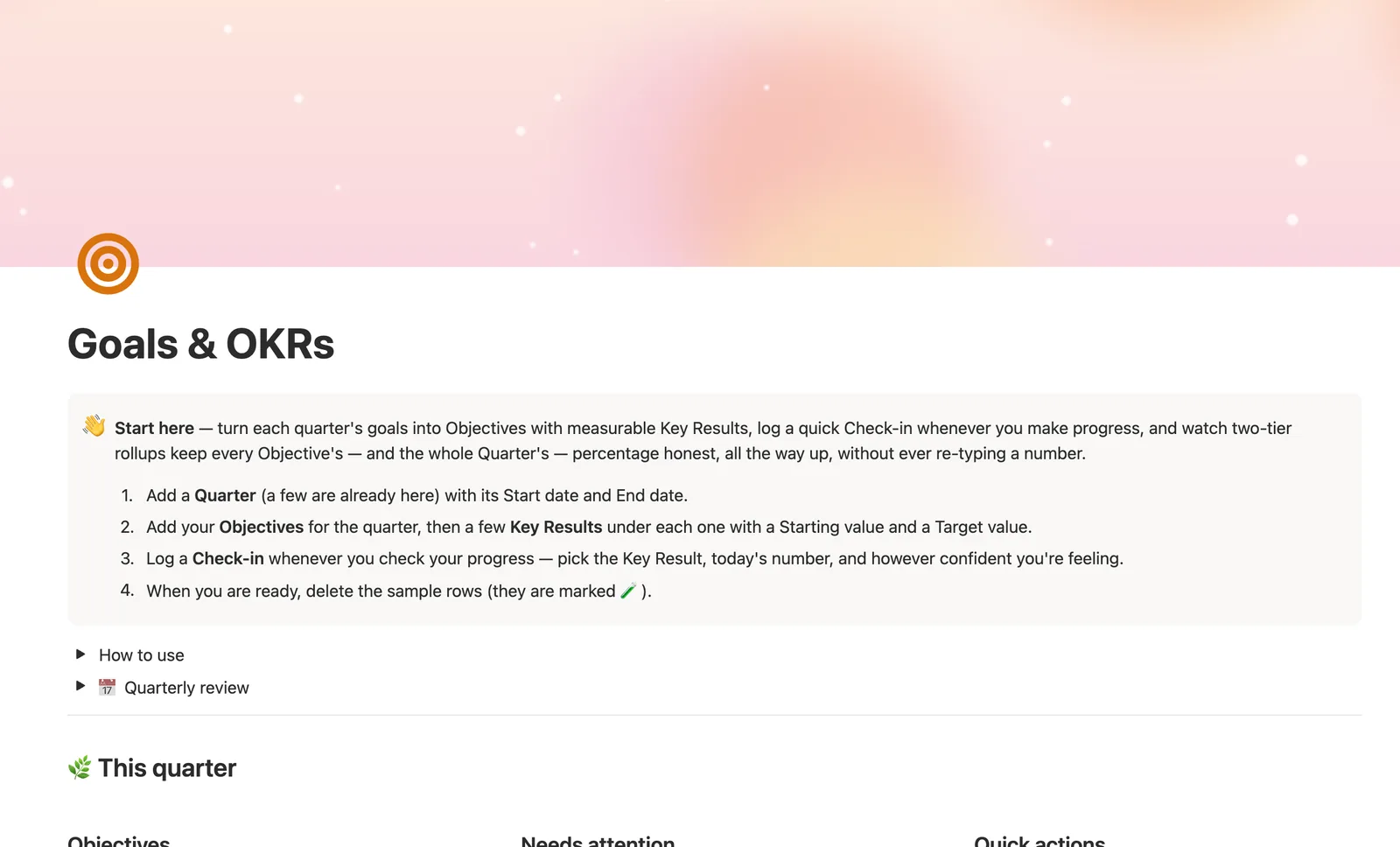
Goals & OKRs is a Notion template that turns each quarter into Objectives with measurable Key Results. Log a Check-in whenever you make progress, and two-tier rollups keep every Objective's, and the whole Quarter's, percentage honest automatically. It's for anyone who wants real OKR math, not a checklist relabeled as goals.
One-time payment · Works on Notion Free · Instant Library access
Who it's for
Who it's for
- People who want to run real OKRs, Objectives with measurable Key Results, not a renamed to-do list
- Anyone tracking goals that go up or down, a metric to hit, not just a yes/no task
- People who want a quarter's overall progress computed from the goals underneath it, not eyeballed
- Teams or individuals who want a confidence signal separate from the raw number
What's inside
What's inside
A real two-tier rollup chain
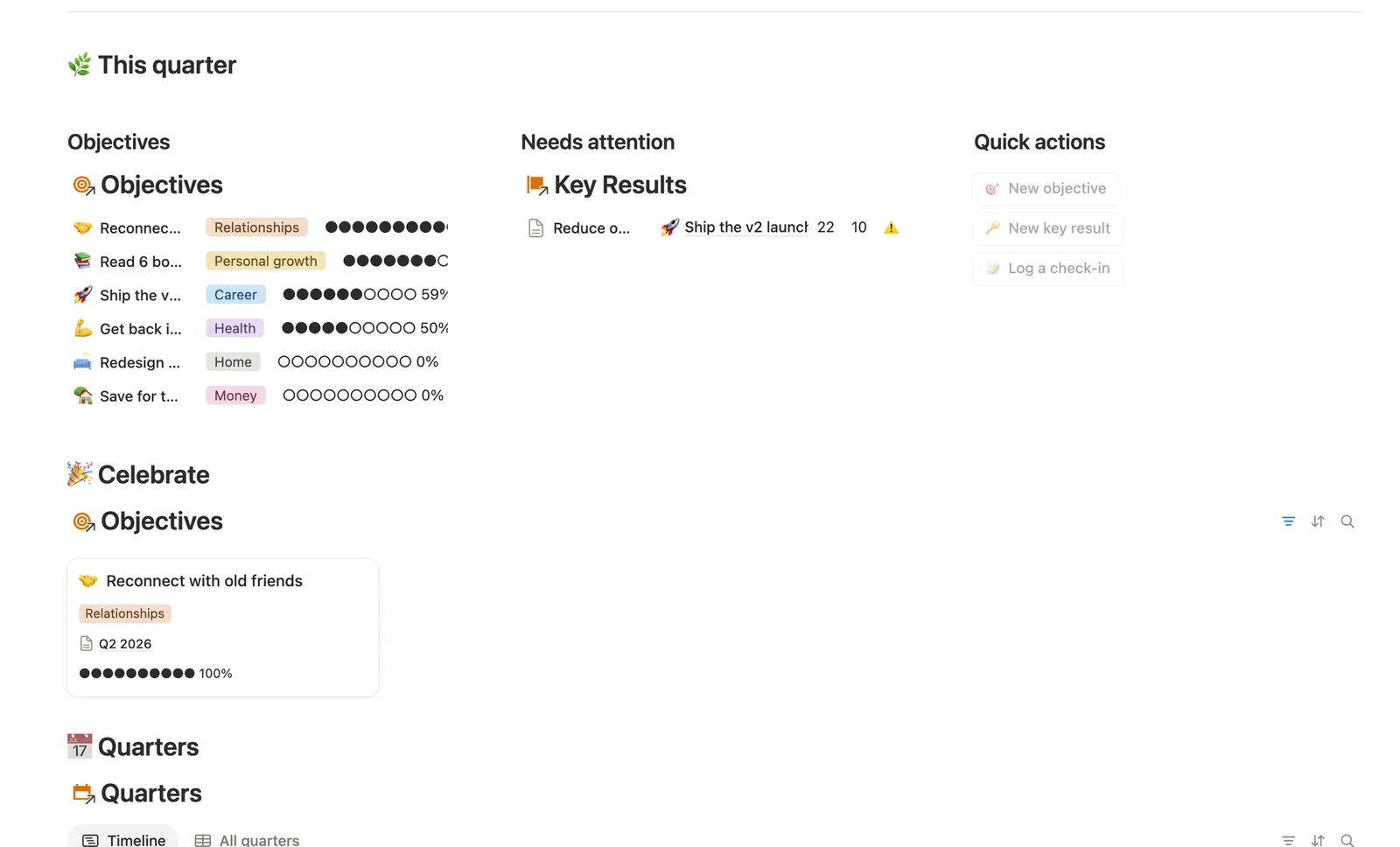
A Check-in's number becomes its Key Result's Current value; Key Results roll up (averaged) into their Objective's Progress, and Objectives roll up the same way into their Quarter's Progress. Nothing above Check-ins is typed by hand.
Metrics that go up or down
Set a Starting value and Target value on any Key Result. A metric meant to fall, like an error rate, works exactly the same as one meant to rise, Progress compares distance from Starting either way.
Confidence, separate from the number
Each Check-in carries a 🟢🟡🔴 Confidence rating on top of the raw number. A Key Result can be numerically on pace and still feel 🔴 Off track, and both are worth capturing.
Needs a check-in, before a goal goes quiet
A Key Result that hasn't heard from you in 3 weeks flags ⚠️ Needs a check-in, on the Key Result itself and rolled up to its Objective, so a stalled goal doesn't just disappear.
Pace, carried forward each quarter
Link Previous quarter on a new Quarter row and Pace compares its Progress against how far the quarter has actually elapsed, the same 🟢🟡🔴 idiom as a budget pacing check.
A milestone template for yes/no goals
The New milestone key result template handles a goal with no real number to track: Starting value 0, Target value 1, done the moment you log a Check-in of 1.
How it works
How it works
Four databases chain together: Quarters, Objectives, Key Results and Check-ins. A Check-in's number becomes its Key Result's Current value, and Progress compares that against Starting and Target. Key Results roll up, averaged, not summed, into their Objective's Progress, and Objectives roll up the same way one level further, into their Quarter's Progress. Nothing above the Check-in level is ever typed in by hand, it's rollups and formulas all the way up.
Spec
- Databases
- 4
- Two-way relations
- 4
- Formulas
- 15
- Rollups
- 5
- Views
- 24
- One-click buttons
- 3
- Database templates
- 5
- Sample rows
- 30
- Databases Quarters, Objectives, Key Results, Check-ins
- Entity pages Quarters, Objectives, Key Results
- Buttons 🎯 New objective, 🔑 New key result, 📝 Log a check-in
How to use
- 01
Nothing here is re-typed: a Check-in's number becomes its Key Result's Current value (its own latest Check-in), Key Results roll up — averaged — into their Objective's Progress, and Objectives roll up the same way into their Quarter's Progress.
- 02
Give each Key Result a Starting value and a Target value — a metric that's supposed to go down (like an error rate) works exactly the same as one going up, the formula just compares distance from Starting either way.
- 03
Confidence on a Check-in (🟢🟡🔴) is your gut sense, separate from the number — a Key Result can be numerically on pace and still feel 🔴 Off track, and that's worth capturing on its own.
- 04
A Key Result that hasn't heard from you in 3 weeks shows up as ⚠️ Needs a check-in — on the Key Result itself, and rolled up to its Objective, so a quietly stalled goal never just disappears from view.
- 05
Link ◀ Previous quarter on each new Quarter row to the one before it — that's what lets a Quarter's own Pace compare its Progress against how far the quarter has actually elapsed, the same 🟢/🟡/🔴 idiom as a budget's pacing check.
- 06
The dashboard's New objective / New key result / Log a check-in buttons create the row for you, but can't set the relation — link it right after, or check Needs linking on that database, which catches anything you forget.
Setup
Setup
- 01
Duplicate the template into your own Notion workspace.
- 02
Add a Quarter with its Start date and End date, a few sample quarters are already there.
- 03
Add your Objectives, then a few Key Results under each with a Starting value and Target value.
- 04
Log a Check-in whenever you check progress, and delete the 🧪 sample rows once you're set up.
Compared
| This template | Spreadsheet | |
|---|---|---|
| Objective progress | Rollup average of Key Results | Manual formula, if built |
| Quarter progress | Rollup average of Objectives | Usually not tracked at all |
| Stalled goal | Flags itself after 3 quiet weeks | Easy to forget entirely |
| Confidence vs. number | Tracked separately, per check-in | Rarely captured |
§ FAQ
FAQ
Does Notion have an OKR template?
Not a built-in one. OKRs aren't a native Notion feature, so a real OKR system has to be built from linked databases. This template ships Quarters, Objectives, Key Results and Check-ins already wired together, with the standard (Current minus Starting) divided by (Target minus Starting) OKR formula built in.
How do I track goals in Notion?
Link each goal to a measurable Key Result with a Starting and Target value, then log a Check-in whenever you make progress. This template does exactly that. Progress, Pace and Status all compute themselves from the numbers you log, so you're never eyeballing a percentage.
What's the difference between OKRs and SMART goals?
OKRs pair a qualitative Objective with one or more measurable Key Results and are usually reviewed quarterly; SMART is a checklist (Specific, Measurable, Achievable, Relevant, Time-bound) for writing any single goal well. This template is OKR-shaped, Quarter, Objective, Key Result, but nothing stops you from writing a SMART-style Objective inside it.
Can Notion track key results automatically?
Not without formulas built for it, Notion has no native OKR feature. This template's Key Results database computes Current value from your latest Check-in and Progress from Starting/Target automatically, so nothing above the Check-in level is re-typed.
Does this work on Notion's Free plan?
Yes. Every rollup, formula and relation in Goals & OKRs runs on Notion's Free plan, no paid Notion upgrade needed.
More from Planning & Focus
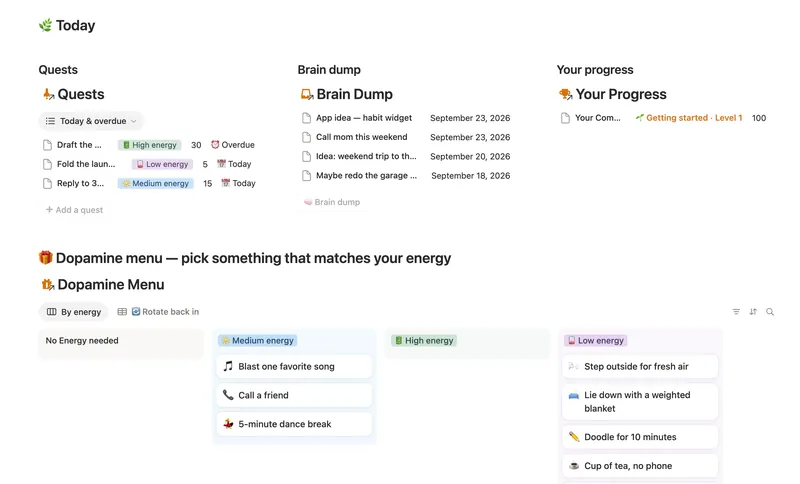
- 03 ADHD Command Center Corral every quest, stray thought and dopamine hit into one gentle system — one that tracks your XP and shows up for you on the days that don't go to plan, not just the good ones. 5 db · 12 formulas · 3 buttons
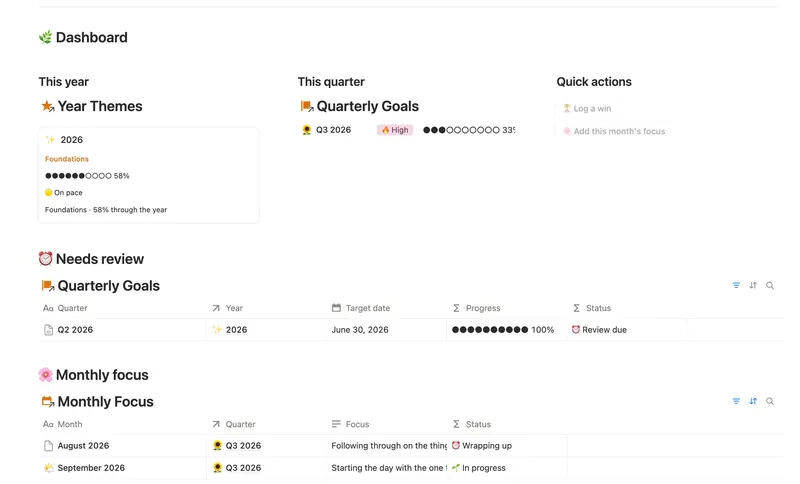
- 06 Annual Review & Year Planner Look back on the year with honest reflection prompts, then turn one yearly theme into quarterly goals and monthly focus you'll actually follow through on. 4 db · 16 formulas · 2 buttons
- 02 Daily Planner & Time Blocks Block your day into real Start/End times, keep tasks tied to the hour you meant to do them, and see — gently, never guiltily — whether today actually went the way you planned it. 3 db · 6 formulas · 2 buttons
§ The Bundle
Get the whole Bundle
Goals & OKRs plus 49 more templates, one payment.
One-time payment · Works on Notion Free · Instant Library access