
Updated Sep 27, 2026
Notion Life OS: How to Build One Without Overbuilding It
A Notion life OS is a set of linked databases covering tasks, goals, habits, money, notes and health, standing in for the five separate apps most people juggle instead. The databases talk to each other through relations, so logging a habit or checking off a task updates a number somewhere else automatically. Build it in layers, starting with tasks.
What is a Notion life OS?
"Life OS" isn't a Notion feature. It's what the template community calls a workspace built to run your whole life, not just one slice of it. Most people juggle a to-do app, a habit tracker, a budgeting app and a notes app, checking four places to answer one question: what actually needs attention today. A Notion life OS puts all of that in one workspace, connected by real database relations instead of copied between apps.
That doesn't mean one page with everything crammed onto it. A life OS is a small set of databases, commonly Tasks/Projects, Habits, Goals, Money and Notes, each doing one job, plus a dashboard pulling today's slice into one view. New to Notion databases? The beginner's guide covers that first; everything below assumes you can create one and add a relation.
Do you actually need a Notion life OS?
If one Tasks database already covers your day, you don't need five more. A life OS earns its place once you're already juggling separate apps for habits, goals or money and want them in one place. Build outward from whichever piece you already use daily, not from a blank template with six empty databases waiting to be filled.
Notion life os template: one giant database or linked modules?
There are two honest ways to structure this, and the tradeoff is real in both directions.
One giant database. Every task, habit, goal and note lives in a single database, with a "Type" select telling them apart and filtered views for each. It's fast to set up, with one search bar for everything. The cost shows up once you use it: a habit doesn't need a "Due date," a goal doesn't need "Priority," and every property you add for one type sits empty on the rest, and any formula that behaves differently per type has to branch on Type first.
Linked modules. Each domain gets its own database (Tasks, Habits, Goals, Money, Notes), connected by relations where they overlap: a task to its project, a habit to its daily check-ins, a goal's key results to the check-ins that measure them. Rollups read real numbers across those relations instead of guessing from a Type field. It takes longer to wire up front, but each database's schema stays clean as it grows.
| One giant database | Linked modules | |
|---|---|---|
| Setup time | Fast: one database, one Type field | Slower: one database per domain, plus relations |
| Schema stays clean | No — irrelevant properties pile up per type | Yes — each database only holds what it needs |
| Progress rollups | Manual, or a formula branching on Type | Real rollups reading the relation |
| Search everything at once | Yes, one database | Only with a linked view pulling from several |
| Holds up past 3–4 domains | Gets messy fast | Scales cleanly |
Past a to-do list and a notes page, linked modules win on maintenance, even with more setup on day one.
How to build a Notion life os dashboard, step by step
Build in this order, with real data in each step before the next — an empty database isn't a foundation, it's a placeholder.
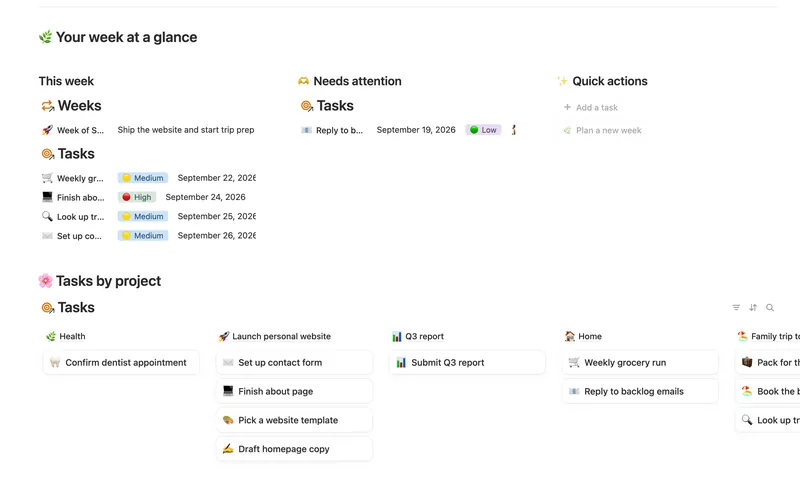
- Tasks and Projects/Areas. Start here regardless of what else you add. A Tasks database with a Done checkbox and a Due date, related to a Projects/Areas database, is the piece every other module points back to.
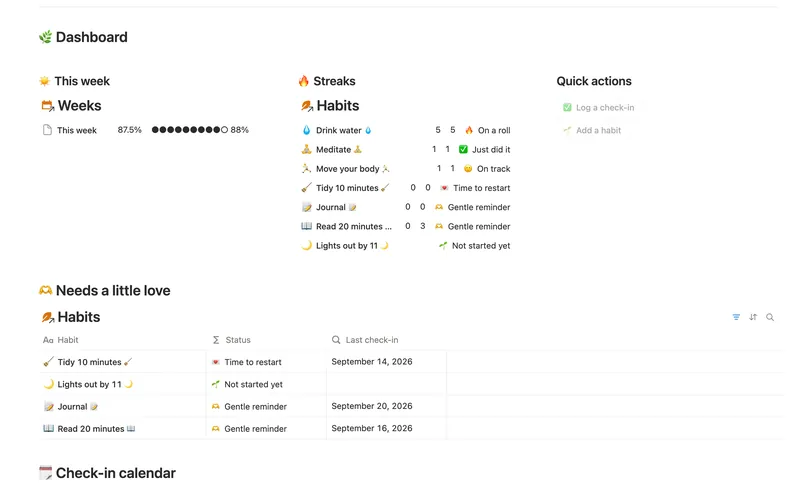
- Habits. A Habits database related to a Check-ins database (one row per day per habit) gives you a current streak and completion rate computed from the relation, not a hand-kept tally.
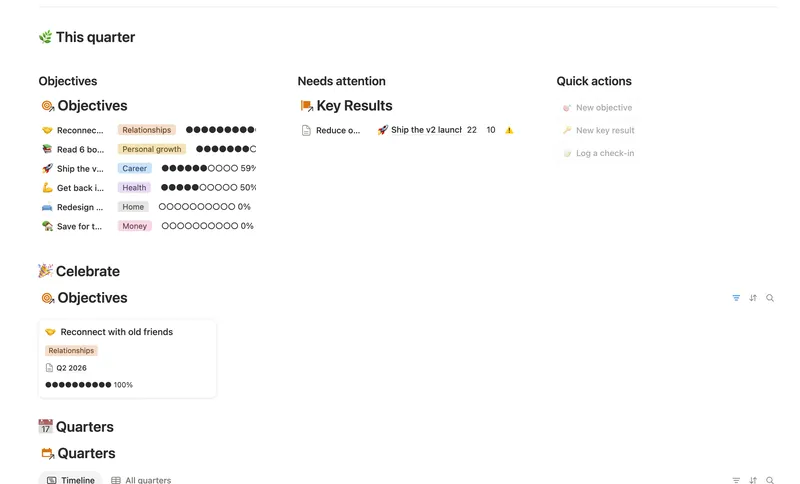
- Goals. A quarterly Goals or OKR structure, with Objectives holding measurable Key Results and Check-ins logging progress against each, keeps a goal tied to the work that serves it — not floating disconnected.
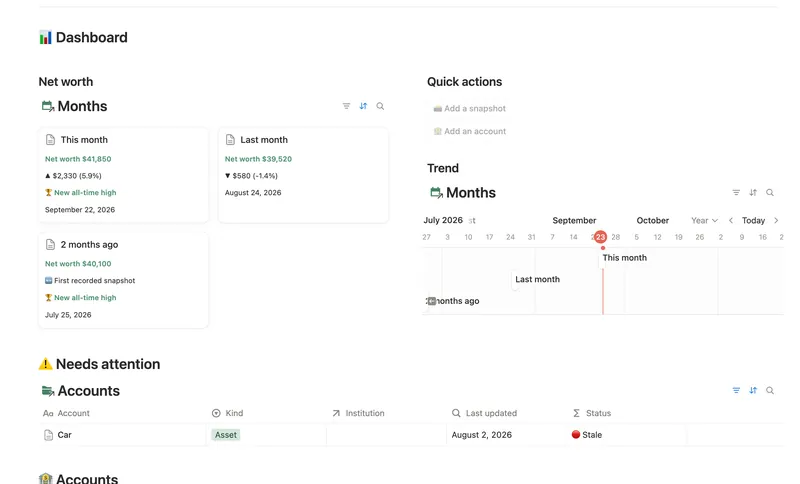
- Money. A simple Accounts-and-Months structure, where a monthly balance snapshot rolls up into net worth automatically, is enough; a life OS doesn't need budgeting granularity to include money.
- Notes. A Resources or Notes database, related to Areas or Projects, holds reference material and journal entries. The PARA method guide covers this layer if notes are where you're spending the most time.
- The dashboard, last. Once the modules above hold a few weeks of real data, build a page of columns and linked database views pulling from each: this week's tasks, today's habits, this quarter's goal progress, this month's net worth trend. The dashboard guide covers the build. As of September 2026, Notion's native dashboard view (shipped in Notion 3.4) is Business and Enterprise only, so this column-and-linked-view build is what Free and Plus actually use.
Building the dashboard first, before the modules underneath it have data, is the most common reason a life OS gets abandoned: there's nothing real to look at yet, so it looks broken.
Is there a free Notion life os setup, or do you need a template?
As of September 2026, every mechanic above (databases, relations, rollups, formulas, database templates) works through relations and rollups on Notion's Free plan; none of it is gated to a paid tier. What a template buys you is wiring time, not access to a feature. Building the six modules above from scratch, correctly related, is a real weekend of work; duplicating a pre-built set is an afternoon.
One thing worth being exact about: the Templitize Bundle is 50 separate templates, split into Life and Work collections, duplicated individually from your Library. The Weekly Planner, Habit Tracker, Goals & OKRs and Net Worth Dashboard templates cover four of the modules above, but they don't arrive pre-related to each other. Making your Habit Tracker's Category select and Weekly Planner's Projects & Areas point at the same thing, by adding a relation on Habit Tracker's Habits database, is work you do yourself after duplicating both; the inside of each module is just already done for you.
How to use Notion to organize your life without it falling apart
A life OS dies from neglect, not bad design. A rhythm keeps it alive:
- Monday, 10 minutes: pull this week's tasks into view, glance at goal progress.
- Daily: check off tasks and log habit check-ins — the only step that has to happen every day.
- Friday, 10 minutes: check the week's completion rate and whatever the dashboard flags as needing attention.
- Once a month: log a net worth or balance snapshot, frequent enough to catch a real trend without becoming a chore.
- Once a quarter: close out the current Goals cycle and open the next one, linked to the quarter before it so you can see whether pace is improving.
Skip the daily step for a week and the rest still works; the databases just show a gap. Skip the weekly review for a month and the system stops reflecting reality — nothing is checking whether it still matches how you're living.
Is an all-in-one Notion template worth it, or is that the over-building trap?
The over-building trap is spending more time designing the system than using it. Twelve databases with three rows of real data each isn't a life OS — it's a drafting exercise that happens to be in Notion instead of a notebook. The fix is a hard rule: don't add a fourth module until the first three have two full weeks of real entries. A sixth database tempting you while Money and Notes sit empty is the signal to stop building and start using what exists.
An all-in-one template saves the wiring above: the relations, the rollup chains, the formulas turning a Done checkbox into a percentage. It can't skip the habit-forming part — a template duplicated and never opened again isn't a life OS either. The Bundle is priced once, at $47, so abandoning a module costs nothing but the ten minutes it took to duplicate.
FAQ
What is a Notion life OS? Linked Notion databases, typically Tasks/Projects, Habits, Goals, Money and Notes, connected by relations so progress in one shows up in the others, replacing several separate single-purpose apps.
Should I build one giant database or separate linked ones? Separate databases hold up better past three or four domains: clean schemas, and rollups reading real numbers instead of a formula branching on Type. One database starts faster but clutters quickly.
What order should I build a Notion life OS in? Tasks and Projects first, then Habits, then Goals, then Money, then Notes, and the dashboard last, once the modules underneath it hold real data.
Is there a free way to build a Notion life OS? As of September 2026, yes — every mechanic involved (relations, rollups, formulas, database templates) works on Notion's Free plan. A template saves setup time, nothing more; the Free plan doesn't withhold any of it.
Is a Notion life OS the same as a second brain? No. A second brain, often built with the PARA method, organizes notes and reference material. A life OS adds live trackers on top of that layer — tasks, habits, goals and money that update themselves. See the PARA method guide for the notes side.
Related templates
- 01 Weekly Planner Plan your week around what actually matters, connect every task to the project or area it belongs to, and close each week with a gentle review — progress that computes itself, no guilt, no spreadsheet. 3 db · 8 formulas · 2 buttons
- 05 Goals & OKRs Turn each quarter's goals into Objectives with measurable Key Results, log a quick Check-in whenever you make progress, and watch two-tier rollups keep every Objective's — and the whole Quarter's — percentage honest, all the way up, without ever re-typing a number. 4 db · 15 formulas · 3 buttons
- 04 Habit Tracker Check off your habits day by day and watch streaks and a weekly score build themselves — with a gentle nudge, never a guilt trip, toward whatever needs a little love. 3 db · 13 formulas · 2 buttons
- 13 Net Worth Dashboard List everything you own and owe across every institution and asset class, and watch net worth compound month over month — with stale balances and allocation drift caught before they quietly skew the number. 5 db · 17 formulas · 2 buttons
§ The Bundle
Build it once, or start from a template
50 Notion templates, $197 value, $47 once.
One-time payment · Works on Notion Free · Instant Library access