
Updated Sep 27, 2026
Notion vs Obsidian: The Honest 2026 Comparison
Notion and Obsidian solve different problems. Notion stores your work in linked databases you can filter, sort and roll up, which suits tasks, budgets and anything with structure. Obsidian stores plain Markdown files on your own device, connected by links and a graph, which suits freeform notes and open-ended thinking. Neither one replaces the other cleanly.
Notion vs Obsidian for note-taking: how each one stores what you write
A Notion page is a block of content that can also carry properties: a Status, a Due date, a relation to a Project. Those properties are what let a formula or a rollup read across every row in a database at once — that's the trade a database-first tool makes, and it's why Notion templates can compute a streak or a net worth trend instead of just holding text.
Obsidian keeps things simpler by design. As Obsidian's own site puts it, "Obsidian stores your notes locally as plain text Markdown files" on your device, and "no one else can read them, not even us." Notes connect with [[wikilinks]] instead of relations, and the built-in Graph view turns those links into a map of how your notes actually relate to each other. That's the real fork between Notion and Obsidian for note taking: Notion is a database with a notebook wrapped around it, Obsidian is a folder of text files with structure layered on top by links, not by schema.
Notion vs Obsidian for a second brain
Both tools get pitched as "second brain" software, but they get there differently. A Notion-based second brain, like the PARA method, files Projects under Areas and links Tasks and Notes to each, so a Project's Progress and Health can be computed automatically from its own linked Tasks — see the PARA method in Notion guide for the exact setup. An Obsidian-based second brain leans on the graph itself: you link notes as you write, and patterns surface later through backlinks and the graph view rather than through a filtered database view.
For a second brain, the honest answer is that Notion suits people who want their capture system to also track outcomes, such as whether a project is actually moving, while Obsidian suits people who want to follow an idea wherever it connects, without deciding up front which database it belongs to.
Offline access and sync: local-first vs cloud-first
Obsidian is local-first by default: your vault is a folder of files on your machine, readable and editable before you've connected to anything. Notion is cloud-first, but not offline-only — on paid plans, recents and favorites auto-download for offline use; on every plan, including Free, you can mark any page "Available offline" yourself. Most blocks can be viewed and edited offline on the desktop or mobile app; live elements like embeds, forms and buttons need a connection, and changes sync automatically, with a quick review if something like an image changed on two devices at once.
Since Obsidian's vault has no built-in server, keeping the same vault current across a laptop and a phone means either manual syncing (Git, a cloud-synced folder) or the official Obsidian Sync add-on, priced at $4/month billed annually (or $5/month billed monthly) for one vault and 1 GB of storage, with an $8/month plan (or $10/month monthly) for 10 vaults and 10 GB, upgradable to 100 GB for an added fee. Notion has no separate sync product because syncing is just what the cloud workspace does.
Notion vs Obsidian pricing in 2026
As of September 2026, here's how the two compare on price:
| Notion | Obsidian | |
|---|---|---|
| Core app | Free for one person, unlimited pages | Free for personal, commercial and nonprofit use, no limits |
| Next tier | Plus: $10/member/month billed annually ($12 billed monthly) | Sync Standard: $4/month billed annually |
| Higher tier | Business/Enterprise, per-member pricing for teams | Sync Plus: $8/month billed annually, 10 vaults |
| Optional support | — | Commercial license, $50/user/year, voluntary |
| What Free actually limits | 5 MB uploads, 7-day history, 10 guests | Nothing in the core app — sync and publishing are the paid layer |
See the Notion free plan limits guide for the full breakdown of what that plan does and doesn't restrict.
Collaboration: editing together vs working alone
Notion is built for teams working the same page at once: "you can edit the same page at the same time with an unlimited number of people," with profile photos showing where everyone's working and edits appearing instantly, according to Notion's own help documentation. Obsidian doesn't ship a comparable built-in multiplayer editor — Sync keeps a shared vault's files current across people and devices, but two people editing the same line at the same moment isn't the workflow the core app is built around. If real-time co-editing matters more than local files, that alone can decide it.
Plugins vs integrations
Obsidian's core is small on purpose, and thousands of community plugins fill the gaps — Dataview, Kanban, Calendar and similar tools are installed locally and can touch your files directly. Notion doesn't have a local plugin system; instead it connects to other tools through its API, via OAuth-based integrations like Zapier or a custom internal integration you build and add from Settings → Connections. Functionally similar outcomes, structurally different: Obsidian plugins run inside the app, Notion integrations run outside it and talk over an API.
AI in Notion vs Obsidian
Notion AI is built in: a limited trial on Free and Plus, and fuller "Notion Agent" capabilities (multi-step tasks, search across connected apps, meeting notes) included on Business and Enterprise. Obsidian's core app has no built-in AI assistant; AI in Obsidian comes from community plugins that connect to a model you choose, including fully local models, so you're not locked into one provider. Which is "better" depends on whether you want AI wired into the tool by default or want to pick your own model.
Mobile apps
Both have free mobile apps for iOS and Android. Notion's mobile app mirrors the desktop database experience, with offline pages you've chosen to download. Obsidian's mobile app is free to install and brings the same vault and plugin experience to a phone; keeping a vault current across devices is where Sync (or another sync method) comes in, same as on desktop.
Can you move your notes between Notion and Obsidian?
Obsidian ships an official Importer, run as a community plugin, that connects to your Notion workspace directly and converts pages to Markdown and databases to its own Bases format; a plain Notion export file works too, but it skips databases and brings over pages only. Either direction takes some manual cleanup afterward — the Importer's own documentation flags limitations from Notion's API, so treat it as a strong start, not a perfect mirror.
Notion vs Obsidian vs Logseq
Thrown into the same search, Logseq is closer to Obsidian than to Notion: it's an open-source, privacy-first, local-first app that also stores notes as Markdown or Org-mode files on your device, with its own graph view for linked notes. If Obsidian's appeal is the local files and the graph, Logseq is worth a look as a free, open-source alternative built on the same idea; if the appeal is databases, relations and rollups, neither Obsidian nor Logseq replaces that.
Notion vs Obsidian for personal use: which should you pick
Pick Notion if what you're organizing has a shape: recurring tasks, a budget, applications you're tracking, a project with a deadline. Pick Obsidian if what you're capturing is closer to raw thinking: a commonplace book, research notes, journaling that doesn't need a Status property. If your actual blocker is turning captured tasks into things you do, that's a workflow problem either tool can solve — see GTD in Notion for one way to structure it.
Test both before you commit
- Duplicate a structured Notion template (a budget, a tracker, a planner) and use it for one real week.
- Download Obsidian, point it at a new folder, and freewrite in it for that same week: journal entries, meeting notes, half-formed ideas.
- Notice which one you opened out of habit rather than obligation.
- Let whichever job lost move to the other tool. The winner keeps that job going forward.
Using both together
Plenty of people run both on purpose, not as a compromise: Obsidian for messy, unstructured thinking, Notion for anything that needs to be tracked, filtered or shared. A common split is to capture fleeting ideas straight into Notion's Idea Inbox template, where a Needs a look flag catches anything that's sat too long until your weekly triage, and once something is worth acting on, file it into the Second Brain template's PARA structure, both part of the 50-template Templitize Bundle. If your reading notes and daily reflections already live in Notion, the Reading List and Daily Journal templates cover both without needing a second tool at all — $47 once, on Notion's Free plan, with lifetime updates.
Related templates
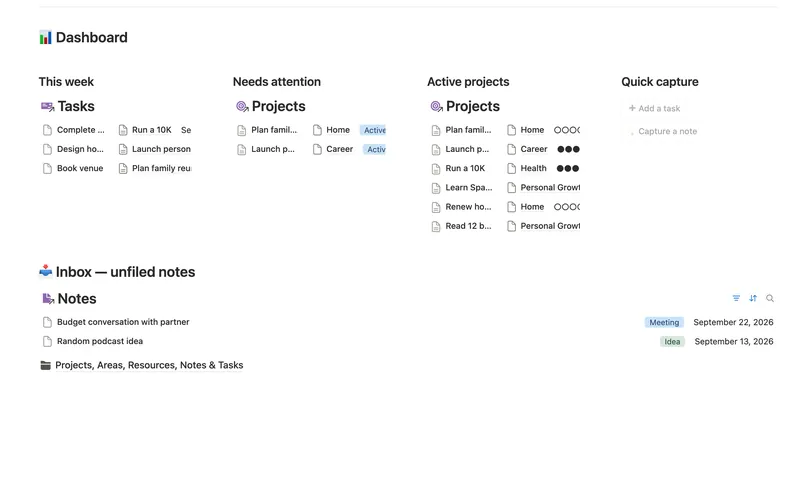
- 25 Second Brain (PKM) Capture everything into Tasks and Notes, file it against Projects, Areas and Resources, and watch Progress, Next due and Health roll up two hops — from a single checked box to a real picture of what's on track and what's stalled. 5 db · 10 formulas · 2 buttons
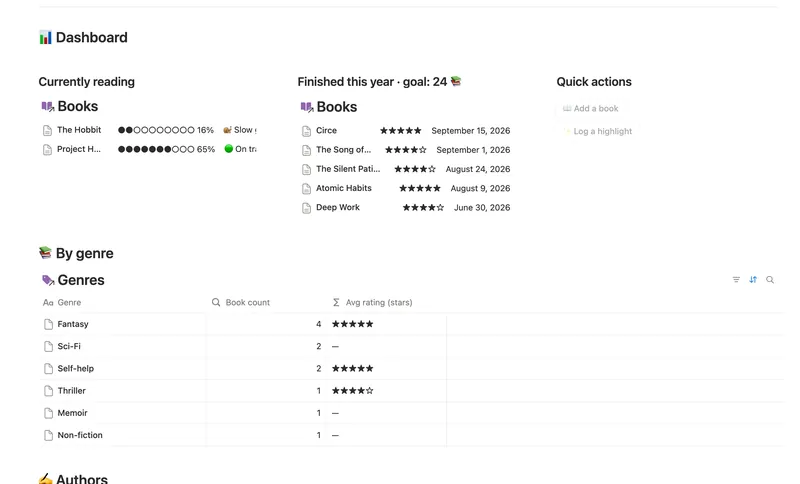
- 26 Reading List & Book Notes Track every book alongside its Author, Genre and Highlights — with a live reading pace, a projected finish date and a yearly-goal count that updates the moment you turn a page. 4 db · 13 formulas · 2 buttons
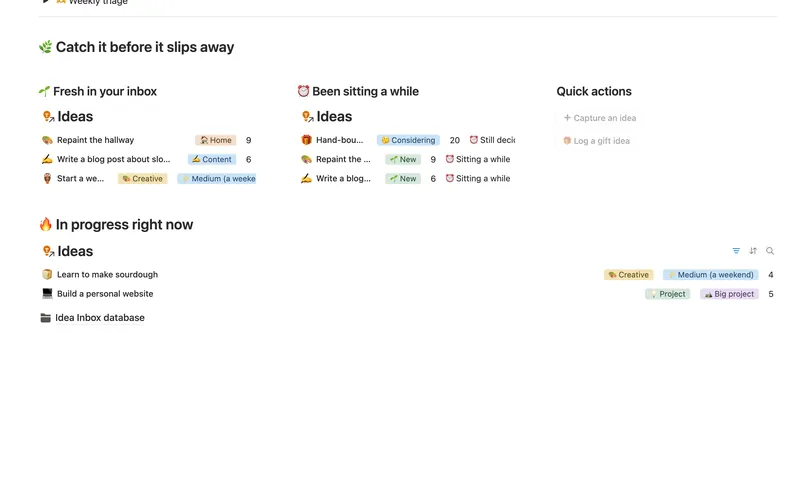
- 07 Idea Inbox Catch every idea the moment it lands, then gently triage it each week — so nothing brilliant slips away and nothing half-baked clutters your day. 1 db · 4 formulas · 2 buttons
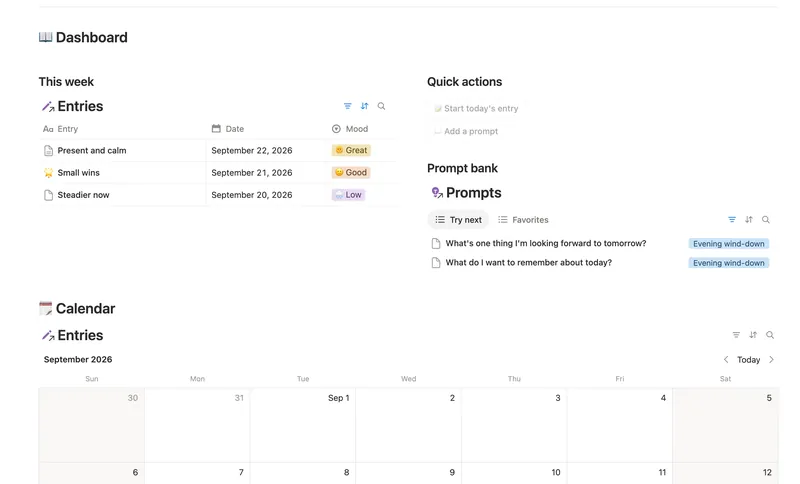
- 28 Daily Journal Capture how each day actually felt — a mood, a gratitude, a few honest lines — and watch a gentle streak build the moment two days land back-to-back. 2 db · 7 formulas · 2 buttons
§ The Bundle
Build it once, or start from a template
50 Notion templates, $197 value, $47 once.
One-time payment · Works on Notion Free · Instant Library access