
Updated Sep 27, 2026
Notion vs. Todoist: Which One Should Run Your Task List?
Todoist wins for pure task capture: natural-language dates, one-tap recurring tasks, and due dates that reschedule themselves automatically. Notion wins once a task needs context, a project page, a client record, or linked notes, since Todoist has no databases. Notion vs Todoist isn't really a one-winner choice: most people need both, for different jobs, not one replacing the other.
Notion vs Todoist for tasks: what each one is actually built for
As a dedicated task manager, everything about Todoist optimizes for capturing and closing one task fast. Its Quick Add field reads plain English, "pay rent every 1st" or "call Sam tomorrow 3pm," and turns it straight into a due date and a recurrence rule without a calendar picker involved. The free Beginner plan covers 5 active projects, task reminders and 3 saved filter views — and like every Todoist plan, tasks are capped at 300 per project, so it's rarely a real ceiling. Pro raises the project cap to 300, and adds custom reminders, task duration and full activity history, for $5 a month billed annually or $7 billed monthly.
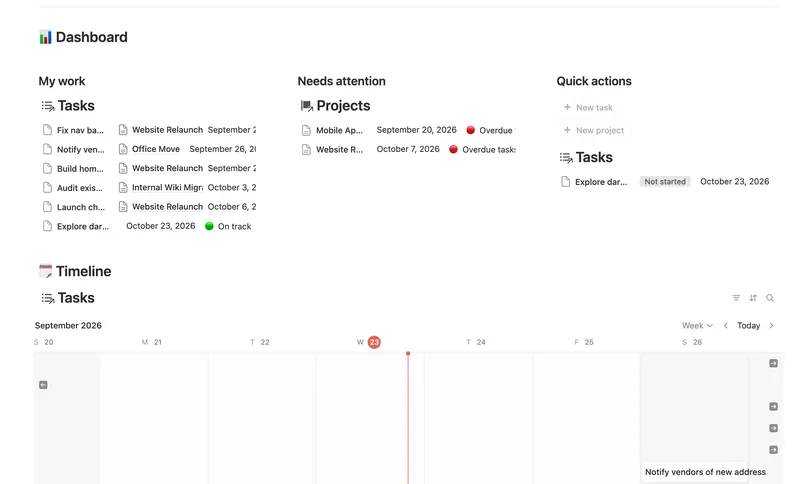
Notion isn't a task manager. It's a database you shape into one. A "task" is a row that can carry a due date the same as Todoist, but also a relation to a Project, a Client, linked meeting notes, or a Depends on field that blocks it until something else finishes. That's the trade: more setup once, more context forever after. The Task & Project Manager template builds that structure already, with sub-items, dependencies and a Timeline whose arrows point at what's actually blocking a task, something a flat task list has no way to represent.
Adding a task is where the gap shows up daily. Todoist's Quick Add is built for typing a task and moving on. Notion's fastest path is a button that creates a pre-filled page, but a button can only fill a relation with the same page every time, so a task that belongs to a different Project still needs one more click after capture.
Notion vs Todoist for ADHD
For pure capture speed, Todoist usually wins: type it, set a rough date in plain English, and Todoist reschedules the due date itself the moment the task repeats. That matters for ADHD specifically because Todoist's recurring dates are native, not a workaround. Complete the task and it moves itself to the next occurrence with no extra step — though a reminder tied to that due date fires once and needs its own separate recurring schedule to repeat along with it.
Notion's reminders work differently, and it is worth knowing before relying on one: an @remind tag or a Remind setting on a date property notifies through a sidebar badge, a desktop push, a mobile push and, if Notion is closed, an email. But the reminder itself doesn't repeat. Notion's own help center lists recurring reminders as "on the roadmap," not shipped. The workaround, a recurring database template that spawns a fresh page on schedule, gets you a recurring task, but not a recurring notification tied to that same row.
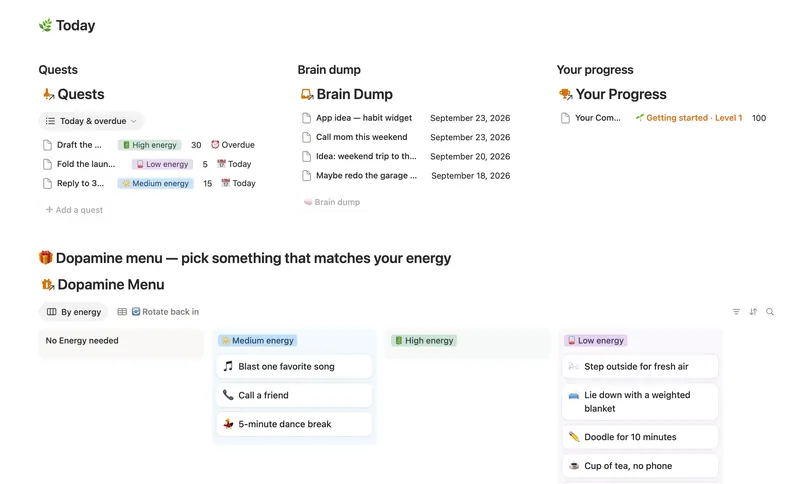
Where Notion pulls ahead for ADHD is capture that doesn't need to be filed correctly on the spot. The ADHD Command Center template is built around exactly that: a Brain Dump database that takes a stray thought with zero structure, sorted later, plus Quests tagged by energy level instead of by rigid priority, so a low-energy day still has something doable on it. ADHD Planning in Notion covers the rest of that setup. Todoist has nothing structurally equivalent; its priority levels and labels assume the thought is already categorized, which is the hardest step to do the moment it derails you.
Which is easier to learn, Notion or Todoist?
Todoist needs no setup: install it, type a task, and it already works. Notion needs a structure duplicated or built first, since a blank workspace does nothing on its own until you add a database, a view and a few properties to it. The templates linked throughout this guide give you that structure on day one; without one, that setup cost is the real trade for Notion's extra context.
Notion vs Todoist vs TickTick: where a third app fits
TickTick answers a different question than either one. It's a task manager like Todoist, but it ships a built-in Pomodoro timer and a habit tracker alongside tasks, all three in one app with no setup required. That makes it a real middle option: more built-in structure than Todoist's pure task list, but still not a database tool, so it can't hold a Project's notes or a Client's contract the way a Notion page can. If gamified habits plus tasks out of the box is the actual want, TickTick gets there faster than building the equivalent in Notion. If that habit tracker needs to live in the same workspace as project notes and a budget, Notion is the only one of the three that can do it.
Can Notion and Todoist actually work together?
Not natively, as of September 2026. Search for a notion and todoist integration and every real option, Zapier, Make, n8n, a dedicated sync tool, is third-party; neither company ships one. Todoist's own help center documents exactly one supported method, and it's a one-way view, not a sync: add an Embed block in Notion, paste in Todoist's web app URL, and get a live window into a Todoist list inside a Notion page. Nothing created there becomes a real Notion database row, and nothing done in Notion pushes back to Todoist.
A third-party automation can move data both directions, but "two-way sync" from these tools usually means two separate one-way rules, one Todoist-to-Notion and one Notion-to-Todoist, and they can conflict if the same task changes in both places before either rule runs. For most people, it's simpler to give each app a job it doesn't share with the other, covered next, than to keep two copies of the same task in sync.
Notion vs Todoist: price, side by side
As of September 2026, here's how the two compare on price:
| Notion | Todoist | |
|---|---|---|
| Free plan | Unlimited pages and blocks, one person; 5 MB uploads | 5 active projects, 300 tasks/project cap, reminders, 3 filters |
| Cheapest paid plan | Plus: $10 per member/month, billed annually | Pro: $5/month billed annually ($7 billed monthly) |
| What paid adds | Unlimited file uploads and charts, longer history, more guests | 300 projects, custom reminders, task duration, full history |
| Recurring items | Database template with Repeat, spawns a new page | Native recurring due date, natural language, reschedules itself |
| Reminder repeats itself | Not yet, "on the roadmap" | Only as its own recurring reminder — one tied to a recurring due date fires once |
| Best at | Context: a project's notes, files and related records in one place | Speed: capture, due date, done |
How to get Todoist-style speed inside Notion
- Turn on Repeat on a database template (Daily, Weekly, or a custom interval) so a new task page appears on schedule instead of being retyped. Recurring Tasks in Notion covers the exact setup, including the one thing a repeating template still can't do on its own.
- Add a button that creates a task page with today's date already filled in. It won't parse "next Tuesday" the way Todoist's Quick Add does, but it cuts capture to one tap.
- Add a Days until due formula,
dateBetween(prop("Due"), today(), "days"), so an urgent task is visible without opening the row. A negative number means it's already overdue; pair it with a Status formula for a color or an icon on top of the raw number. - If the actual friction is capture, not speed, an inbox-first structure fixes that: everything lands in one place first and gets clarified later, so nothing has to be filed correctly the moment it arrives. GTD Setup in Notion walks through building that.
Use both, on purpose
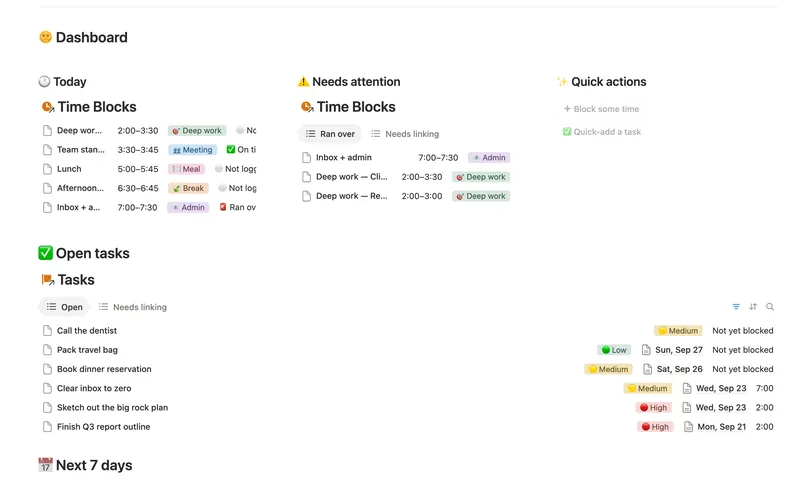
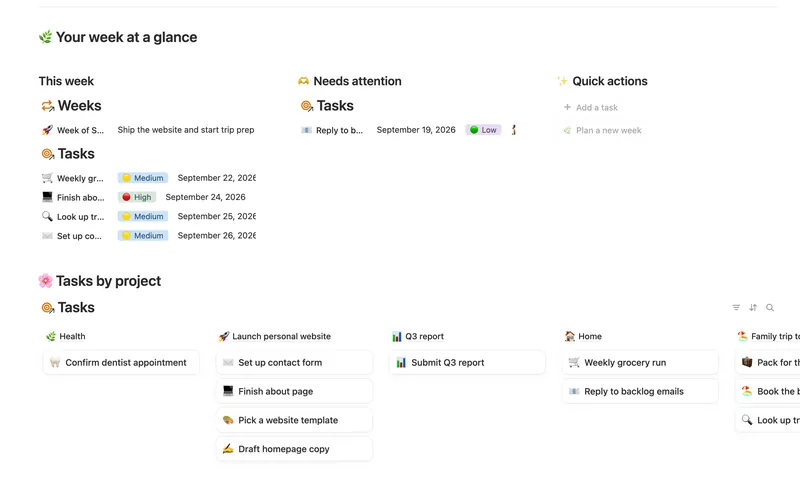
The honest answer to "Notion or Todoist" is usually both, split by job rather than synced by tool. Todoist for anything that's really just a due date and a reminder: a recurring chore, a call to make today. Notion for anything that needs to remember why it exists: a client project, a home renovation, a freelance pipeline with notes attached. The Weekly Planner and Daily Planner templates cover the Notion side of that split, tasks linked to a Project or a time block instead of floating in a flat list, and they're part of the 50-template Templitize Bundle, $47 once, built to run on Notion's Free plan with no upgrade required.
Notion or Todoist: the short answers
Is Notion or Todoist better for tasks? Todoist, if a task is just a due date and a reminder. Notion, once a task needs a linked project, notes or a client record attached to it.
Does Notion have recurring tasks like Todoist? Not the same way. Todoist reschedules a task automatically when it's completed. Notion recreates the page on a schedule using a recurring database template, a different mechanic with the same practical result.
Is there an official Notion and Todoist integration? No. The only method either company documents is a one-way embed of Todoist inside a Notion page. A real two-way sync needs a third-party automation tool.
Related templates
- 46 Task & Project Manager Break every Project into Tasks with real sub-items and dependencies, then let Progress, Health and a dependency-aware Timeline compute themselves — with a My work view that always shows exactly what's yours to do next. 3 db · 11 formulas · 2 buttons
- 03 ADHD Command Center Corral every quest, stray thought and dopamine hit into one gentle system — one that tracks your XP and shows up for you on the days that don't go to plan, not just the good ones. 5 db · 12 formulas · 3 buttons
- 02 Daily Planner & Time Blocks Block your day into real Start/End times, keep tasks tied to the hour you meant to do them, and see — gently, never guiltily — whether today actually went the way you planned it. 3 db · 6 formulas · 2 buttons
- 01 Weekly Planner Plan your week around what actually matters, connect every task to the project or area it belongs to, and close each week with a gentle review — progress that computes itself, no guilt, no spreadsheet. 3 db · 8 formulas · 2 buttons
§ The Bundle
Build it once, or start from a template
50 Notion templates, $197 value, $47 once.
One-time payment · Works on Notion Free · Instant Library access